Functions of the operating and
20
Operating system
Instrument settings and data input
Date, time and weekday input
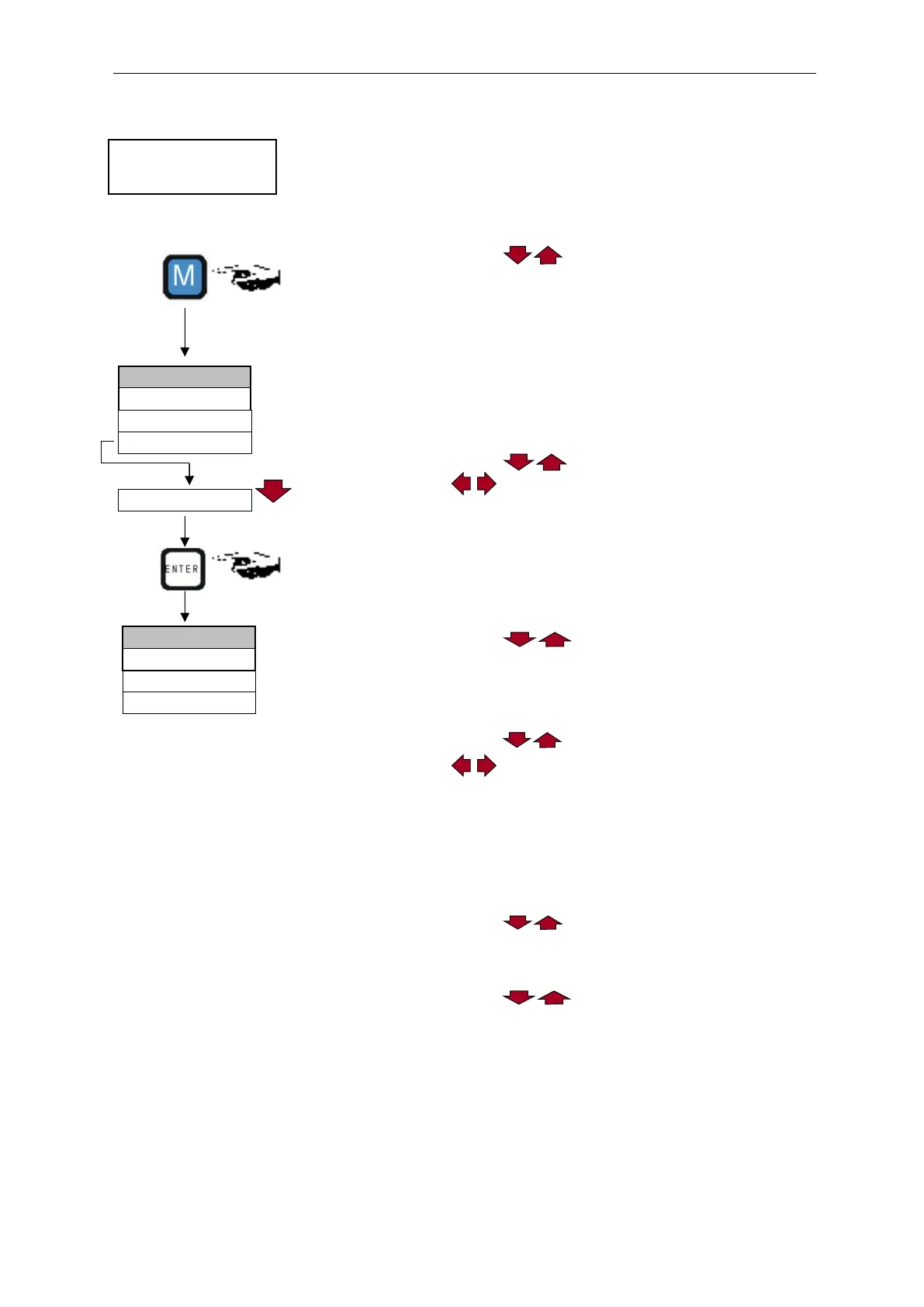
Press the "M" key
The basic menu ">PROGRAM" appears
Use the cursor block to select the desired menu item
"Date/Time of day"
The selection appears in CAPITAL LETTERS.
Press "ENTER" to confirm your selection
The selected submenu ">DATE/TIME of day" appears
The menu item "DATE" has already been selected (capital letters)
Press "ENTER" to confirm the menu item "DATE"
The cursor flashes in the date field: "█9.01.09"
Use the cursor keys to select the desired number
Use the keys to move the cursor to the next input field
Repeat this input process until the year has been entered
Press "ENTER" to confirm the entry
The date has now been entered.
Exit the menu item "DATE" in order to set the time.
Use the cursor block to select the desired menu item
"TIME OF DAY"
Press "ENTER" to confirm your selection
The cursor flashes at the first position of the time: "█0:00"
Use the cursor keys to select the desired number
Use the keys to move the cursor to the next input field
Repeat this input process until the seconds have been entered
Press "ENTER" to confirm the entry
The time has now been entered.
Exit the menu item "TIME OF DAY" to set the weekday
Use the cursor block to select the desired menu item
"DAY OF WEEK"
Press "ENTER" to confirm your selection
Use the cursor block to select the selected weekday
Press "ENTER" to confirm the entry
Press the "M" key twice to end programming
The standard measured value display appears on the display
Testomat instrument
(display) in display mode
>PROGRAM
▼▲
ME
>DATE/TIME OF DAY
DATE 09.01.09
Day of week Monday


 To Next Page