Description of the signal inpu
34
Set range of readings
This menu is for matching the current range to an end value.
Measuring values in the selected range can be represented by a
corresponding current. For all values that are larger than the upper
measuring value 20mA is generated.
Example:
0mA (4mA) matches 0 mg/l
20mA matches 200 mg/l
In >BASIC PROGRAM, select => PROGRAM VALUES=> INTERFACES
Select one of the current interfaces and press “ENTER” to confirm
the selection.
The menu “RANGE OF READINGS” is displayed.
Select the desired range.
Press "ENTER" to confirm the selection.
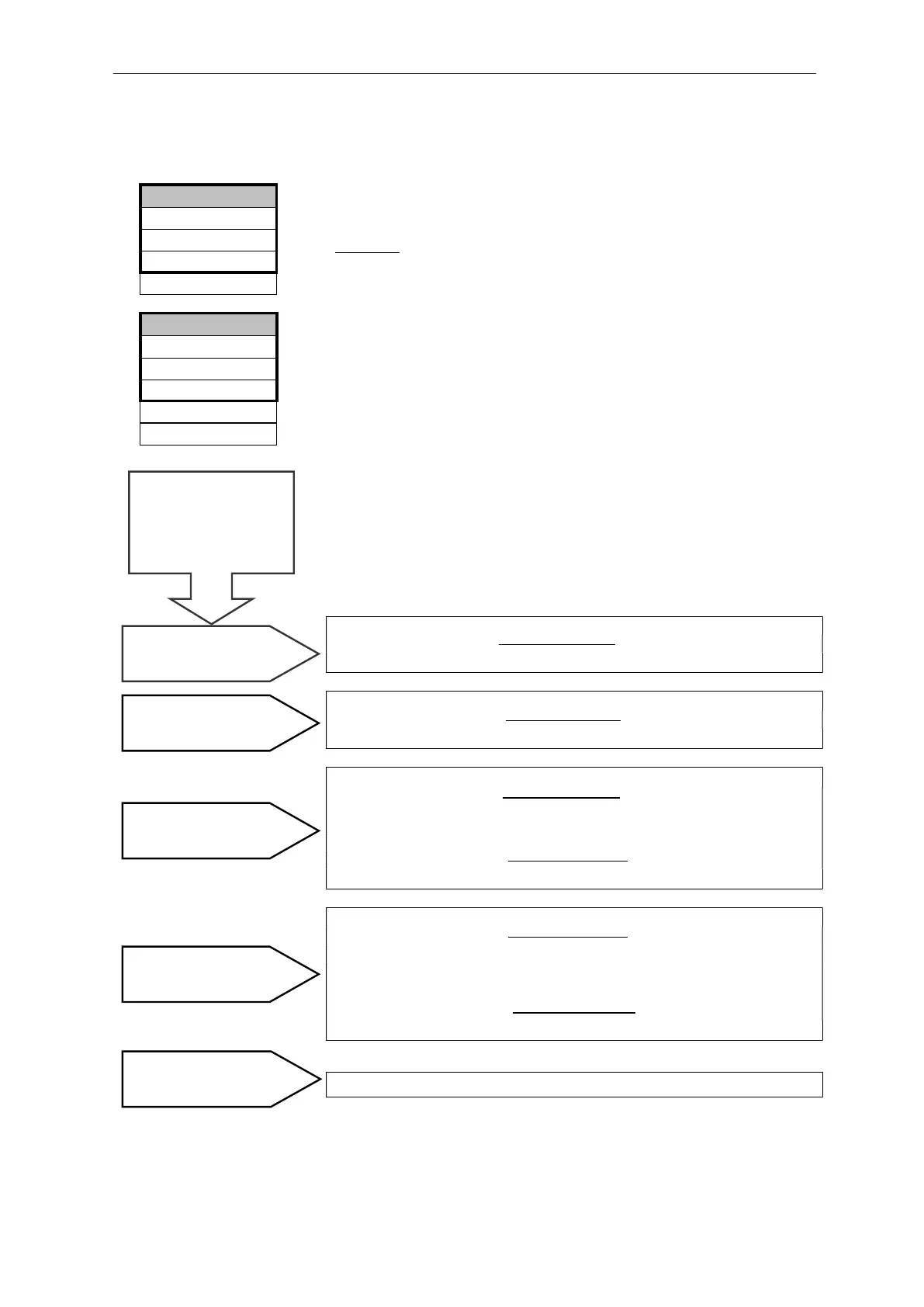
Calculation of output currents
The entire current range (0 – 20 mA or 4 – 20 mA) is available for
one measuring point. However, the current range is divided for two
measuring points. The value from measuring point 1 is displayed in
the lower half (0 – 10 mA or 4 – 12 mA) and the value for measuring
point 2 in the upper half (10 – 20 mA or 12 – 20 mA).
Measured value
Current = x 20 mA
Maximum value
Measured value
Current = x 16 mA + 4 mA
Maximum value
Measured value 1
Current 1 = x 10 mA
Maximum value
Measured value 2
Current 2 = x 10 mA + 10 mA
Maximum value
Measured value 1
Current 1 = x 8 mA + 4 mA
Maximum value
Measured value 2
Current 2 = x 8 mA + 12 mA
Maximum value
The current is set to 20 mA.
Measured value = The value shown on the display in the selected
unit
Maximum value = End value set under „RANGE OF READINGS
(e.g. 200 mg/l)
1 measuring point
0 - 20 mA
1 measuring point
4 - 20 mA
2 measuring points
0 - 20 mA
2 measuring points
4 - 20 mA
Measuring range
exceeded (e.g. >50 mg/l
How is the current
calculated for a
specific measured
0 to 1000
0 to 500
0 to 200 *
RANGE OF READINGS ▼▲ME
0 to 2500
0 to 4999
Type RS232
Type 4-20mA *
TYPE 0-20mA
>INTERFACES ▼▲
ME
Type Data logger


 To Next Page