Password protection and basic program
21
Password protection and basic
program
A four-digit password is required to enter data and to carry out
settings in the basic program. The password is the current time of
Testomat 2000
®
Polymer
in reverse order.
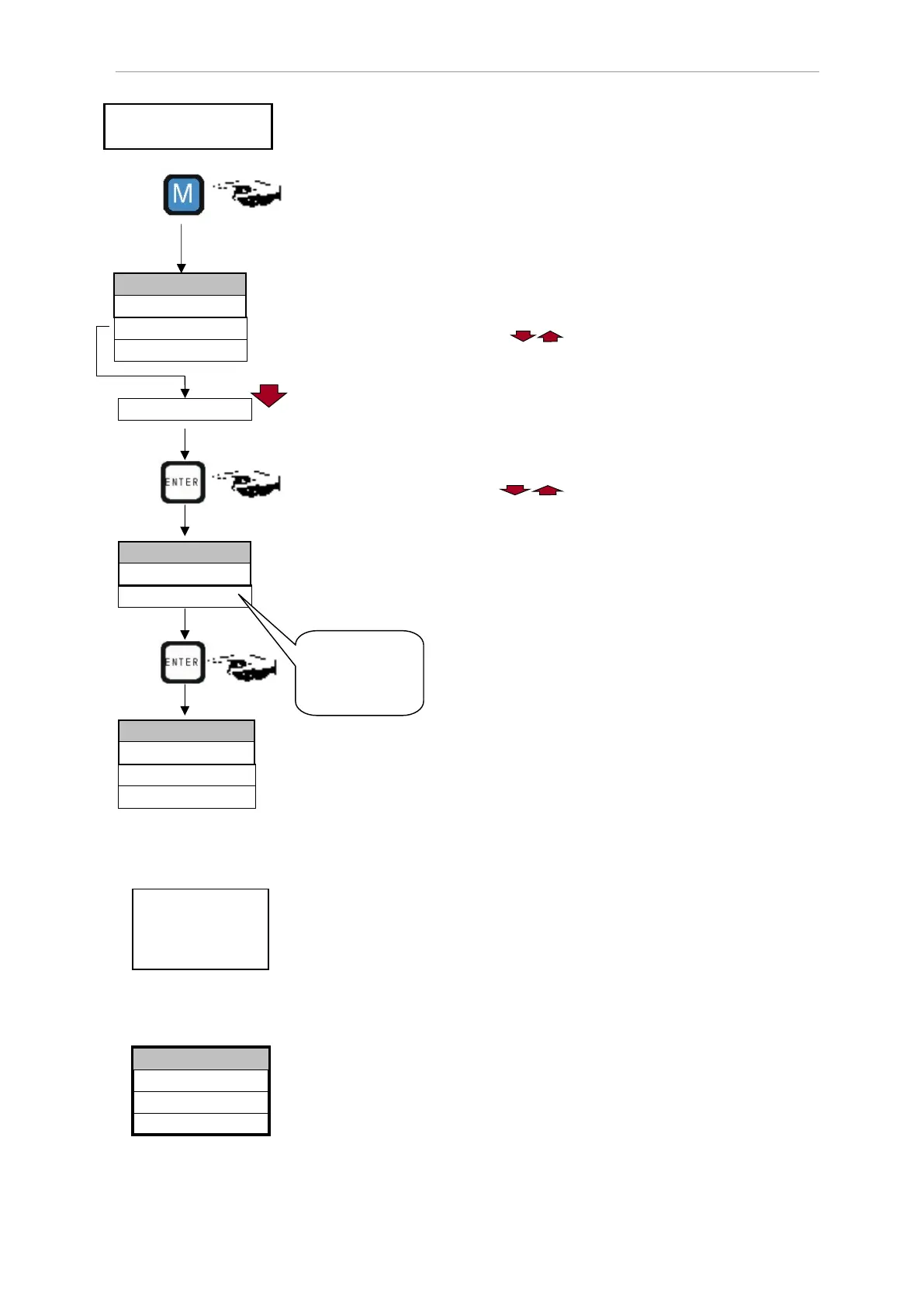
Password entry
Press the "M" key
The basic menu ">PROGRAM" appears
Use the cursor block to select the desired menu item
"Basic program"
The selection appears in CAPITAL LETTERS.
Press "ENTER" to confirm your selection
The selected submenu ">BASIC PROGRAM" appears
Press "ENTER" to confirm the menu item "BASIC PROGRAM"
The cursor flashes in the "Password:" field █000
Use the cursor keys to enter the time in reverse order:
"5201"
Press "ENTER" to confirm the entry
The selection menu for the basic program appears. You can now
enter the plant specific data.
Selecting the operating mode
Under the menu item "Mode of Operation" it is possible to select the type
of analysis controller. Testomat 2000
®
Polymer
provides numerous
selection options: Time control, quantity control via water meter and
external analysis start.
Shortest interval = 0 minutes between analyses. Largest interval =
255 minutes.
The analysis interval (time between two analyses) is determined by
the duration of the supplementary program AUX, the set flush times
(internal and external), the programmed interval and the duration of
the analysis.
Selecting the time control
In >BASIC PROGRAM, select
=> PROGRAM VALUES=> MODE OF OPERATION=> TIME
CONTROLLED
Press "ENTER" to confirm the selection
(An asterisk " * " appears at the end of the line)
("TIME CONTROLLED" " * " is preset)
>PROGRAM
▼▲
ME
>BASIC PROGRAM
▼▲
ME
>BASIC PROGRAM
▼▲
ME
Please enter the
time in reverse
order:
=> 5201
Testomat instrument
(display) in display mode
Time controlled
Internal start via a
timer.
External (Start)
Volume interval
TIME CONTROLLED *
>MODE OF OPERATION
▼▲
ME


 To Next Page