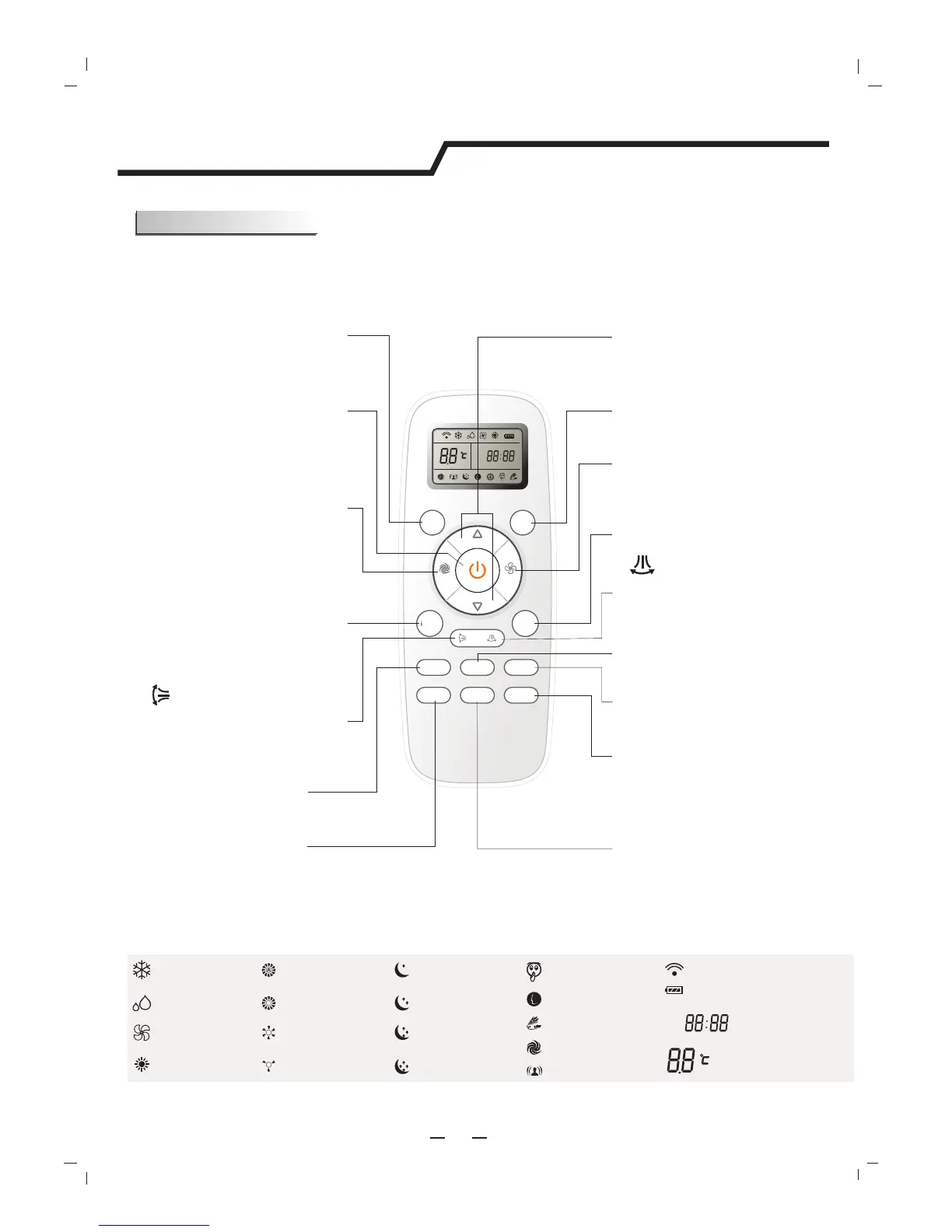
Remote controller
6
Indication symbols on LCD:
Note: Each mode and relevant function will be further specified in following pages.
Signal transmit
Dry indicator
Fan only indicator
Heating indicator
Cooling indicator
High fan speed
Medium fan speed
Low fan speed
Display set temperature
Display set timer
Display current time
Auto fan speed
ON
OFF
Smart indicator
Super indicator
Ifeel
Quiet indicator
Economy indicator
Battery power indicator
Sleep 1 indicator
Sleep 3 indicator
Sleep 4 indicator
Sleep 2 indicator
The remote controller transmits signals to the system.
FAN
Used to select fan speed in sequence auto,
high, medium or low.
SLEEP
Used to set or cancel Sleep Mode operation.
SMART
Used to enter fuzzy logic operation directly,
regardless of the unit is on or off.
POWER
The appliance will be started when it is
energized or will be stopped when it is
in operation, if you press this button.
MODE
Press this button to select the operation mode.
Remote controller
5
TEMP + -
Used to adjust the room temperature and
the timer, also real time.
DIMMER
When you press this button, all the display
of indoor unit will be closed. Press any
button to resume display.
SWING
Used to stop or start vertical adjustment
louver swinging and set the desired up/
downairflow direction.
Used to stop or start Horizontal adjustment
louver swinging and set the desired left/right
airflow direction.
SWING
QUIET
Used to set or cancel Quiet Mode operation.
ECONOMY
Used to set or cancel Economy Mode
operation.
SUPER
Used to start or stop the fast cooling/heating.
(Fast cooling operates at high fan speed with
16℃ set temp automatically ; Fast heating o-
perates at auto fan speed with 30℃ set temp
automatically)
13
TIMER ON
Used to set or cancel the timer operation.
IFEEL
Used to set Mode operation,p
the I FEEL button for about 5 seconds, the tr-
ansmit signal in the display will disappear, the
I FEEL function will be shunted off.
IFEEL ress
CLOCK
Used to set the current time.
ON
OFF
MODE
SMA RT
QUIET
DIMMER
ECON OM Y
FEEL
SUPE R
FAN SPE ED
CLOCK
TIMER ON
TIM ER OFF
SLEEP
TEMP.
TEMP.
TIMER OFF
Used to set or cancel the timer operation.




 To Next Page