SUPER
Operation instructions
TEMP.
TEMP.
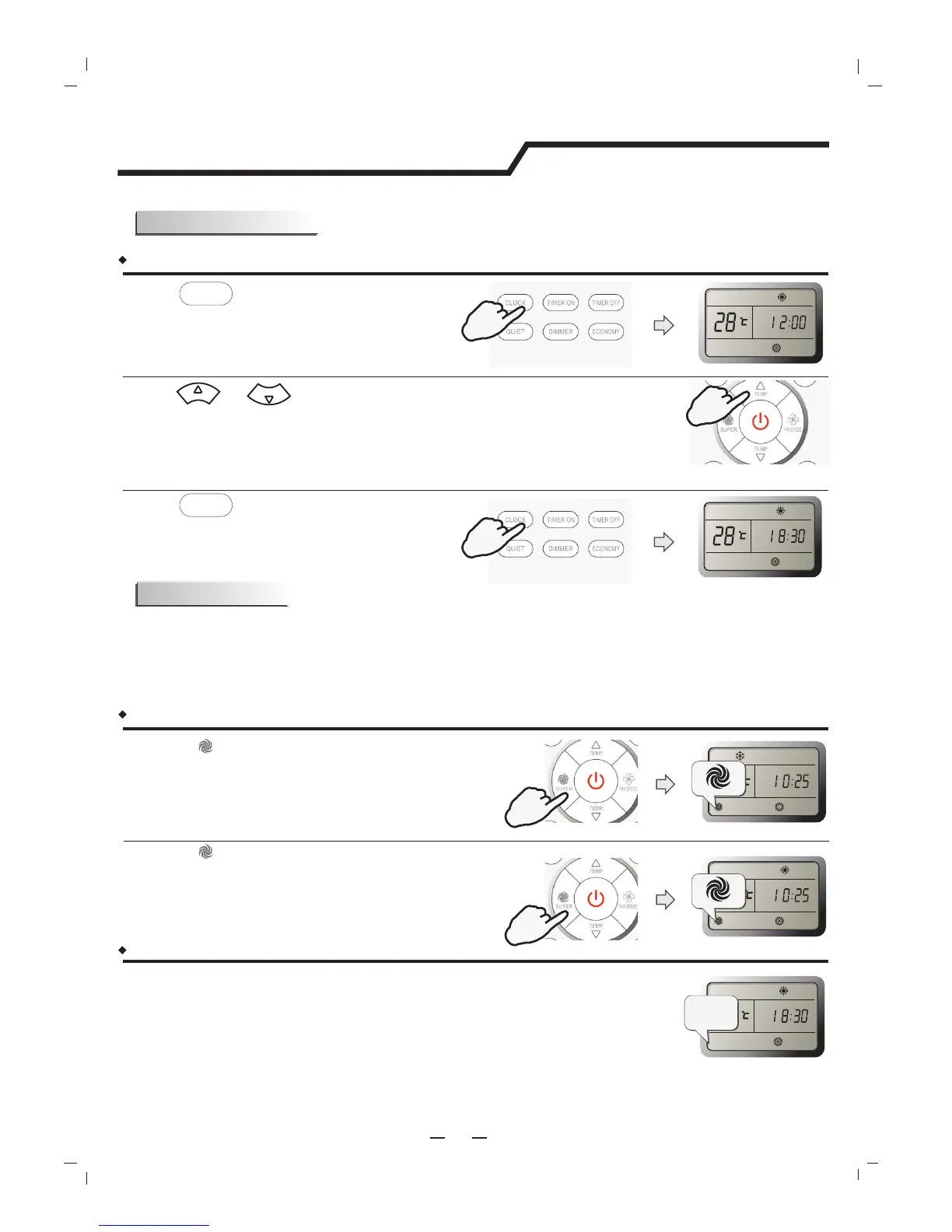
CLOCK button
How to adjust the real time?
Press button.
Press and buttons.
Press button again.
SUPER mode can be set when the appliance is in operation or energized.
Note:
The Appliance will continue working in SUPER mode for 15 minutes , if you don't escape from it
by pressing any of the buttons mentioned above.
SMART button is not available in SUPER mode.
SUPER mode
SUPER mode is used to start or stop fast cooling or heating.
Result :
Result :
Result :
The time flashes on the LCD.
1.
2.
CLOCK
CLOCK
3.
The real time is set.
How to set SUPER mode?
Press button at the cool mode.
Result :
At high fan speed ,the set temperature
automatically to 16℃.
SUPER
Press button at the heat mode.
Result :
At auto fan speed ,the set temperature
automatically to 30℃.
How to cancel SUPER mode?
11
Press . SUPER , MODE, FAN, ON/OFF,SLEEP or TEMPERATURE SETTING button
Result :
The display return to the original mode.
In SUPER mode, you can set airflow direction or timer
Escape from SUPER mode.
PRESS
PRESS
PRESS
PRESS
Cancel
PRESS
Once to increase or decrease the time setting by 1 minute.
One and a half seconds to increase or decrease the time setting
by 10 minute.
For a longer time to increase or decrease the time by 1 hour.




 To Next Page