ON
SMART
QUIET
DIMMER
FEEL
SUP ER
CLOCK
TIMER ON
TEM P.
TEM P.
MODE
ECONOMY
FAN SP EE D
TIM ER OFF
SLEEP
Operation instructions
14
SLEEP mode can be set in COOLING ,HEATING mode. or DRYING
This function gives you a more comfortable environment for sleep.
The appliance will stop operation automatically after operating for 8 hours.
Fan speed is automatically set at low speed.
Note: Heating is NOT available for cooling only air conditioner.
SLEEP mode
Set temperature will rise by 2 if the appliance operates in cooling ℃ at most mode for
2 hours constantly,
Set temperature will decrease by 2℃ at most if the appliance operates in heating
mode for 2 hours
SLEEP mode 1:
Set temperature will rise by 2 if the appliance operates in cooling
by 1℃ after 6 hours, then decrease by 1℃ after 7 hours.
℃ mode for 2 hours constantly, decrease
Set temperature will decrease by 2 if the appliance operates in heating mode for 2 hours constantly, rise
by 1℃ after 6 hours, then rise by 1℃ after 7 hours.
℃
SLEEP mode 2:
Set temperature will rise by 1 if the appliance operates in cooling
hours, then decrease by 2 after 6 hours,
decrease by 1 after 7 hours.
℃ ℃
℃
℃
mode for 1 hour , rise by 2 after 2
Set temperature will decrease by 2 if the appliance operates in heating mode for 1 hour , decrease by
2 after 2 hours, then rise by 2 after 6 hours, rise by 2 after 7 hours.
℃
℃ ℃ ℃
SLEEP mode 3:
Set temperature will keeps steady.
SLEEP mode 4:
Each time button is pressed.
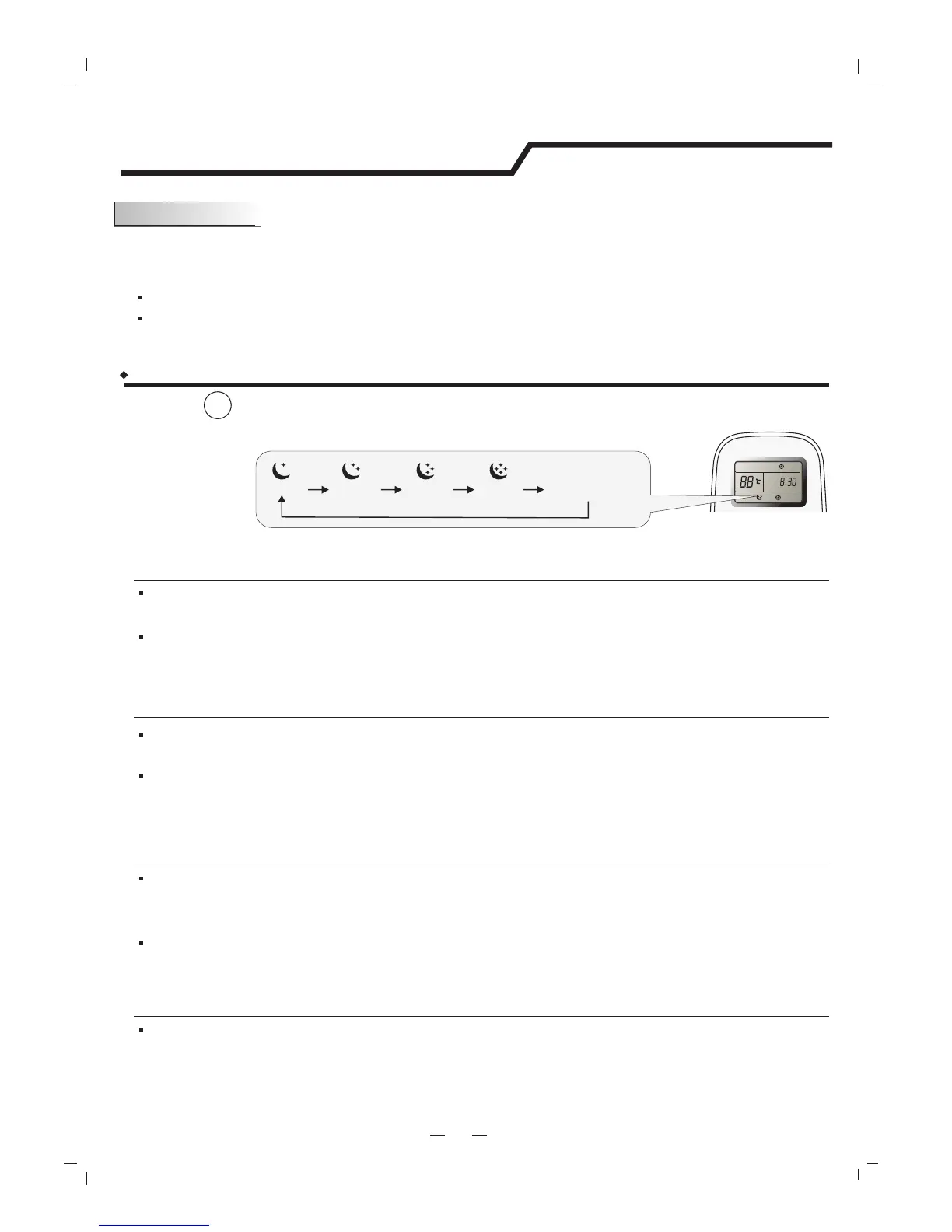
How to set SLEEP mode ?
Result :
The operation mode is changed in sequence:
SLEEP
SLEEP 2
SLEEP 3
QUIT SLEEP MODE
SLEEP 4
SLEEP 1
then keeps steady.
constantly, then keeps steady.
Note: Press SUPER ,SMART, MODE,SLEEP or FAN button cancel SLEEP mode.
Note: By pressing "Sleeping mode" four times, or selecting other modes like SUPER, SMART, OR FAN,
you could cancel the sleeping function of those units without four sleeping curves.




 To Next Page