Operation instructions
Indoor temperature
SMART button is ineffective in SUPER mode.
Target temperature
21℃ or below 22℃
26℃Over 26℃
21℃-23℃
23℃-26℃
Your feeling
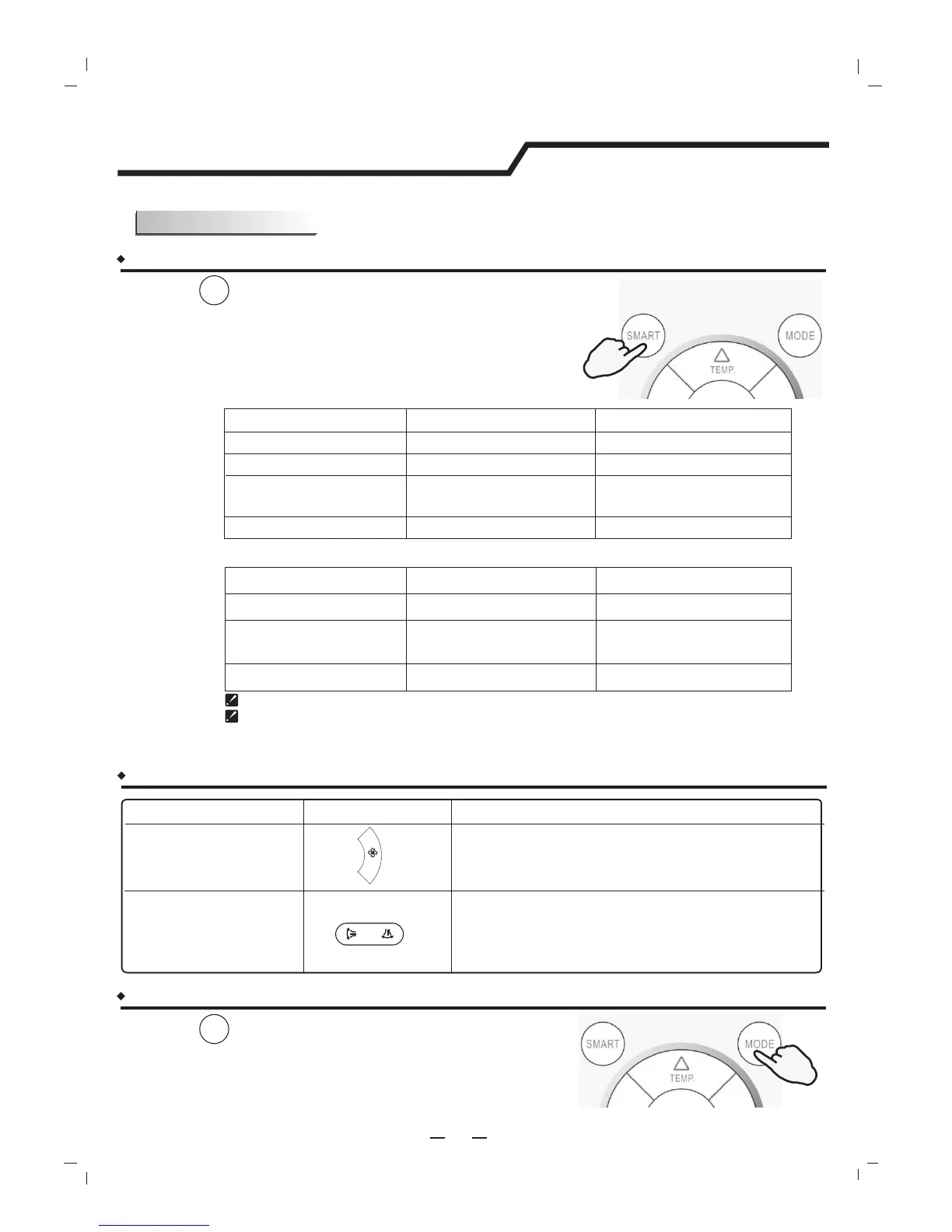
What you can do in SMART mode?
Button
Adjust
Operation mode
HEATING
FAN ONLY
DRY
Room temperature
decrease 2℃ after
operate for 3 minutes
COOLING
Uncomfortable because
of unsuitable air flow
volume.
Uncomfortable because
of unsuitable flow
direction.
Note: Temperature, airflow and direction are controlled automatically in SMART mode.
However, For the on/off, you can choose from -2 to 2, for the inverter you can choose
from -7 to 7. if you still feel uncomfortable.
10
SMART mode
Heat pump models
Cooling only models
Indoor temperature
Target temperature
23℃ or below
26℃
Over 26℃
23℃-26℃
Operation mode
FAN ONLY
DRY
Room temperature
decrease 2℃ after
operate for 3 minutes
COOLING
FAN SPEE D
How to set SMART mode?
Press the button.
SMART
Result : Enters SMART mode(fuzzy logic operation)
directly regardless of the unit is on or off.
Temperature and fan speed are automatically
set based on theactual room temperature.
PRESS
How to cancel the SMART mode?
Press the button.
MODE
Result :
PRESS
Indoor fan speed alternates among High, Medium
and Low each time this button is pressed.
Press it once, the vertical adjustment louver(horizontal
adjustment louver) swings to change vertical airflow
direction(horizontal airflow direction). Press it again,
swings stops.
The SMART mode will be canceled.
Press MODE button cancel SMATR mode.




 To Next Page