Wall Mounting
Before assembling the wall mounting, make sure the bolts are fully tightened on
the wall mount bracket. If not, the TV may tilt after the installation
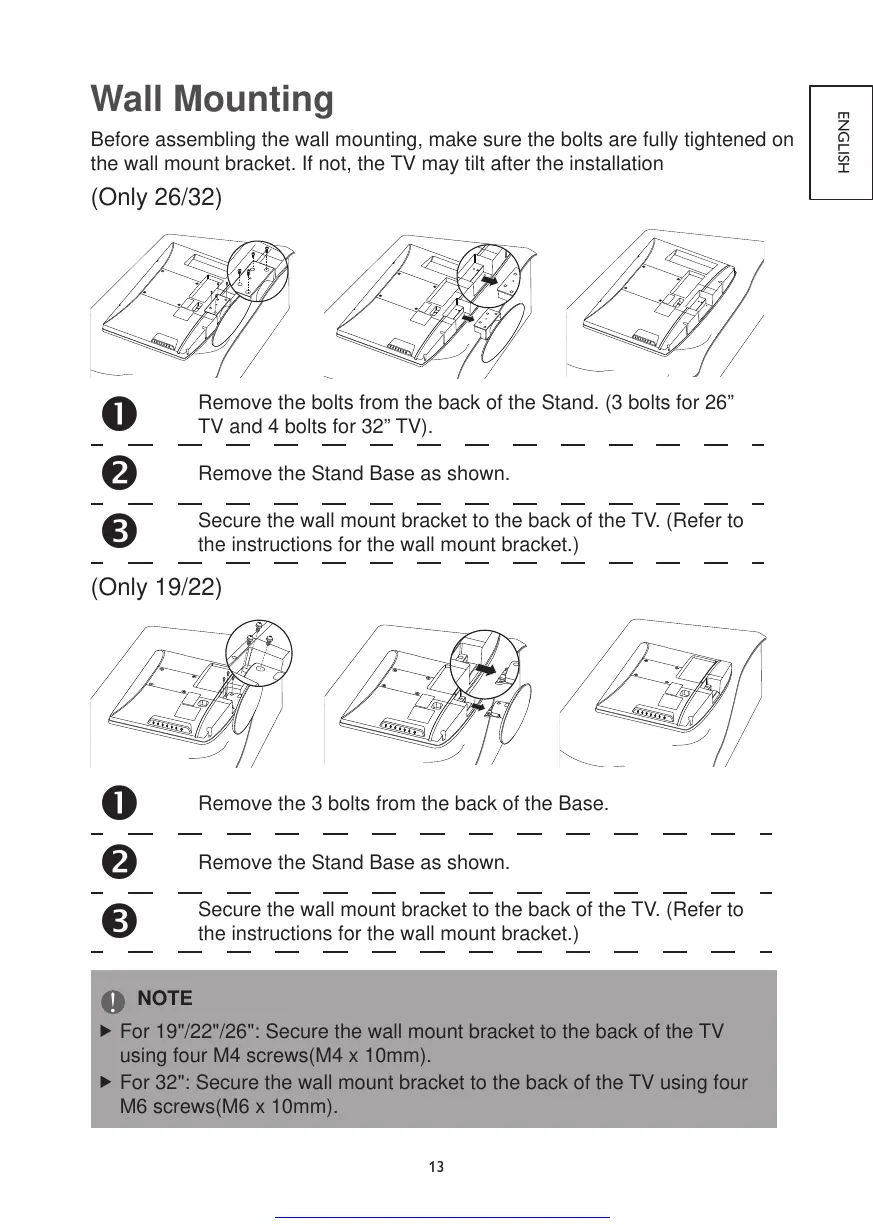
(Only 26/32)
Remove the bolts from the back of the Stand. (3 bolts for 26”
TV and 4 bolts for 32” TV).
Remove the Stand Base as shown.
Secure the wall mount bracket to the back of the TV. (Refer to
the instructions for the wall mount bracket.)
(Only 19/22)
Remove the 3 bolts from the back of the Base.
Remove the Stand Base as shown.
Secure the wall mount bracket to the back of the TV. (Refer to
the instructions for the wall mount bracket.)
NOTE
For 19"/22"/26": Secure the wall mount bracket to the back of the TV
using four M4 screws(M4 x 10mm).
For 32": Secure the wall mount bracket to the back of the TV using four
M6 screws(M6 x 10mm).



 To Next Page