Picture Improvement Technology
Flesh Tone
Flesh tone will be more natural.
Adaptive Luma Control
Automatically adjust the brightness and contrast after analyzing the input signal.
Noise Reduction
Removes interference up to the point where it does not damage the original
picture.
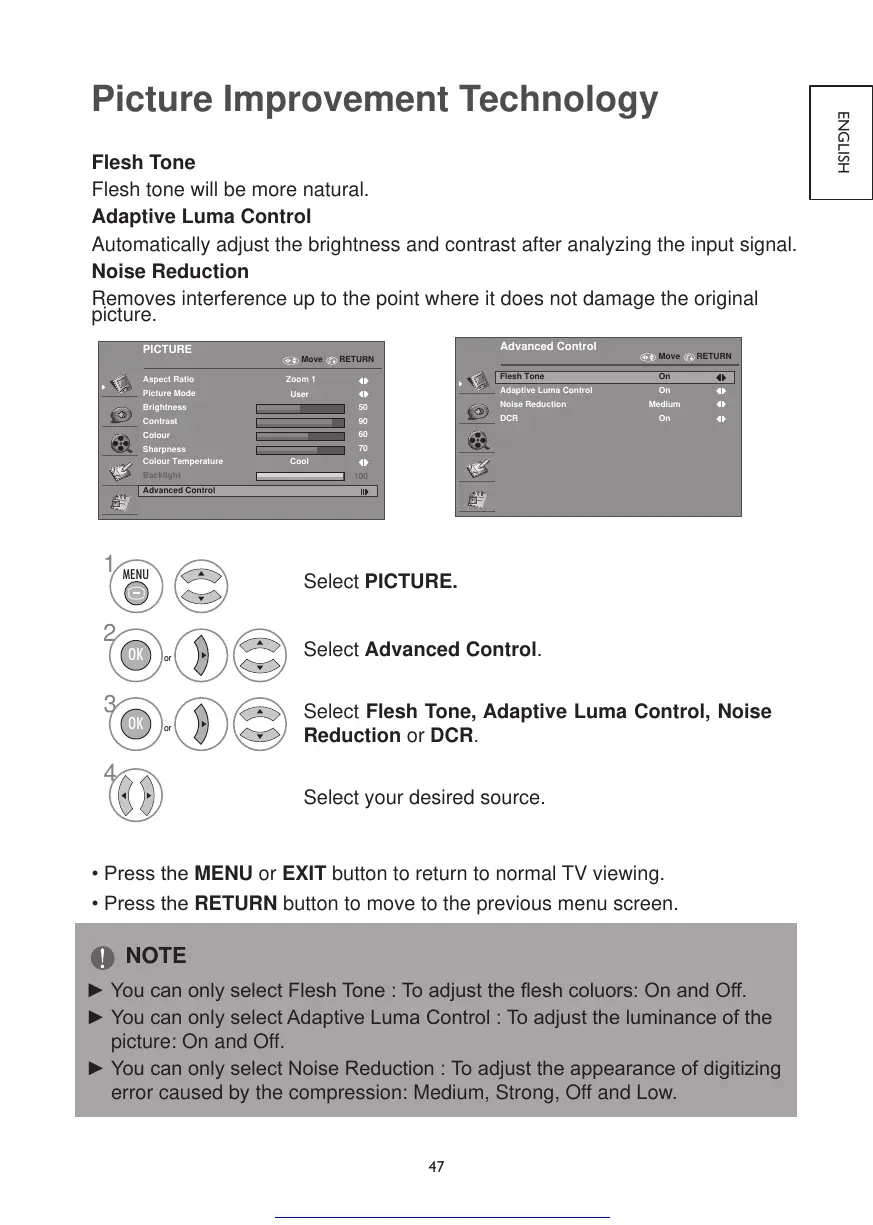
Select PICTURE.
Select Advanced Control.
Select Flesh Tone, Adaptive Luma Control, Noise
Reduction or DCR.
Select your desired source.
•PresstheMENU or EXIT button to return to normal TV viewing.
•PresstheRETURN button to move to the previous menu screen.
NOTE
►YoucanonlyselectFleshTone:Toadjusttheeshcoluors:OnandOff.
►YoucanonlyselectAdaptiveLumaControl:Toadjusttheluminanceofthe
picture: On and Off.
►YoucanonlyselectNoiseReduction:Toadjusttheappearanceofdigitizing
error caused by the compression: Medium, Strong, Off and Low.



 To Next Page