Connecting with a Euro Scart cable
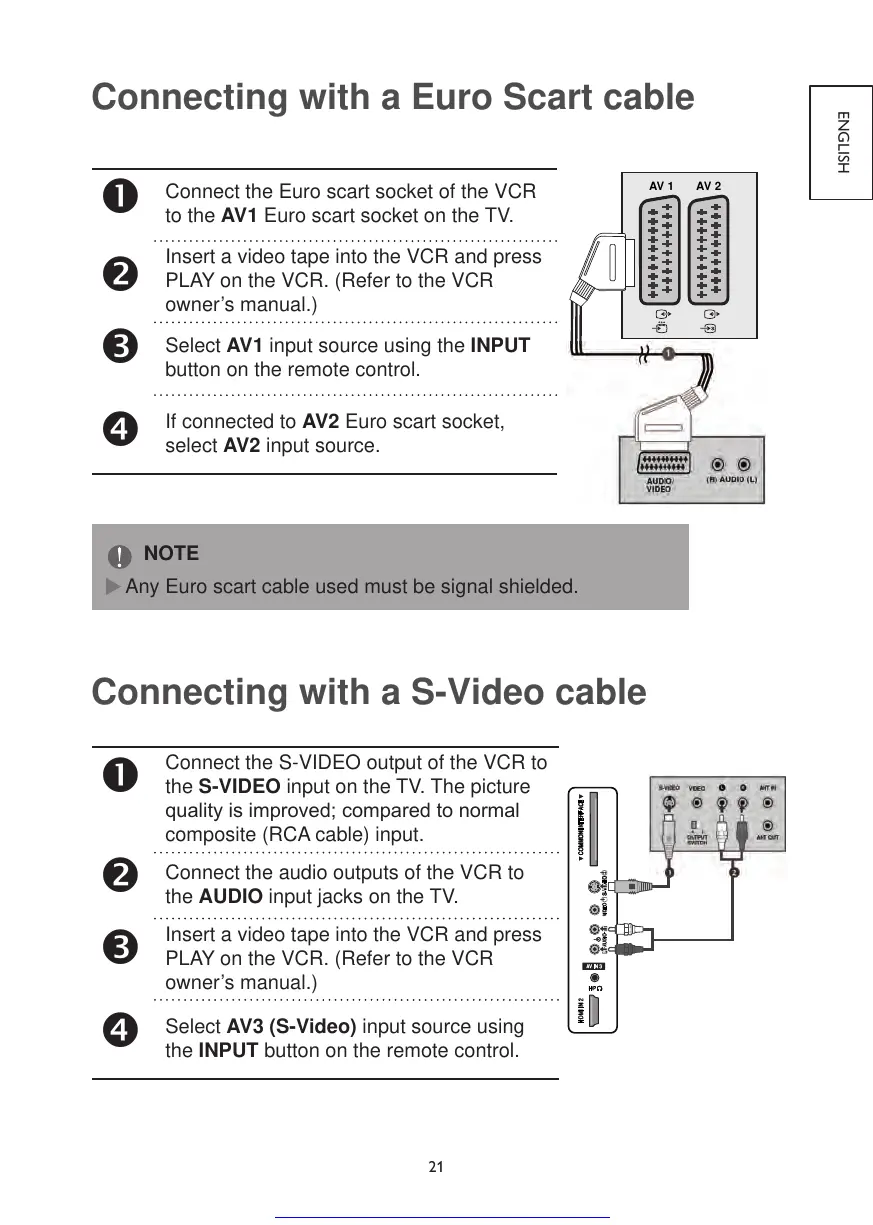
Connect the Euro scart socket of the VCR
to the AV1 Euro scart socket on the TV.
Insert a video tape into the VCR and press
PLAY on the VCR. (Refer to the VCR
owner’s manual.)
Select AV1 input source using the INPUT
button on the remote control.
If connected to AV2 Euro scart socket,
select AV2 input source.
NOTE
Any Euro scart cable used must be signal shielded.
Connecting with a S-Video cable
Connect the S-VIDEO output of the VCR to
the S-VIDEO input on the TV. The picture
qualityisimproved;comparedtonormal
composite (RCA cable) input.
Connect the audio outputs of the VCR to
the AUDIO input jacks on the TV.
Insert a video tape into the VCR and press
PLAY on the VCR. (Refer to the VCR
owner’s manual.)
Select AV3 (S-Video) input source using
the INPUT button on the remote control.



 To Next Page