EasyManua.ls Logo

Hitachi 22LD4550U - Parental Control; Ratings; Set Password & Lock System

Hitachi 22LD4550U
78 pages
Print Icon
To Next Page IconTo Next Page
To Previous Page IconTo Previous Page
Loading...
ENGLISH
63
PARENTAL CONTROL / RATINGS
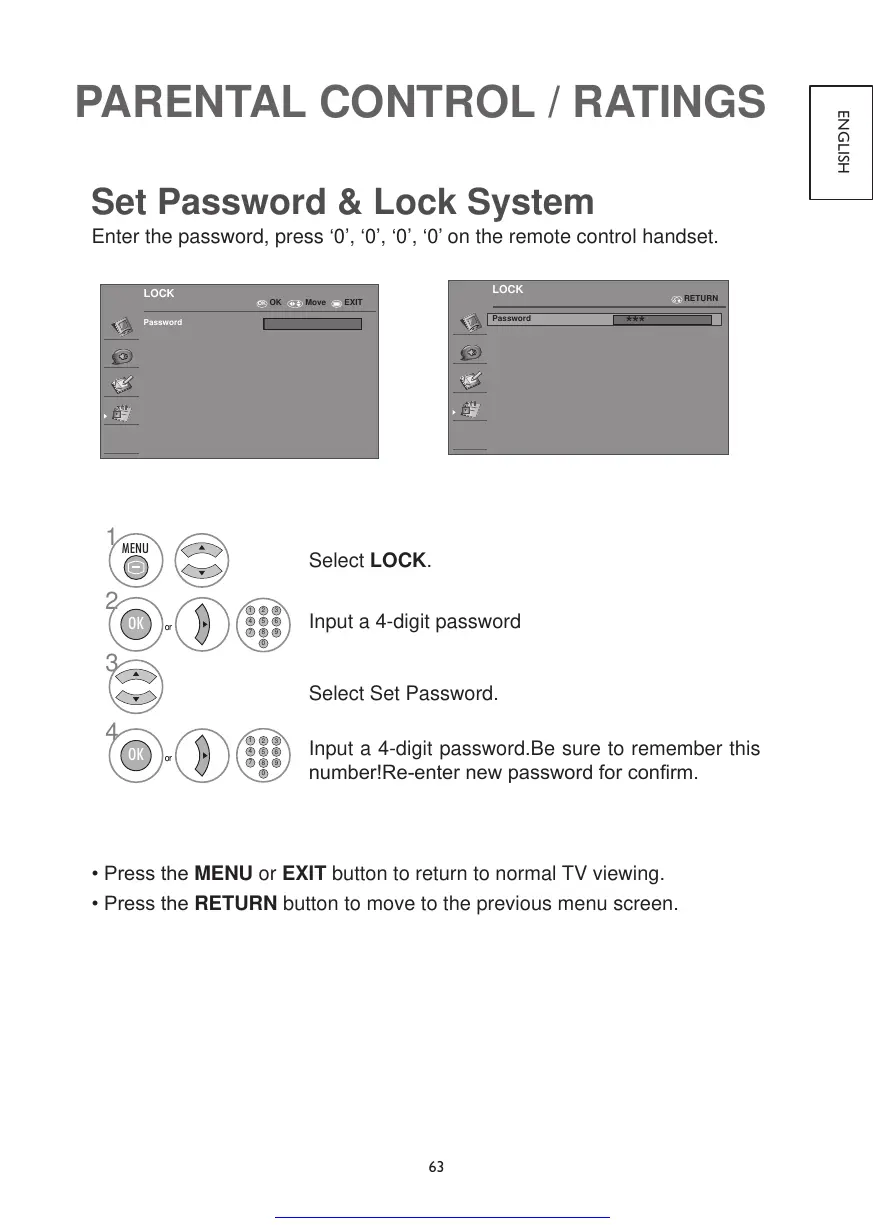
Set Password & Lock System
Enter the password, press ‘0’, ‘0’, ‘0’, ‘0’ on the remote control handset.
OK
LOCK
Password
OK Move EXIT
LOCK
Password
***
RETURN
1
2
3
1
2 3
4
5 6
7
8
0
9
1
2 3
4
5 6
7
8
0
9
MENU
or
OK
4
or
OK
Select LOCK.
Input a 4-digit password
Select Set Password.
Input a 4-digit password.Be sure to remember this
number!Re-enternewpasswordforconrm.
•PresstheMENU or EXIT button to return to normal TV viewing.
•PresstheRETURN button to move to the previous menu screen.
Get other manuals https://www.bkmanuals.com

Table of Contents

Other manuals for Hitachi 22LD4550U

Related product manuals