EasyManua.ls Logo

Hitachi 22LD4550U - Preset Picture Settings; Picture Mode-Preset

Hitachi 22LD4550U
78 pages
Print Icon
To Next Page IconTo Next Page
To Previous Page IconTo Previous Page
Loading...
44
ENGLISH
Preset Picture Settings
Picture Mode-Preset
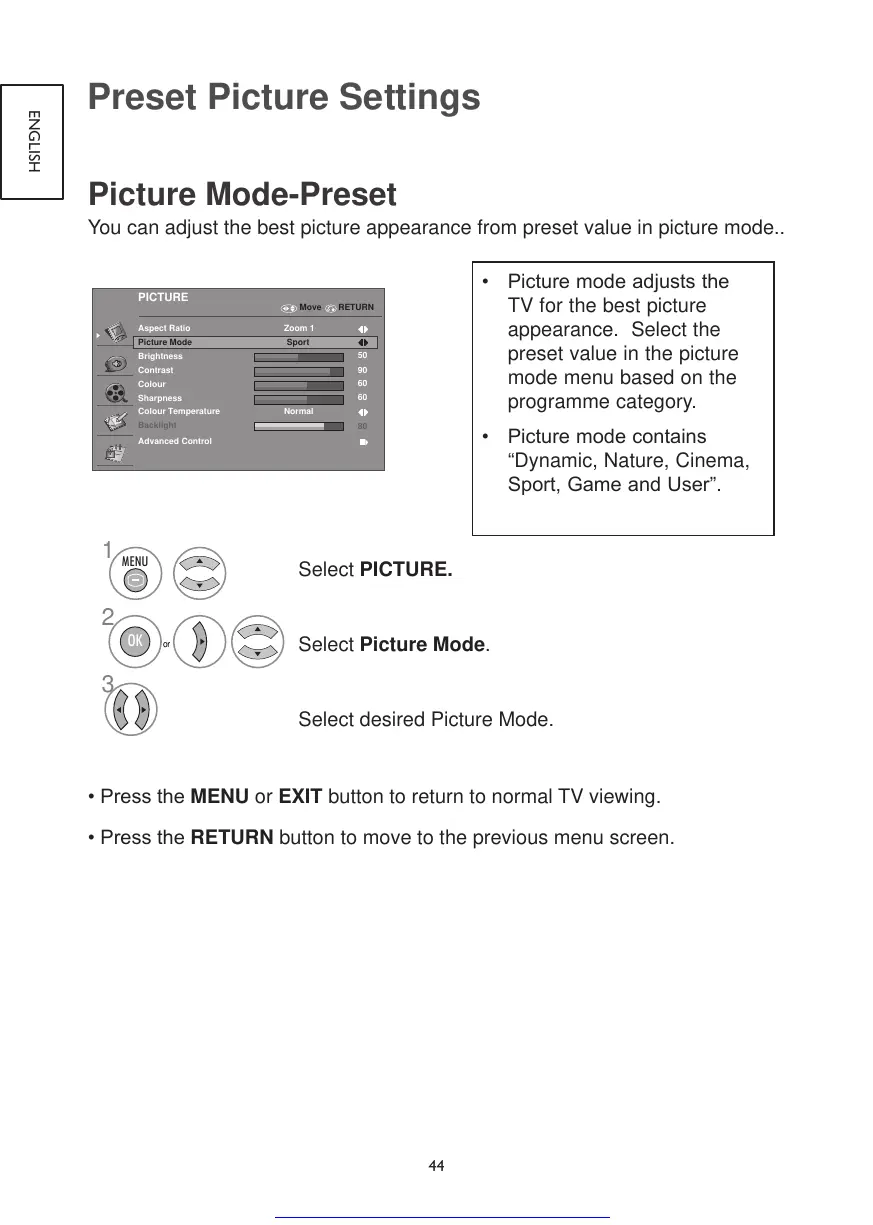
You can adjust the best picture appearance from preset value in picture mode..
PICTURE
Aspect Ratio Zoom 1
Picture Mode
Brightness
Contrast
Colour
Sharpness
50
90
60
60
80
Backlight
Sport
Advanced Control
Colour Temperature Normal
Move RETURN
1
2
3
or
MENU
OK
Select PICTURE.
Select Picture Mode.
Select desired Picture Mode.
•PresstheMENU or EXIT button to return to normal TV viewing.
•PresstheRETURN button to move to the previous menu screen.
• Picturemodeadjuststhe
TV for the best picture
appearance. Select the
preset value in the picture
mode menu based on the
programme category.
• Picturemodecontains
“Dynamic, Nature, Cinema,
Sport,GameandUser”.
Get other manuals https://www.bkmanuals.com

Table of Contents

Other manuals for Hitachi 22LD4550U

Related product manuals