EasyManua.ls Logo

Hitachi 22LD4550U - Audio Language Selection (in Digital Mode Only)

Hitachi 22LD4550U
78 pages
Print Icon
To Next Page IconTo Next Page
To Previous Page IconTo Previous Page
Loading...
ENGLISH
35
Audio Language Selection (In Digital
Mode Only)
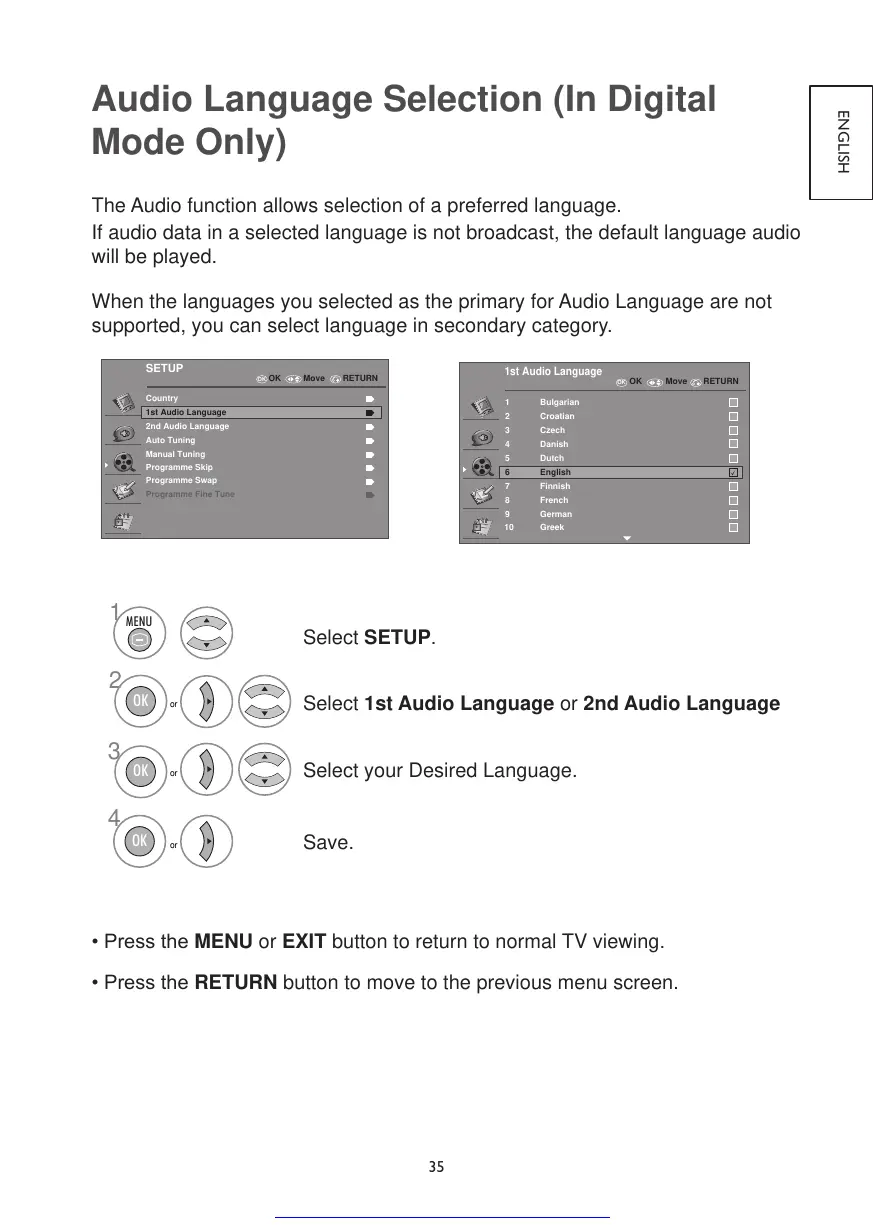
The Audio function allows selection of a preferred language.
If audio data in a selected language is not broadcast, the default language audio
will be played.
When the languages you selected as the primary for Audio Language are not
supported, you can select language in secondary category.
OK
SETUP
Country
1st Audio Language
2nd Audio Language
Auto Tuning
Manual Tuning
Programme Skip
Programme Swap
Programme Fine Tune
OK Move RETURN
OK
1st Audio Language
1
2
3
4
6
7
8
9
Bulgarian
Croatian
Czech
Danish
Dutch
French
Finnish
English
German
10 Greek
5
RETURNOK Move
1
2
3
4
MENU
OK
OK
OK
or
or
or
Select SETUP.
Select 1st Audio Language or 2nd Audio Language
Select your Desired Language.
Save.
•PresstheMENU or EXIT button to return to normal TV viewing.
•PresstheRETURN button to move to the previous menu screen.

Get other manuals https://www.bkmanuals.com

Table of Contents

Other manuals for Hitachi 22LD4550U

Related product manuals