EasyManua.ls Logo

Hitachi 22LD4550U - Clock Setup

Hitachi 22LD4550U
78 pages
Print Icon
To Next Page IconTo Next Page
To Previous Page IconTo Previous Page
Loading...
58
ENGLISH
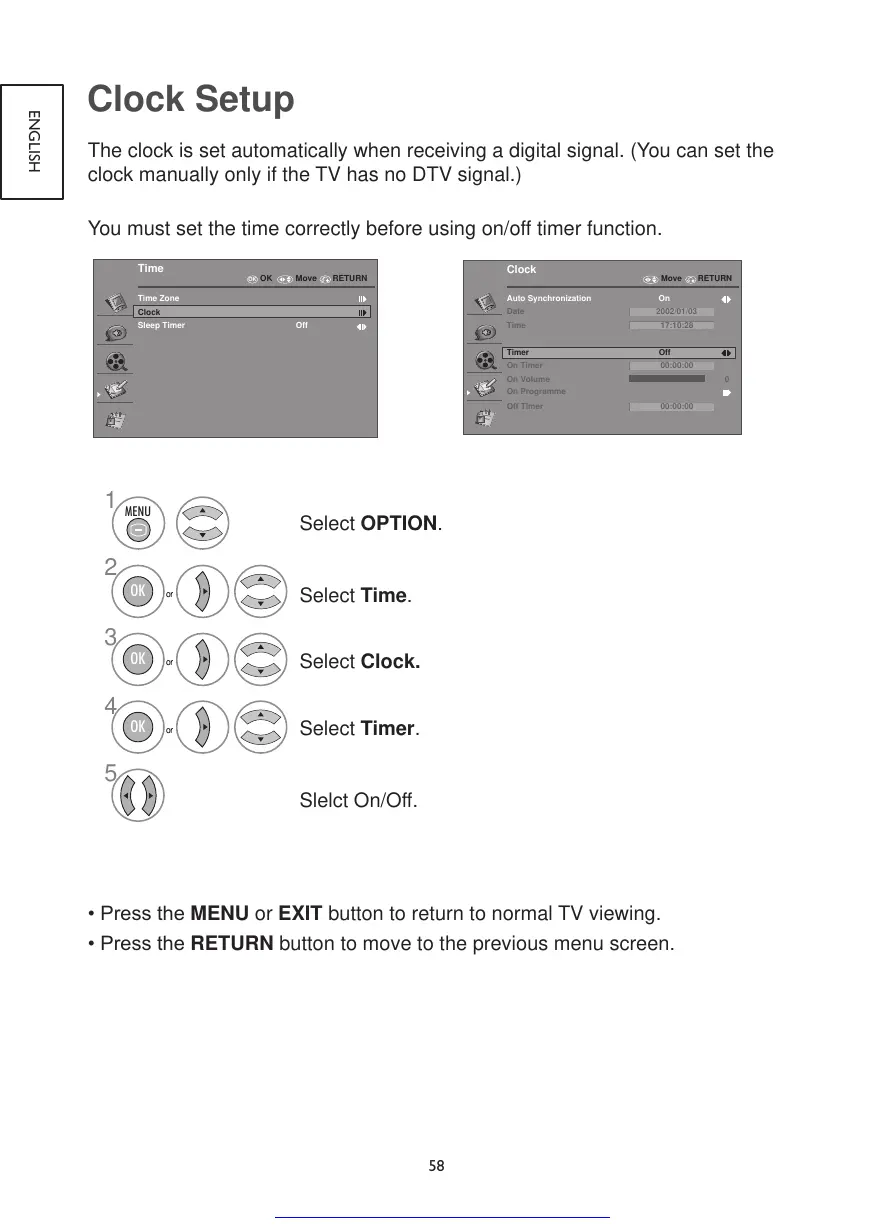
Clock Setup
The clock is set automatically when receiving a digital signal. (You can set the
clock manually only if the TV has no DTV signal.)
You must set the time correctly before using on/off timer function.
OK
Time
Time Zone
Clock
Sleep Timer
Off
RETURNOK Move
Clock
Auto Synchronization On
2002/01/03
17:10:28
Date
Time
Timer Off
0
On Timer
On Volume
On Programme
Off Timer
00:00:00
00:00:00
Move RETURN
1
2
3
or
MENU
OK
4
5
or
OK
or
OK
Select OPTION.
Select Time.
Select Clock.
Select Timer.
Slelct On/Off.
•PresstheMENU or EXIT button to return to normal TV viewing.
•PresstheRETURN button to move to the previous menu screen.
Get other manuals https://www.bkmanuals.com

Table of Contents

Other manuals for Hitachi 22LD4550U

Related product manuals