Engl ish -12-
ule time. By pressing “YELLOW/BLUE” you can
advan c e t he sc hedule bac k ward / forward of a
day.
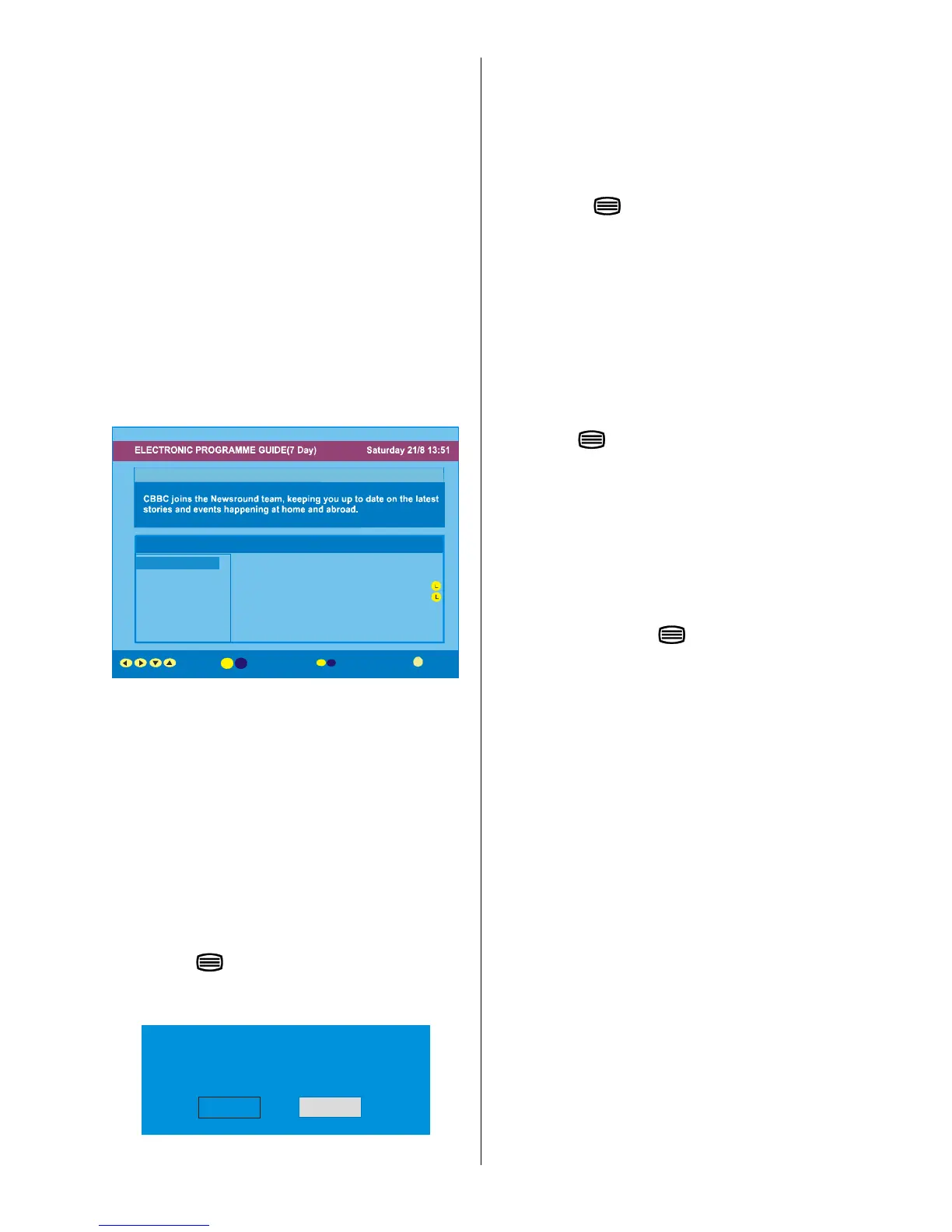
• If you press “INFO” button you can see the detailed
help information easily. And by pressing “INFO” but-
ton again you can exit Help menu.
• The starting time for EPG is the current time.You can
see the event information for the next two hours. By
pressing
a
/
b
button, you can go to the next/
previous hours while Programmes list is highlighted.
• lf you press the “SELECT” button when a next event
is highlighted, a reminder is set for the highlighted
programme and a clock appears on the screen.
Programme reminders can be set to signal that a
programme is about to start when you are watching
another channel. If you set reminder to a programme,
then you will be asked for switching to that channel
when the reminder time is reached.
Newsround 16:55-17:00
30. CBBC Channel 15:00 Even Stevens
40. BBC NEWS 24 15:50 Newsround Showbiz
41. ITV News 16:00 Basil Brush
50. Four Text 16:55 Newsround
51. BBCI
800. BLUE/LEFT 1k...
801. CCIR17/1kHz...
Channels Programmes on Saturday 21/8, 15:00 - 17:00
eTime
Displaying The Subtitles
With Digital terrestrial broadcasting (DVB-T), some
programmes are broadcast with subtitles. Subtitles
can be displayed when watching these programmes.
Press the “ M” button to display the Main menu, high-
light the Configuration line using
a
/
button
andpress the “SELECT ” button to display the Con-
figuration menu.
Highlight the “Subtitle” item in Configuration menu
and use
_
/
`
button to set Subtitle to off or a lan-
guage.
If “Subtitle” is on via selecting one language option,
pressing the
button causes the following warn-
ing message display on the screen.
Pressing the “GUIDE” button again exits EPG menu.
Interactive services cannot be used
while subtitles are on. Would you like
to tur n subtitles off now?
Yes No
Digita l Teletext
With Digital terrestrial broadcasting (DVB-T), in addi-
tion to pictures and sound, you can also watch digital
teletext.
Digital teletext is sometimes broadcast at the same
time as normal broadcasting.
1. Press the
button.
The digital teletext information appears.
2. Operate it with the coloured buttons,
_,
`
/
a
,
buttons and OK button.
The operation method may differ depending on the
contents of the digital teletext.
Follow the i nstructions di splayed on digital teletex t
screen.
• When “Press SELECT” button or similar message
appears on the screen, press the “SELECT” button.
• When the
(Text) button is pressed, the TV re-
turns to television broadcasting.
• With Digital terrestrial broadcasting (DVB-T), in addi-
tion to digital teletext broadcasting at the same time
as normal broadcasting, there are also channels
with just digital teletext broadcasting.
• The aspect ratio when watching a channel with just
digital teletext broadcasting is the same as the as-
pect ratio of the picture watched previously.
• When you press the
(Text) button again, the
digital teletext screen is displayed.
Over Air Download
To ensure that your IDTV always has the most up-to-
date information, please ensure that after use it is set
to its standby mode. At 3AM each day, the IDTV auto-
matically searches for any new information which
may be broadcast and will download this to your
IDTV automatically. This operation will normally take
approximately 30 seconds.
Ifyouwanttodothis,youneedtosetAutomatic
Download to “Enabled” in Receiver Upgrade set-
ting. For details see page 16.
Widescreen
Depen ding o n the type of broadcast being transmitted,
progr ammes can be viewe d in a number of formats.
Press the “ WIDE ” button repea tedly to select between
Auto or 16:9.
When Auto is selected, the format being displayed is
determined by the picture being broadcast.
Please Note: Menu size changes depending on the
chosen image size.



 To Next Page