Engl ish -27-
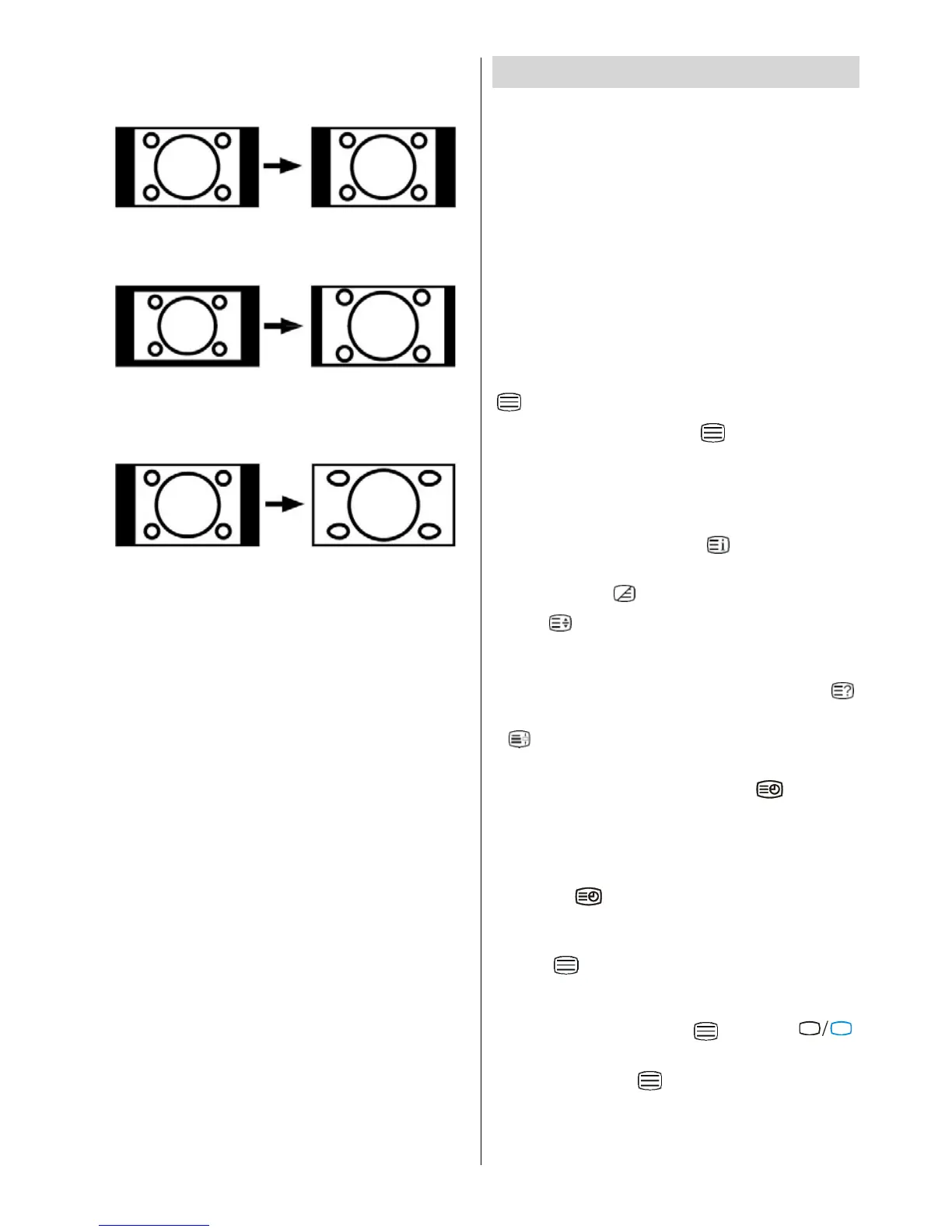
4:3
Use to view a normal picture (4:3 aspect ratio) as this
is its original shape.
14:9 Zoom
This zooms up the wide picture (14:9 aspect ratio) to
the upper and lower limits of the screen.
Panoramic
This stretches the left and right sides of a normal
picture (4:3 aspect ratio) to fill the screen, without
making the picture appear unnatural.
The top and bottom of the picture are slightly cut off.
Fre eze Pict ur e
You can free ze the picture on the screen by pressing
the “OK” button.
Note: This feature will be unavailable t o be used
while watchi n g PC, YPBPr and HDMI sour ce s.
Teletext
You can display Teletext information on your TV. Each
channel which broadcasts teletext, transmits a page
with information on how to use its teletext system
(usually page 100). Depending on the TV channel,
teletext is tra nsmitted in different systems.The colours
used in the options line correspond with the colour
buttons of your remote control.
• Ensure that the TV is receiving a good signal, or
some text errors may occur.
• When four coloured items appear at the bottom of
the text page,Fasttext is available.Fasttext allows
you to access p ages quickly and easily.Pre ss the
corresponding coloured button to access the page.
Spe cial Teletex t Functions
“ ”ToDisplayapageoftext.
The view tex t services press “
”. To return nor mal
viewing press again.Programmes cannot be changed
until text is cancelled.
• To select a page, press the number buttons or pro-
gram buttons (P+, P-).
• To select index page, press “
” button.
•To select superimposed over the programme on the
screen, press “
”.
•Press“
” once to enlarge top half of the page,press
again to enlarge the bottom half of the page.Press
again to revert normal size.
• To discover solutions on quiz and games press “
”
• At times it is convenient to hold a page of text.Press
“
” to hold a page. The page w ill be held on screen
until the button pressed again.
• To s ele c t s ub c ode pages pres s “
”.Subcode
pages are subsections of long Teletext pages that
can only be displayed on the screen one section at
atime.
• Time information will be displayed on screen after
pressing “
” button.If the programme does n ot
have teletext transmission, no information will be
displayed.
•When”
” button is pressed while in teletext mode,
the screen will be splitted into two windows, one
displaying the teletext and the other displaying the
current channel. Press the “
” button or “
TV



 To Next Page