123
4
56
897
0
GUIDEWIDE
SOUND PICTURE FEATURE INSTALL
?
PC
ABC DEF GHI
STU
VWX YZ
EXIT
PQRJKL MNO
TV DTV
-/--P< P
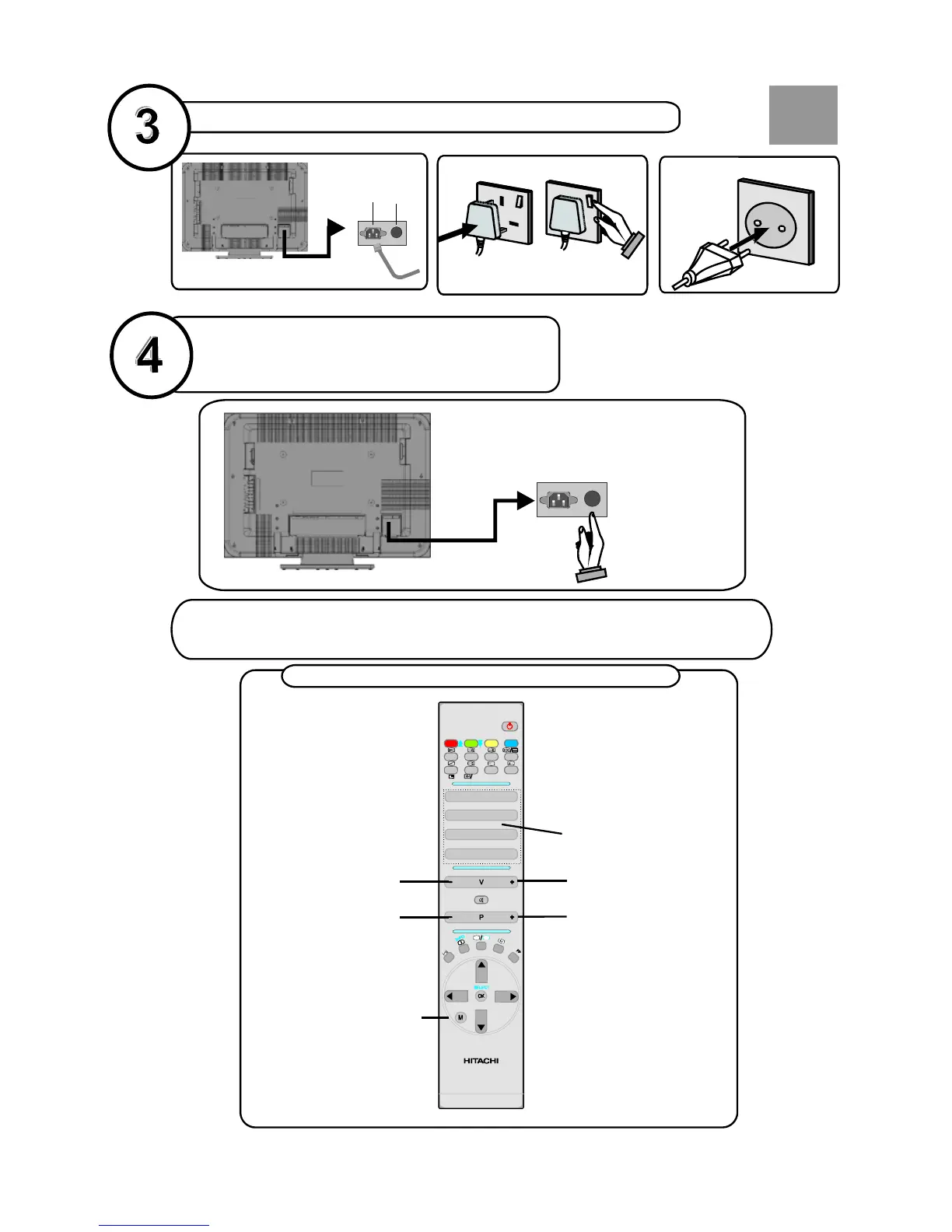
basic functions of remote control
connect the TV plug to the mains socket
switch your TV on
by pressing the On/Off button
NB: When the set is first switched on, the set will be in standby
. Press the channel up down (P-
and the indicator
on the front of the set will illuminate red , P+)
or numeric buttons (1, 2, 3, ...) to operate.
insert plug...
European
plug
...and switch on
insert plug...
UK plug
Programme Up*
Volume Up*Volume Down*
Programme Down*
To select a programme
number.
To enter the main menu
*Also used for navigation in menus
Power Cord
Input
Power on/off
button
Plug the
...
mains lead
into the TV
RC 1072
GB


 To Next Page