Once the TV has found all your local stations, they are then
automatically assigned a programme number and name, if available
from the broadcast.
important note before starting Auto Setup
important note.
start A.P.S. (Auto Programming System)
If you have a Video Cassette Recorder or a Satellite receiver connected to your TV
please ensure that they are switched on before automatic tuning begins. In t he case of
a VCR, insert a pre-recorded tape and begin playback of your equipment. These
measures ensure that all your external equipment is tuned in during the Auto Setup
procedure.
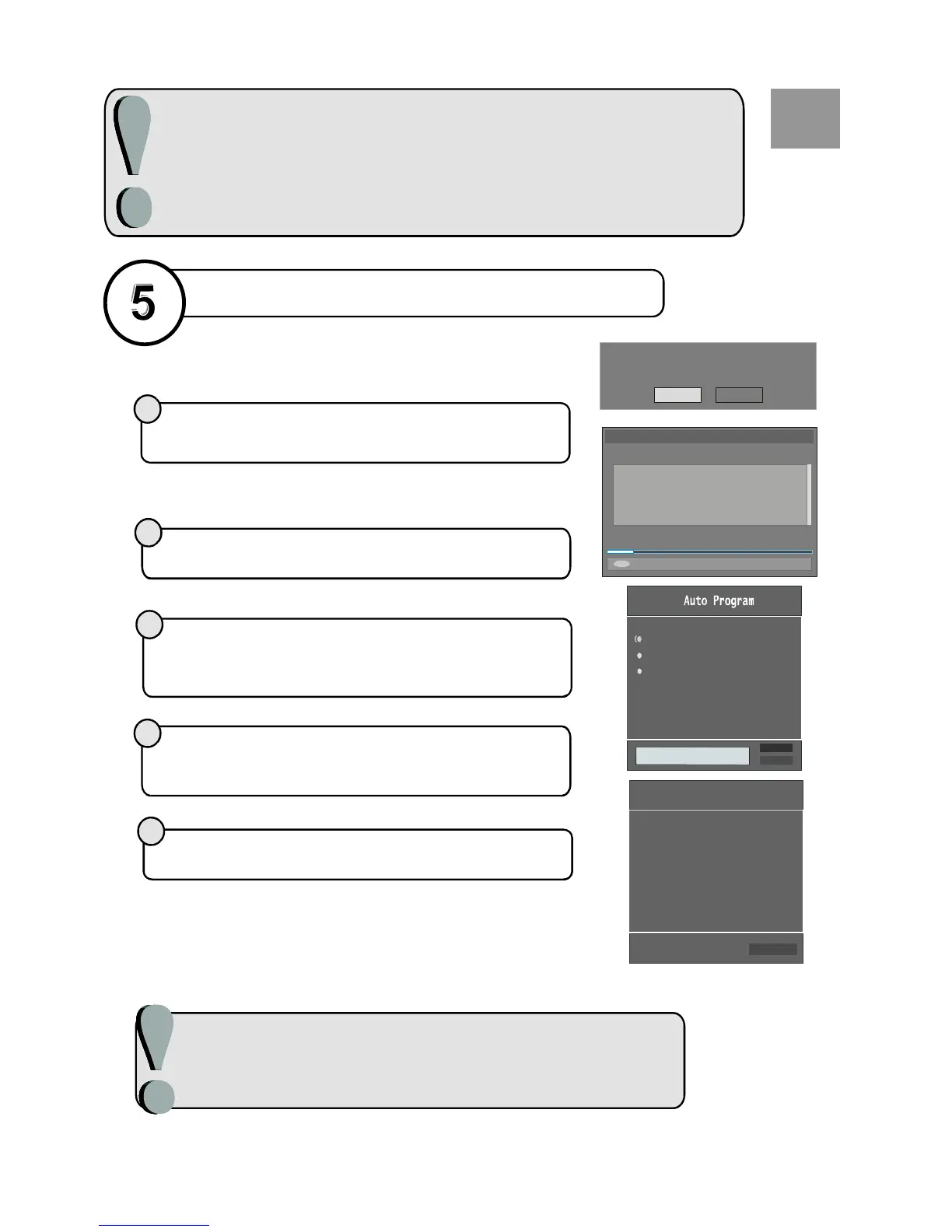
When the TV is turned on for the first time, it is in the digital mode.
Because this is the first time the TV is used, there are no channels stored
in the memory and the following message appears on the screen.
1
2
3
5
After APS is finalized, the programme table will appear on the screen.In the
programme list you will see the programme numbers and names assigned to the
programmes.
4
Please ensure aerial is plugged in. Do y ou
want to star t first time installation?
Yes No
MENU
BBC ONE
BBC TWO
BBC CHOICE
Searching UHF channels 30. Please wait. This will take a few minutes
Cancel searching
AUTOM ATIC SEARCH
Channels:
12 %
To start installation process, select to cancel select This process
will take about five minutes. To cancel searching, you can press “ ”
button at any time during the process.
“Yes”, “No”.
M(MENU)
After process is completed, a message asking for analogue
channel search appears on the screen. To continue APS, first select t he
, and by pressing button and then
press the or “ ” button.
Automatic Search
Language Country TXT Language
RED OK
/
_`
For details on the Program menu please refer to the Installation Menu section of
the instruction book.
Country
Language
UK
Ok
Cancel
PLEASE CHECK ANTENNA CABLE
AUTO PROGRAMMING SYSTEM
TXT Language
UK
P03-C04
63.75 MHz
6%
63.75 MHz
Cancel
APS is running...
GB



 To Next Page