English -7-
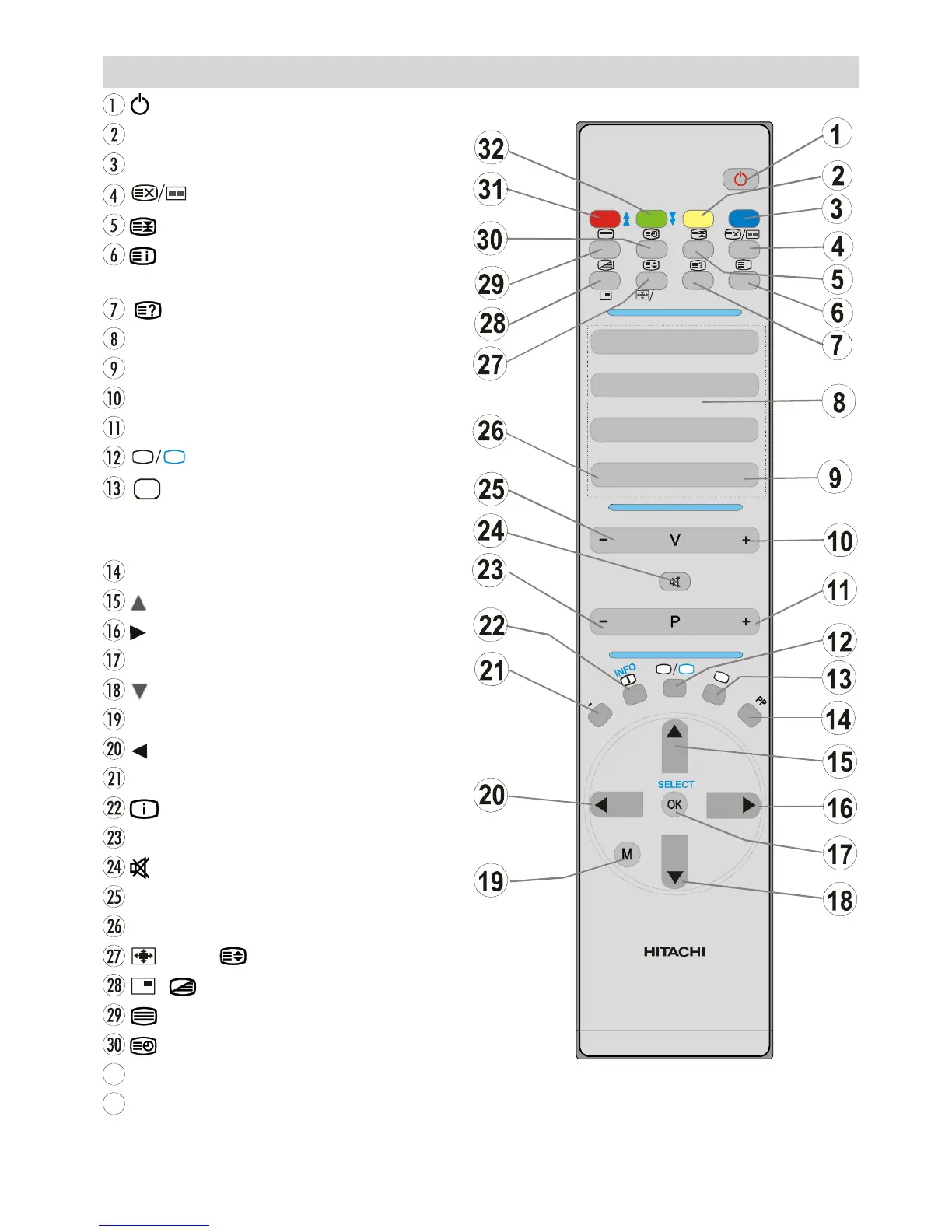
Remote Control Buttons
=StandBy
YELLOW / FEATURE = Feature Men u
BLUE / INSTA LL =InstallMenu
= Update / PAP Mode
=Hold
/ GUIDE = Index Page
GUID E= Electronic Programme Guide (EPG)
/ PC = Reveal / PC
0-9= Direct Programme
- / - - / EXIT =NoFunction
V+ =VolumeUp
P+= Programme Up
TV
DTV
=TV/DigitalTVMode
AV
= External Source
(TV, EX T1, EX T2 , EX T2 S, FAV,
S-VIDEO, HDMI, YPBPR, PC, DTV)
PP = Personal pre ference
M =Menu
= Curso r Left
I-II = Mono/Ster eo - Dual I-II
/ INFO =Info
-P= Programme Down
=Mute
-V= Volume Down
P<P = Previous Programme
/ WIDE / = Image size / Expand
/ = PIP Mode /Mix
= Teletext
=Time/subtitle on / off in the digital mode
31
RED / SOUND = Sound Menu



 To Next Page