Engl ish -15-
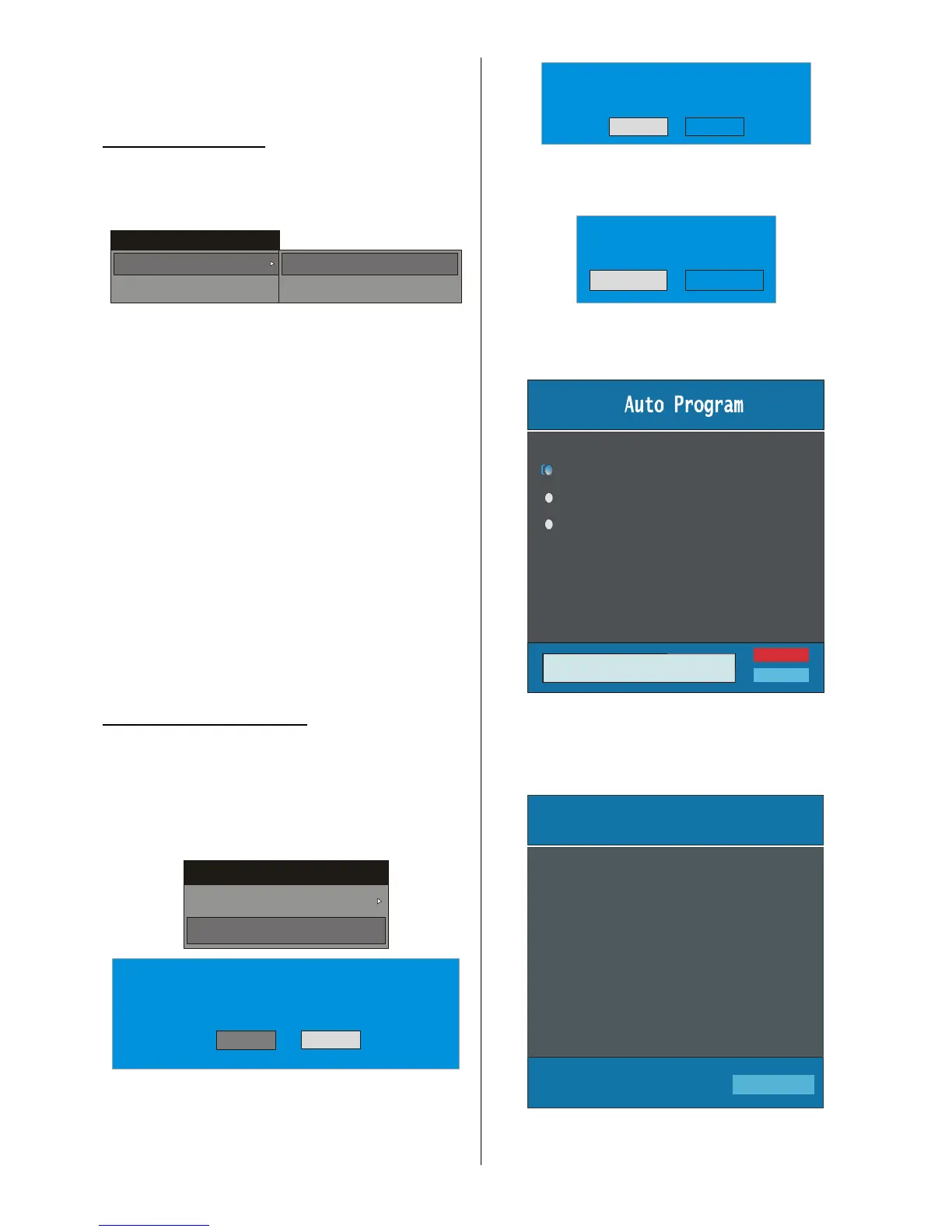
This menu includes the following items:
1. Add New Channels
2. First Time Installation.
ADD NEW CHANNELS:
This tuning menu consists of two parts:
x Automatic Sea rch
x Manual Search
Installation
Add New Chan nels
First Time Installation
Automatic Search
Manual Search
Automatic Search:
Automatic search is started by pressing the “OK”
button in the auto-search pop up menu. All the ser-
vices are searched and a channel table is created
automatically.
All channels found are stored in a sorted form w ith
respect to their channel numbers. Some serv ices
may not appear with the correct channel number. At
the time of printing, not all broadcasters are sending
their channel number information.
Manual Search:
In manual search, the number of the multiplex is en-
tered manually and only that multiplex is searched for
the channels. For every valid channel number , signal
level, signal quality and network name are shown at
the bottom of the screen.
In both manual and auto search any existing channel
in the database is not re-stored to avoid redundant
duplicates of that channel.
FIRST TIME INSTALLATION
The user can use this item to load default settings,
which had been loaded to the receiv er at the factory.
To insta ll factory settings, highlight “First Time In-
stallation” menu and press the “OK” button, then
you will be asked to confirm for deleting all channels
and settings.
Ins tallation
Add New Channels
First Time I nstallation
Yes
Your previous digital channel list will be destroy ed.
Are you sure you want to delete all digita l channels
and settings for first time i nstallation?
No
By selecting YES and pressing the “OK” button, the
existing channel table will be deleted.
After factory settings is loaded, “FirstTimeInstal-
lation” menu will be displayed.
Please ensure aerial is plugged in. Do you
want to start first time installation?
Yes No
Press the “ OK” button to start installation. After search
is completed for digital channels, a message asking
search for analogue channels appears on the screen.
Yes
Do you want to search for
analogue channels?
No
Press the “OK” button to searc h for analogue
channels.The following menu appears on the screen
for analogue channel search.
Country
Language



 To Next Page