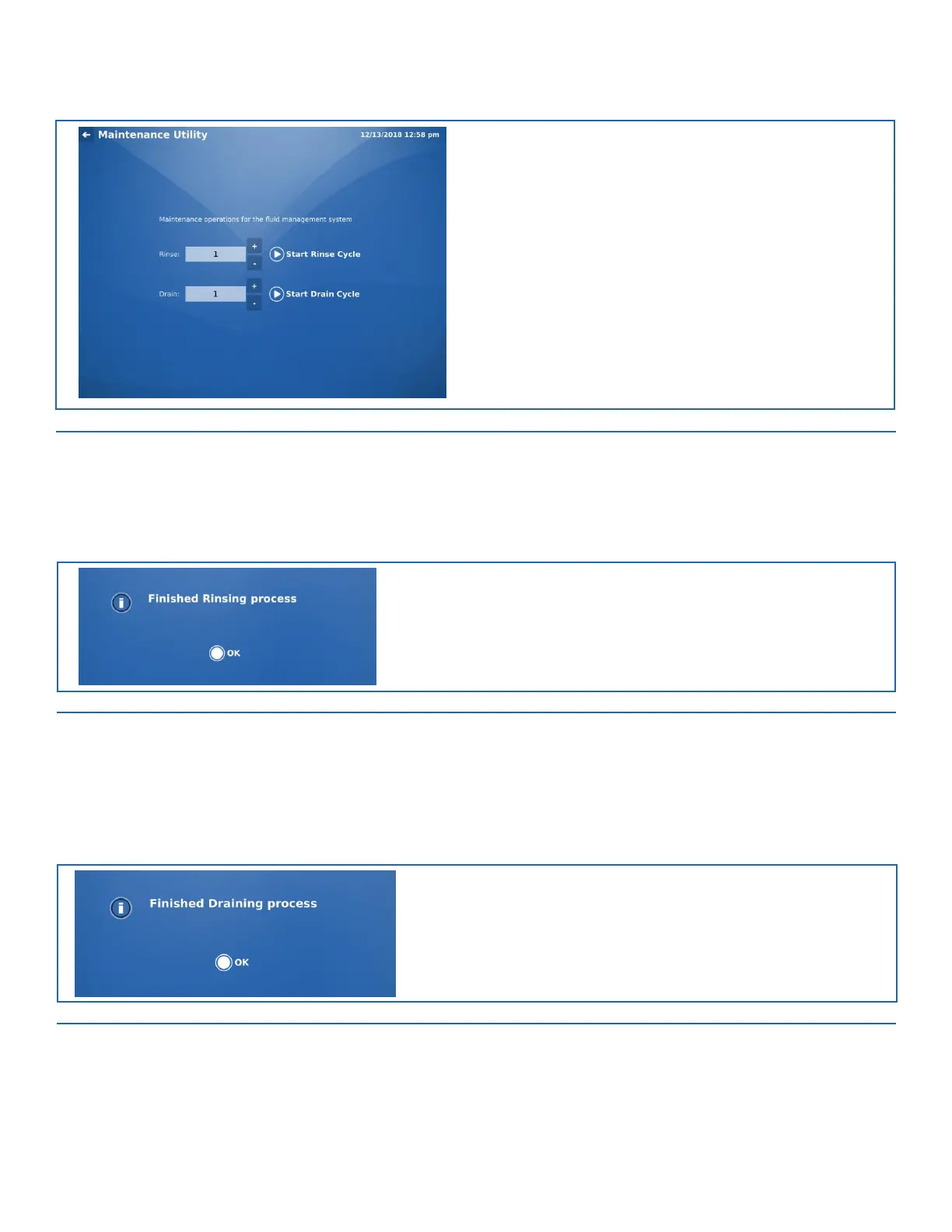
FIGURE 10-2. Maintenance Utility Screen
4.
Set the desired number of rinse cycles, and then press the Start Rinse Cycle button to start the cycle. The following number of
cycles are recommended, based on when the instrument will be next used:
•
If a consecutive run will be performed immediately, it is not necessary to run a rinse cycle.
•
If the instrument will not be run again for one day, one rinse cycle should be completed.
•
If the instrument will not be run for several days, two rinse cycles should be completed.
5.
A pop-up window notifies the operator once the cycle is complete.
FIGURE 10-3. Finished Rinsing Process Window
6.
Once the cycle has ended, disconnect water bottles from all lines. Place all disconnected lines onto a clean, absorbent material.
7.
Set the desired number of drain cycles, and then press the Start Drain Cycle button to start the cycle. Refer to Figure 10-2. The fol-
lowing number of cycles are recommended, based on when the instrument will be next used:
•
If a consecutive run will be performed immediately, it is not necessary to run a drain cycle.
•
If the instrument will not be run again for one day, one drain cycle should be completed.
•
If the instrument will not be run for several days, two drain cycles should be completed.
8.
A pop-up window notifies the operator once the cycle is complete.
FIGURE 10-4. Finished Draining Process Window


 To Next Page