EasyManua.ls Logo

Hitachi UX Twin Nozzle - User Manual

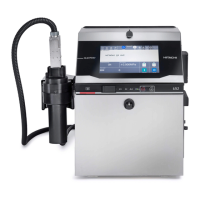
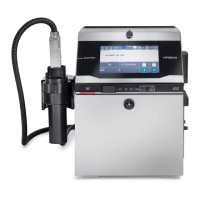
Hitachi UX Twin Nozzle
47 pages
Print Icon
To Next Page IconTo Next Page
Loading...
Instruction Manual for LAN Communication Modbus
Ethernet Communication
HITACHI Printer
Model UX Twin-Nozzle
Thank you for purchasing the Hitachi IJ Printer Model UX Twin Nozzle.
This instruction manual describes the Ethernet communication (LAN Communication Modbus)
function. For other features of the printer, please refer to Instruction manual or Technical
manual.
If the printer is improperly handled or maintained, it may not operate smoothly and may become
defective or cause an accident. It is therefore essential that you read this manual to gain a
complete understanding of the printer and use it correctly.
After thoroughly reading the manual, properly store it for future reference.
First Edition

Other manuals for Hitachi UX Twin Nozzle

Questions and Answers

  • S
    Scott HernandezAug 3, 2025
    What to do if external device can't communicate with Hitachi Printer?
    • J
      Joseph SchroederAug 3, 2025
      If an external device fails to communicate with the Hitachi Printer, verify the printer connection. Power on the printer's main power switch. If it's already on, turn it off, check the power outlet, and plug it back in. Ensure the printer's IP address is on the same network segment as the external device. If there's a potential IP address conflict, disconnect the LAN cable and change the printer's IP address. Temporarily disable Windows Firewall or security software and retry. Also, confirm the settings of the external device.
  • D
    Desiree ByrdAug 8, 2025
    Why is data not changed when Hitachi UX Twin Nozzle Printer is powered on again?
    • A
      Andrew MataAug 8, 2025
      The data is not changed because the printer saves the data when ink ejection is stopped. To ensure your changes are saved, power off the printer only after the ink ejection stop process is complete. Note that changes made via communication during standby will not be saved.
  • T
    Tracy RodriguezAug 14, 2025
    What to do if viscosity readings are out of range on my Hitachi Printer?
    • L
      Leah WallaceAug 14, 2025
      If the viscosity readings on your Hitachi Printer are out of range, it could be due to ink adhered to the inside of the viscometer, or a faulty proximity sensor. Try disassembling and washing the viscometer. If that doesn't work, replace the proximity sensor. If there is still no recovery, replace the viscometer.
  • M
    Michael EstesAug 20, 2025
    Why is the viscosity reading unstable on my Hitachi UX Twin Nozzle Printer?
    • C
      Chris NortonAug 20, 2025
      Unstable viscosity readings on your Hitachi Printer may be due to a foreign object entering the system. First, retry the calibration. If the fault persists, disassemble and clean the viscometer. If the issue continues, the viscometer may need to be replaced.
  • C
    Corey WilsonAug 27, 2025
    How to fix inside temperature too high error on Hitachi UX Twin Nozzle Printer?
    • J
      Joseph WilliamsAug 27, 2025
      If your Hitachi Printer displays an 'Inside Temperature Too High' error, the thermistor may be faulty. Check the connector of the thermistor. If the connection is fine, replace the thermistor.

Summary

Ethernet communication Function

Overview of Ethernet Communication

Explains the function for Ethernet communication between the IJ Printer and an external unit using a LAN environment.

Configuration Diagram for Ethernet

Shows a diagram illustrating the Ethernet communication setup between the IJ Printer and an external unit.

Ethernet Usage Notice

Provides important notices and lists functions that are not operational or not supported during Ethernet communication.

Preparations for Connection

Network Connection Preparations

Details steps for connecting to an Intranet LAN or from outside the company, including IP address acquisition.

IJ Printer Preparations

Outlines necessary preparations for the IJ Printer, such as LAN cable connection and communication environment settings.

LAN Cable Connection

Illustrates the physical connection of the LAN cable to the IJ Printer's I/O section.

Setting the Communication Environment

Details how to set the LAN function and other parameters on the communication environment setup screen.

Usage Precautions

Provides important notices and lists functions that are not operational or not supported during Ethernet communication.

Glossary

Connection Test

Procedure for Connection Test

Provides a step-by-step procedure to test the network connection between the IJ Printer and a PC.

Modbus Communication

Modbus Communication Overview

Explains the Modbus protocol support and its common use in industrial equipment.

Modbus Transmission Procedure

Describes the structure of request and response messages for Modbus communication.

Modbus Message Format

Details the function codes, device addresses, and data formats used in Modbus communication.

Data Configuration

Holding Registers Configuration

Details the configuration of Holding Registers, mapping word addresses to specific printer functions and parameters.

Input Registers Configuration

Details the configuration of Input Registers, mapping word addresses to printer status and information.

Detail of Data Configuration

Analysis Information Details

Provides details on analyzing communication errors using function codes, classification codes, and error factors.

Modbus Communication Rule for IJ Printer

Examples of Transmission Procedure

Character Size Setting Example

Demonstrates how to change the character size of a nozzle using Holding Register writing.

Print Content Setting Example

Shows how to set print contents and character counts for multiple nozzles.

Character Height Setting Example

Demonstrates changing character height for multiple nozzles via Holding Register writing.

Unit Information Retrieval Example

Illustrates how to retrieve unit information using Input Register reading.

Calendar Character Setting Example

Details setting calendar characters for print contents of a specific item and nozzle.

Troubleshooting Guide

Troubleshooting External Communication Issues

Provides steps to check and solutions for issues preventing external device communication with the IJ Printer.

Troubleshooting Data Change Retention Issues

Offers solutions for data not being retained after power cycling the IJ Printer, related to ink ejection status.

Hitachi UX Twin Nozzle Specifications

General IconGeneral
BrandHitachi
ModelUX Twin Nozzle
CategoryPrinter
LanguageEnglish

Related product manuals