www.hi-ti.com
11
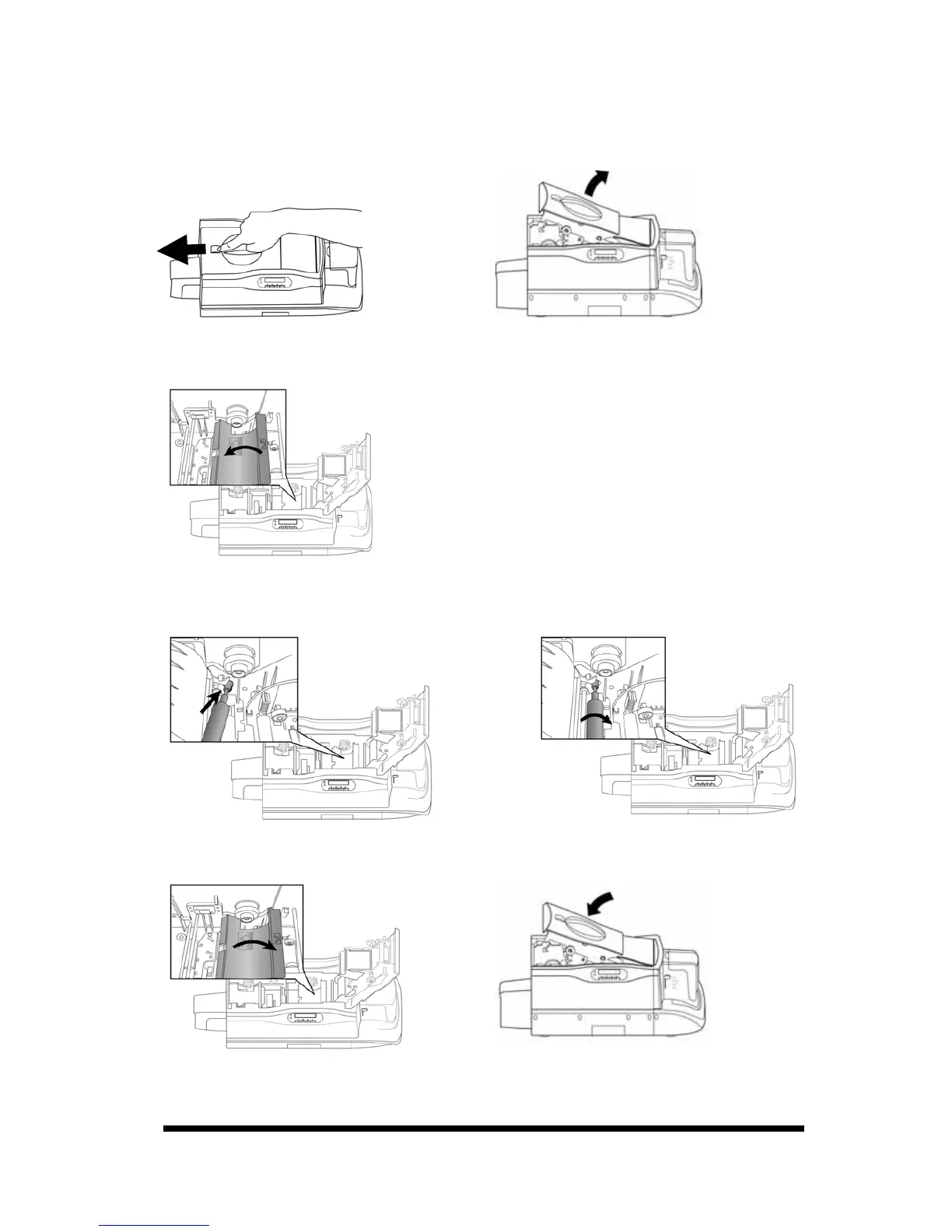
1-4 Install Cleaning Roller*
Please ※ install the cleaning roller before using the card printer.
. Slide the ID button and lift the ribbon door up.
2. Open the cover of the cleaning module, as illustrated.
3. While holding the cover of the cleaning module open, insert the cleaning roller spool
into the spool receivers. Turn the cleaning roller after its installation; if it turns smoothly,
then the installation of the cleaning roller should be correct. If it does not turn smoothly,
please re-install the cleaning roller.
4. Please close the cover of the cleaning module and close the ribbon door to finish the
installation of the cleaning roller.
*Remark: For CS310i/CS320i (Card Printer + Laminator), please install the second cleaning
roller into the laminator as above procedures, after installing the first one into the card
printer.










 To Next Page