www.hi-ti.com
22
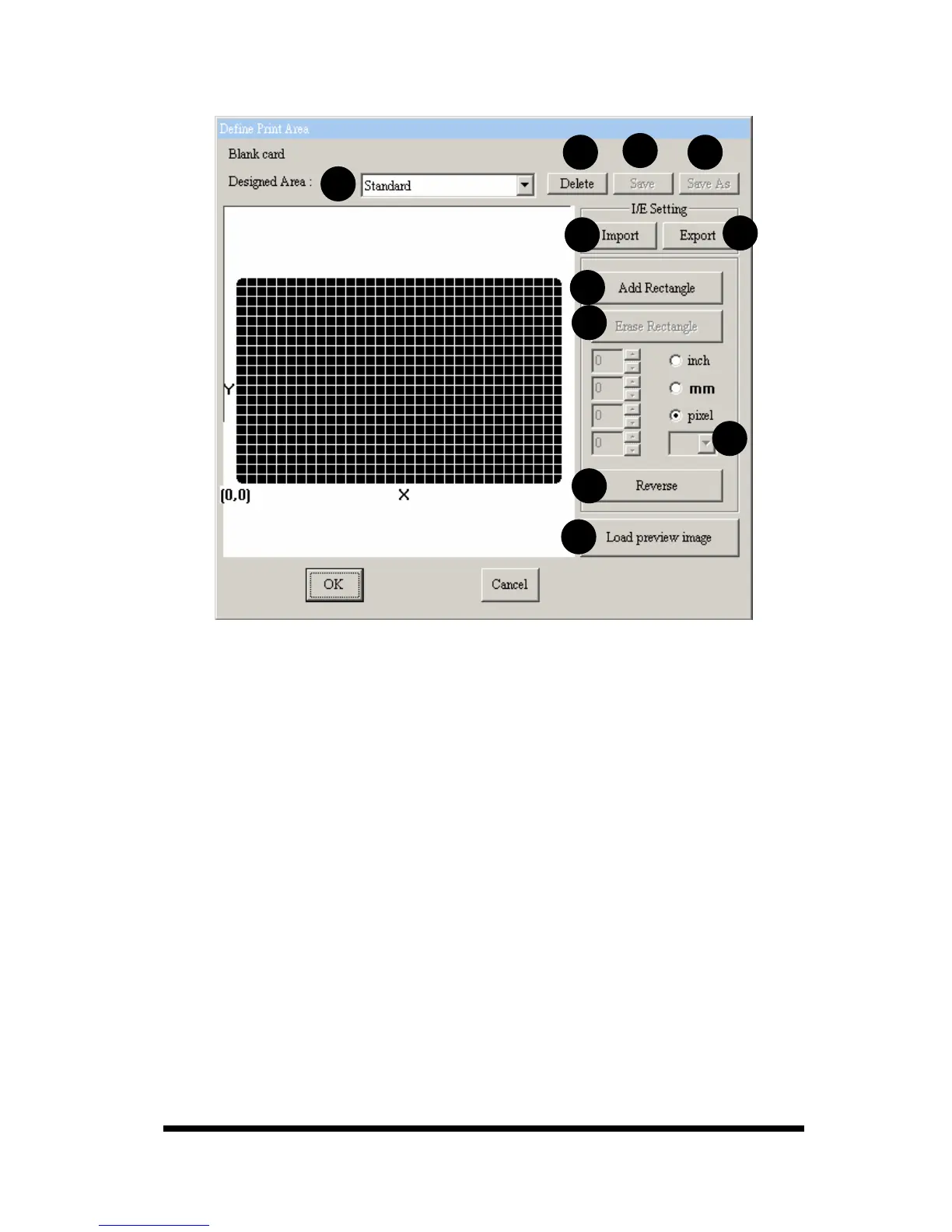
[Edit Area]
A.
Designed Area: You can choose the default layout setting or the custom
layout previously designed and saved through the drop-down list. If you
would like to create a new layout, please select [User defined].
B.
Delete: Delete the layout setting file.
C.
Save: Save the layout setting file in a particular folder after editing.
D.
Save As: Save the layout setting file in any location after the modification.
E.
Import: Import the layout setting file from any location for editing.
F.
Export: Export the layout setting file to any location.
G.
Add Rectangle: Add a non-printing area. You can set the width, height and
position of this area.
H.
Erase Rectangle: Delete a non-printing area.
I.
Rectangle list: You can select a different rectangle from the rectangle list.
J.
Reverse: You can inverse all no-printing areas to be printing areas by
pressing this button.
K.
Load Preview Image: You can load any image to adjust the position of the
card and preview the effect after its adjustment.
A
B
C
D
E
F










 To Next Page