www.hi-ti.com
25
[Tools]
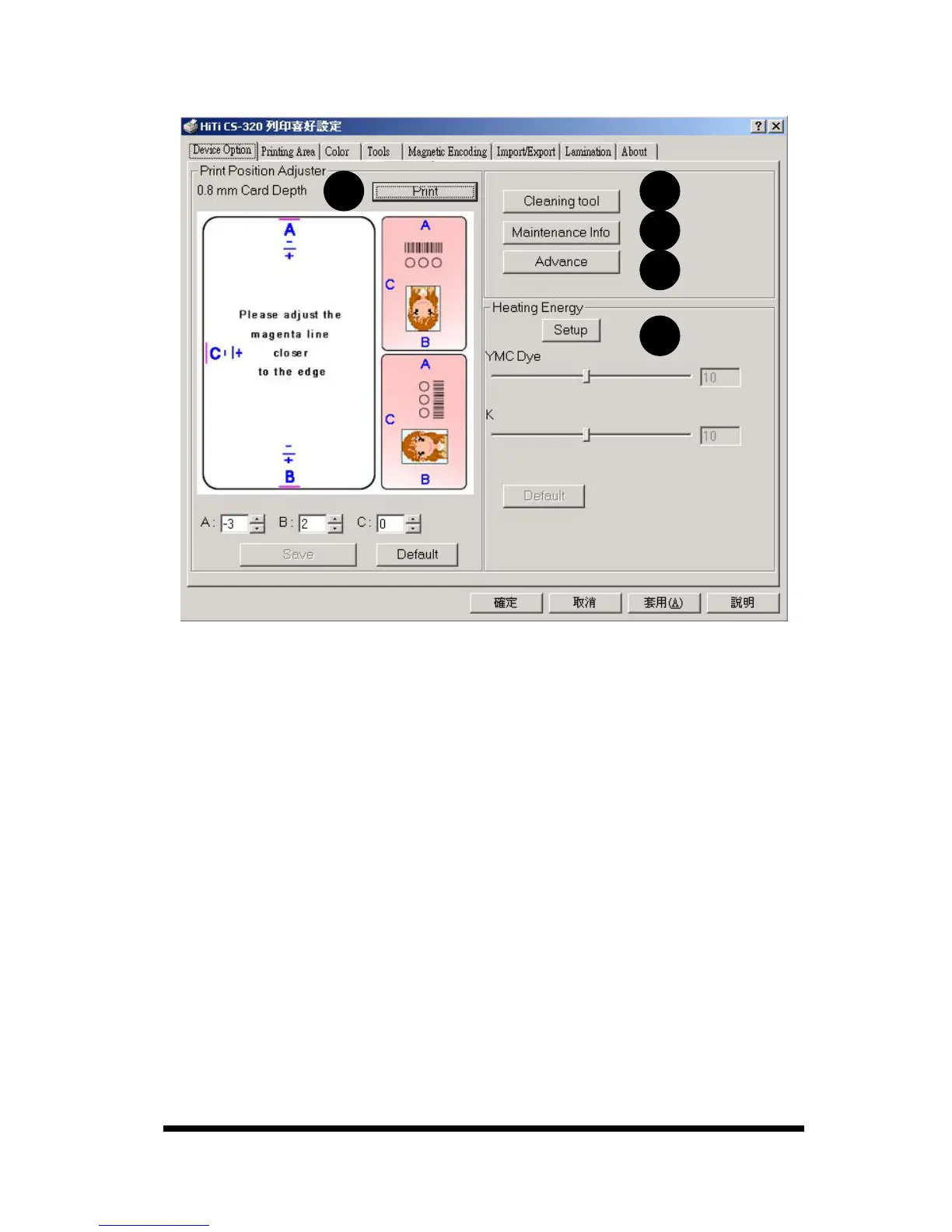
A.
Printing Position Adjuster: You may set the thickness of the card and print
out a test chat, then modify parameter [A] or [B] or [C] to adjust the printing
position.
Notice:※
1. Please make sure the position of the thickness adjuster on the printer
matches the thickness of the card before proceeding to modify
parameter [A] or [B] or [C] to adjust the printing position.
2. When you modify the printing position, please note that the red line is not
too close to the edge of the card in order to avoid any ribbon damage.
B.
Cleaning Tool: You can use the cleaning mode to clean your printer. (Use
cleaning cards from HiTi.)
C.
Maintenance Info: This function will display cleaning/maintenance records
and show the procedure for the print head replacement.
D.
Advance: To show Progress Bar or not.
E.
Heating Energy: You can set ”YMC Dye”, ”K” parameters, ranging from 1 to
10 to decide the color intensity. If you use the YMCKO ribbon, then you can
adjust the parameters for YMC and Resin K within the YMCKO ribbon;
however, if you decide to use the Resin K ribbon, only Resin K parameters
can be adjusted.
A B
C
E
D










 To Next Page