Automatic Firmware Update 18 (32)
7 Automatic Firmware Update
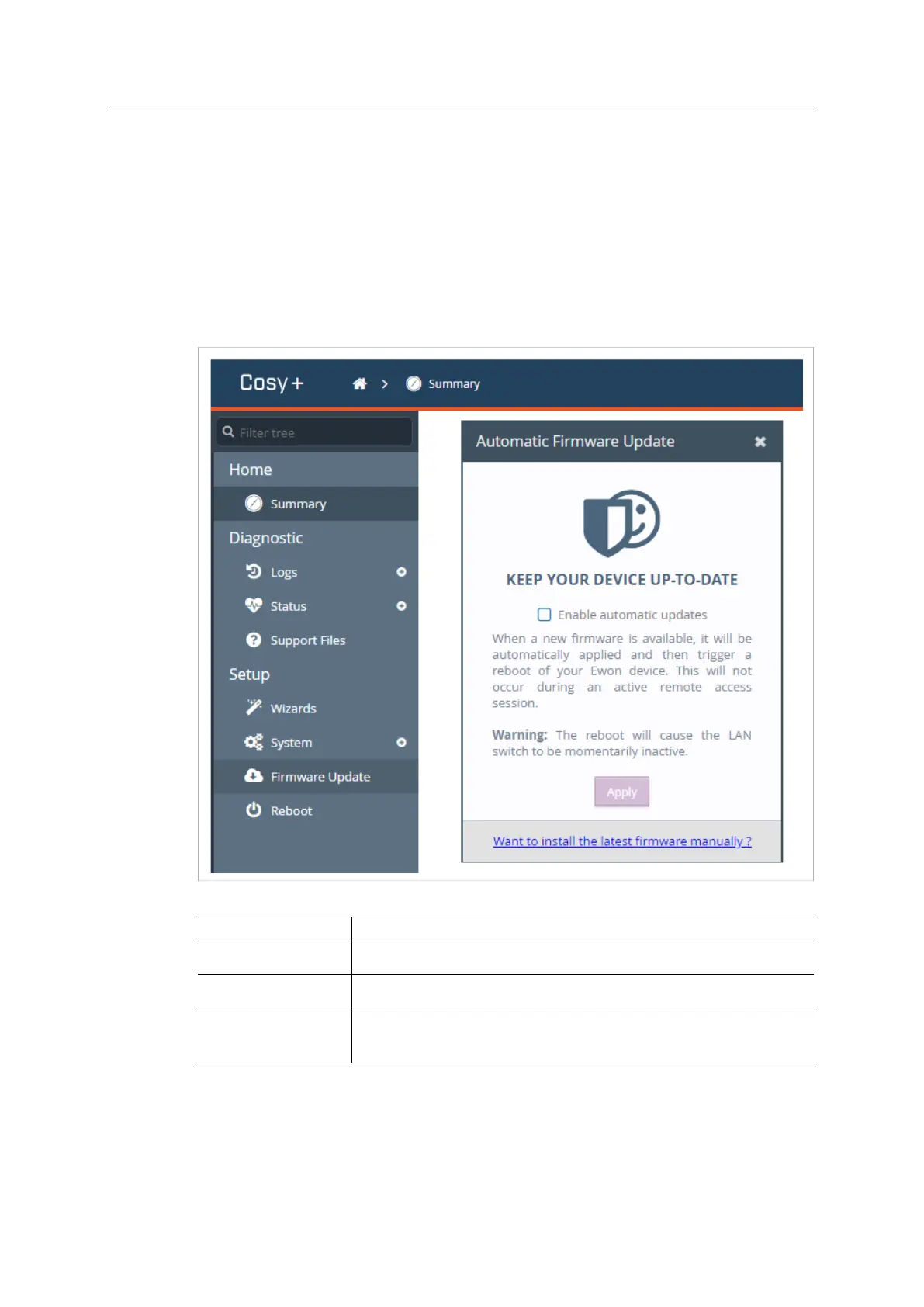
The Firmware Update section allows the Ewon Cosy+ to be automatically up-to-date, without
human intervention.
This feature displays as a pop-up above the current page the user is browsing.
The Ewon Cosy+ requires a reboot after each automatic firmware update. The reboot will never
occur when a remote user is connected to the Ewon Cosy+.
You can also use this section to update manually the Ewon Cosy+ to the latest firmware version
without activating the automatic update.
Fig. 16 Automatic firmware update
Control
Description
Enable automatic updates Checkbox that controls the automatic update feature.
To save/apply the modification, you must click on the Apply button.
Apply Apply the desired behavior of the automatic firmware update
This button applies the status of the Enable automatic updates box.
Want to install the latest
firmware manually?
Update, once, the Ewon Cosy+ to the latest firmware version available.
This does not activate the automatic firmware update.
It will induce a reboot of the Ewon Cosy+
If you decide to update your Ewon Cosy+, a prompt will appear and ask you to confirm that you
want to go through the update process.
The upgrade process includes a reboot of the Ewon Cosy+ at the end of this process.
Ewon Cosy+ User Manual
UM-0005-00 1.0 en-US













 To Next Page