Appendix A: Access to the Ewon Cosy+ 30 (32)
A.4.3 Talk2M Wizard
The Talk2M Wizard, configures the VPN connection between the Ewon Cosy+ and your Talk2M
account on the Talk2M server..
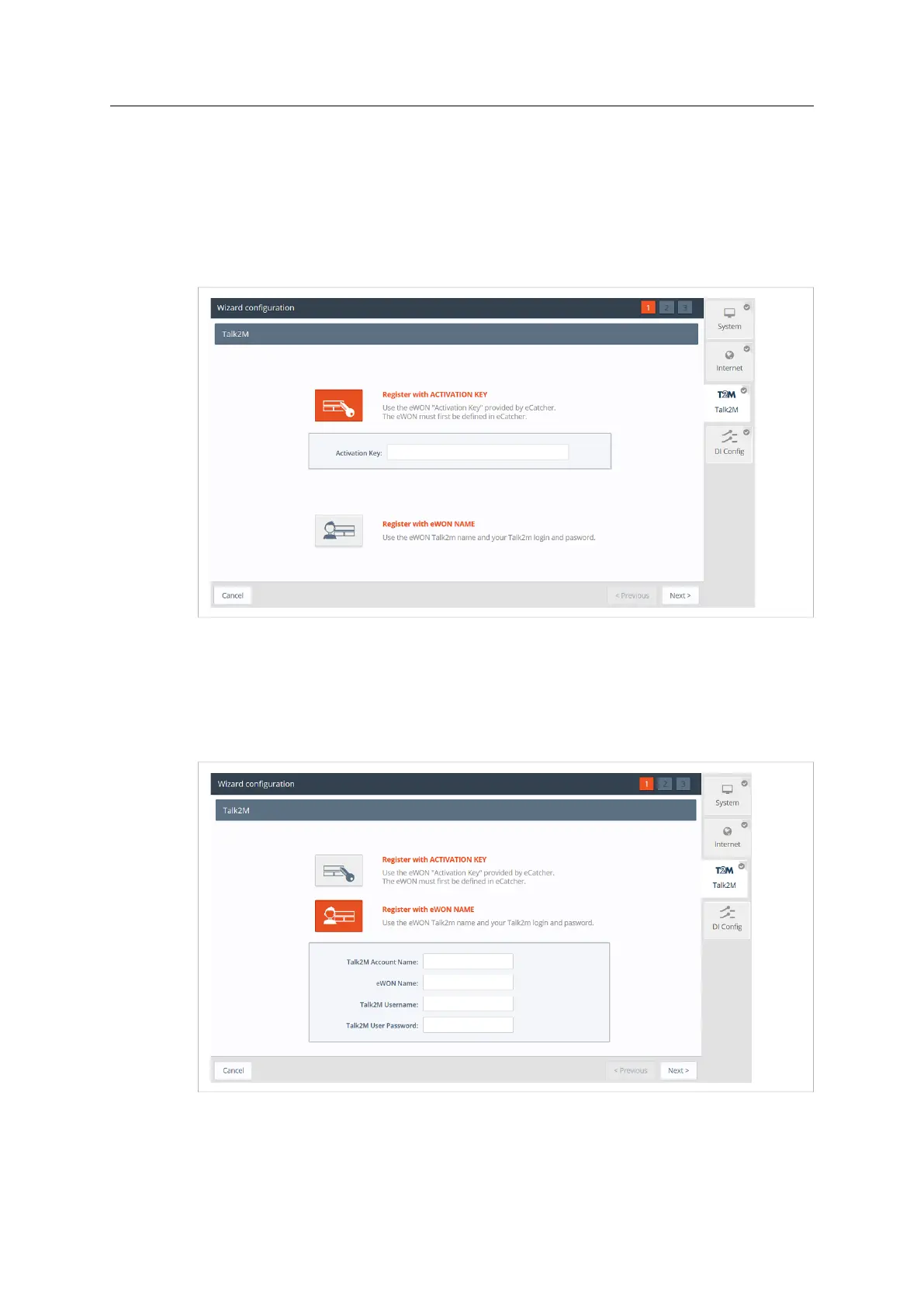
• On the first screen of the Talk2M Wizard, select Register with Activation Key option
• Paste the Activation Key you copied from Talk2M Account Configuration, p. 21.
Click Next to move forward to the next screen.
Fig. 28 Talk2M Wizard Activation Key
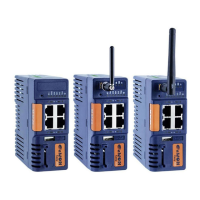
Alternately, it is possible to register with the Ewon Name option:
• Click on Register with Ewon Name
• Enter the Talk2M name of the Ewon Cosy+, and a valid Talk2M account user credentials.
Click Next to move forward to the following screen.
Fig. 29 Talk2M Wizard Registration Name
If the network used for Internet access apply a proxy server:
• Select the appropriate authentication method: Proxy with basic authentication, Proxy with
NTLM authentication, Proxy without authentication.
Ewon Cosy+ User Manual
UM-0005-00 1.0 en-US













 To Next Page