Access to the Ewon Cosy+ 6 (32)
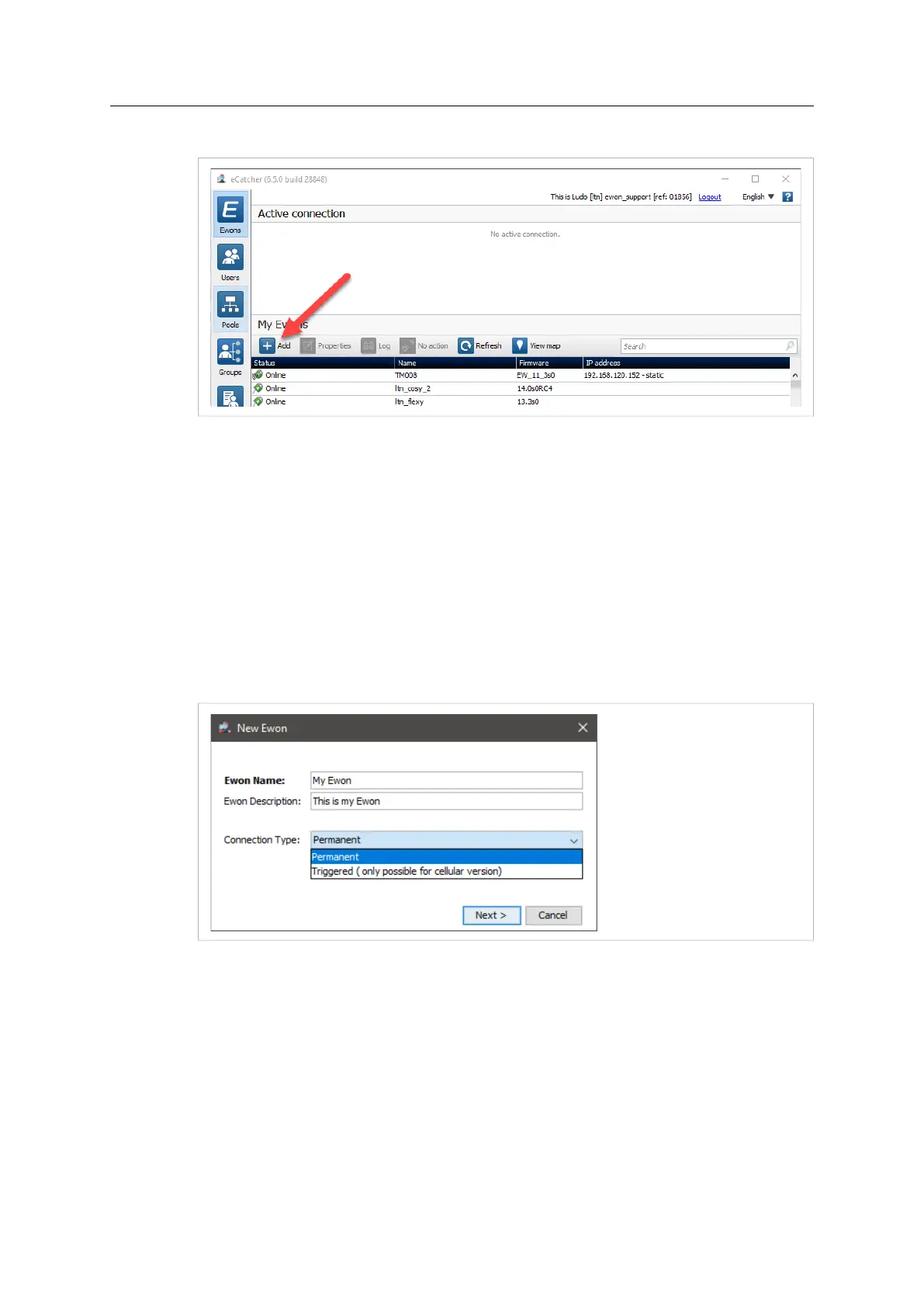
4. On eCatcher’s main interface, click the + Add icon. A new window appears.
Fig. 2 Add an Ewon in eCatcher — 2
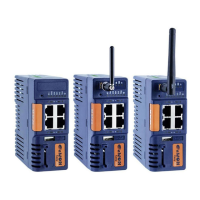
5. Enter the name of your Ewon Cosy+.
The Talk2M server displays this name to identify the remote connection to your Ewon Cosy+
6. Select the Connection Type to specify how your Ewon Cosy+ connects to the Talk2M server.
You can choose between two possibilities:
– Permanent: for Ethernet, Wi-Fi or cellular models. Your Ewon Cosy+ stays permanently
online.
– Triggered: only for cellular models. Your Ewon Cosy+ is offline (but still functional) until
you wake it up with an SMS.
If you specify a triggered connection, then eCatcher asks for the phone number of your
Ewon Cosy+. The phone number allows Talk2M to send an SMS which wakes up your
Ewon Cosy+.
Fig. 3 Add an Ewon in eCatcher — 3
7. Click Next.
Ewon Cosy+ User Manual
UM-0005-00 1.0 en-US













 To Next Page