Overview 6 (22)
2.4 Installation overview
Setting up Netbiter Remote Access comprises the following basic steps:
1. Physical installation of a Netbiter gateway at the location of the remote device
2. Activation of the Netbiter gateway in Netbiter Argos
3. Configuration of Remote Access functionality in Netbiter Argos
4. Installation of QuickConnect on the local computer to use for Remote Access
5. Configuration of one or more remote access channels to the device to be accessed
6. Initiation/opening of the connection to the remote device
This document does not describe how to physically install a Netbiter EasyConnect gate-
way or how to set up an account in Netbiter Argos. Please refer to the documentation
available at the Netbiter support website, www.netbiter.com/support.
2.5 Connection Examples
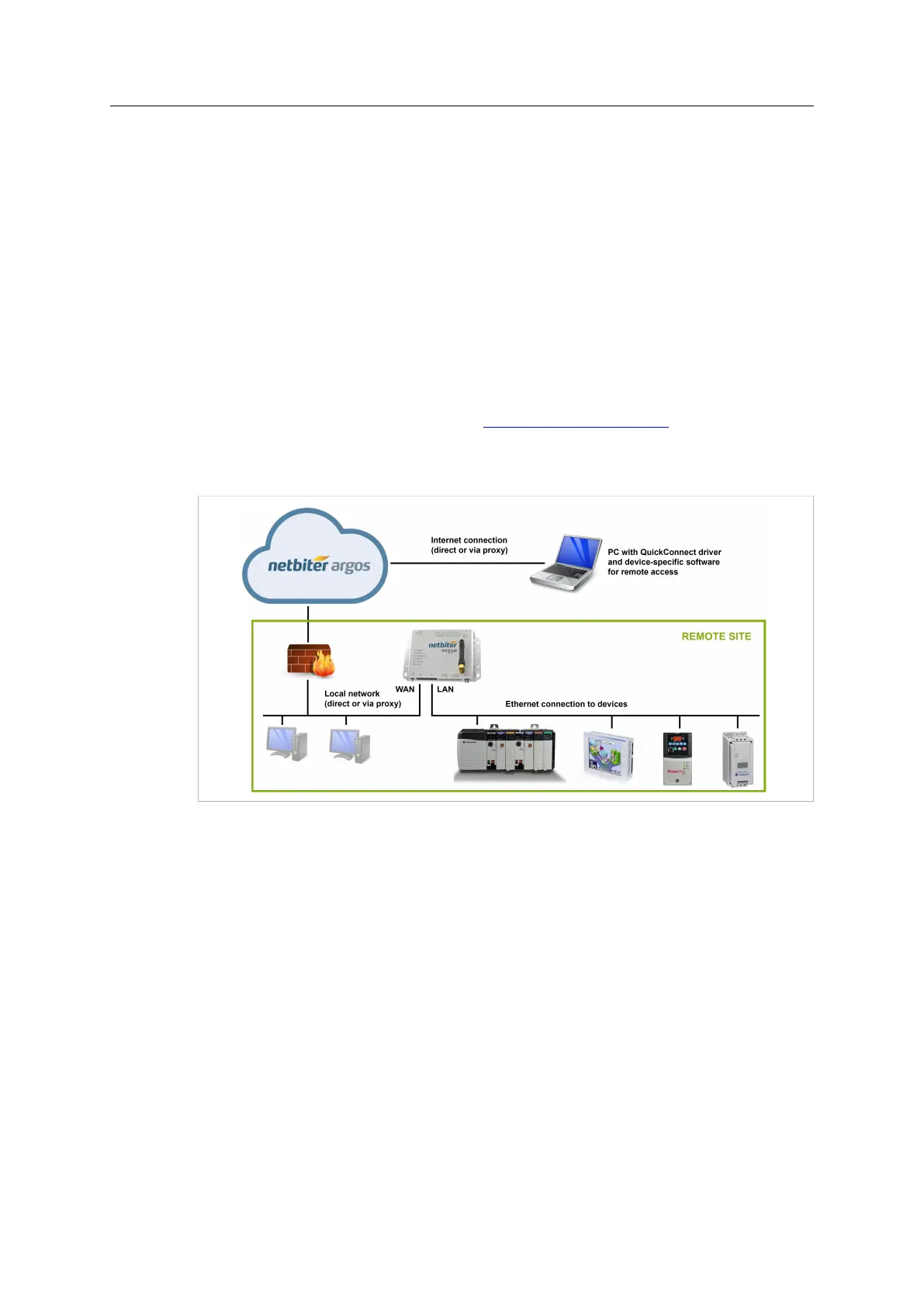
Fig. 1 WAN link to Ethernet LAN
Remote access to an Ethernet-based control network via a LAN network at the remote site,
using an Ethernet-based connection over the Internet.
Netbiter
®
Remote Access User Manual Doc ID: HMSI-27-240 Version: 2.0



 To Next Page