Home
HP Compaq
Laptop
nc6000 - Notebook PC
Page 164
HP Compaq nc6000 - Notebook PC - Page 164
196 pages
Manual
Save Page as PDF
To Next Page
To Next Page
To Previous Page
To Previous Page
Loading...
A–6
Maintenance and Serv
ice Gui
de
Connec
tor P
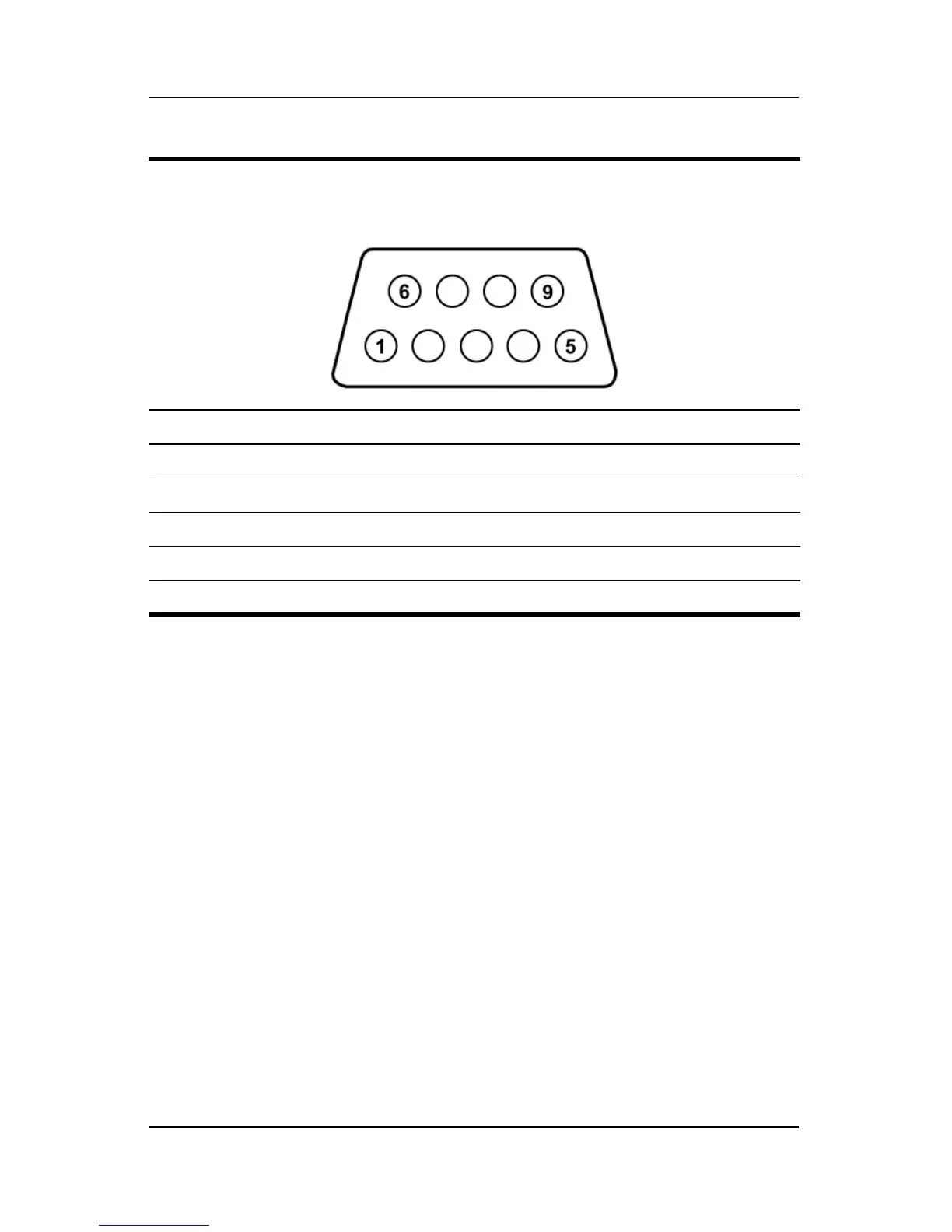
in Assignments
Ta
b
l
e
A
-
9
Serial
Pin
Signal
Pin
Signal
1
Carrier detect
6
Data set ready
2
Receiv
e data
7
Ready to send
3
T
ransmit data
8
Clear to send
4
Data terminal ready
9
Ring indicator
5G
r
o
u
n
d
163
165
Table of Contents
Main Page
Default Chapter
3
Table of Contents
3
Connector Pin Assignments
6
Specifications
6
1 Product Description
7
Models
8
Features
17
Clearing a Password
19
Power Management
19
External Components
20
Keyboard Components
25
Top Components
26
Bottom Components
30
Design Overview
32
2 Troubleshooting
33
Computer Setup and Diagnostics Utilities
34
Using Computer Setup
34
Selecting from the File Menu
35
Selecting from the Security Menu
36
Selecting from the Advanced Menu
37
Using Diagnostics for Windows
39
Obtaining, Saving, or Printing Configuration Information
39
Obtaining, Saving, or Printing Diagnostic
40
Test Information
40
Troubleshooting Flowcharts
42
Flowchart 2.1—Initial Troubleshooting
43
Flowchart 2.2—No Power, Part
44
Flowchart 2.3—No Power, Part
45
Flowchart 2.4—No Power, Part
46
Flowchart 2.5—No Power, Part
47
Flowchart 2.6—No Video, Part
48
Flowchart 2.7—No Video, Part
49
Flowchart 2.9—No Operating System (Os) Loading
51
Flowchart 2.10—No os Loading, Hard Drive, Part
52
Flowchart 2.11—No os Loading, Hard Drive, Part
53
Flowchart 2.12—No os Loading, Hard Drive, Part
54
Flowchart 2.13—No os Loading, Diskette Drive
55
Flowchart 2.14—No os Loading, CD- or DVD-Rom Drive
56
Flowchart 2.15—No Audio, Part
57
Flowchart 2.16—No Audio, Part
58
Flowchart 2.17—Nonfunctioning Device
59
Flowchart 2.18—Nonfunctioning Keyboard
60
Flowchart 2.19—Nonfunctioning Pointing Device
61
Flowchart 2.20—No Network/Modem Connection
62
3 Illustrated Parts Catalog
63
Serial Number Location
63
Notebook Major Components
64
Miscellaneous Plastics Kit
70
Mass Storage Devices
72
Miscellaneous
73
Sequential Part Number Listing
74
4 Removal and Replacement Preliminaries
79
Tools Required
79
Service Considerations
80
Plastic Parts
80
Cables and Connectors
80
Preventing Damage to Removable Drives
81
Preventing Electrostatic Damage
81
Packaging and Transporting Precautions
82
Workstation Precautions
83
Grounding Equipment and Methods
84
Typical Electrostatic Voltage Levels
86
5 Removal and Replacement Procedures
87
Serial Number
88
Disassembly Sequence Chart
89
Preparing the Notebook for Disassembly
91
Notebook Feet
97
Mini PCI Communications Board
98
Multibay Device
102
Bluetooth Wireless Communications Board
103
Integrated Smart Card
105
Keyboard
107
Modem Board
111
Memory Expansion Board
112
Switch Cover
114
Keyboard Plate
116
Security Module (TPM)
117
Fan Assembly
118
Heat Sink
121
Processor
124
Display Assembly
126
Top Cover
130
RTC Battery
133
LED Board
135
Button Board
137
System Board
139
Hard Drives
147
External Ac Adapter
148
System Dma
154
System Interrupts
155
Universal Serial Bus
160
External Monitor
161
B Power Cord Requirements
165
3-Conductor Power Cord
165
General Requirements
166
Country-Specific Requirements
167
C Screw Listing
169
Other manuals for HP Compaq nc6000 - Notebook PC
Hardware Guide
113 pages
Related product manuals
8510p - Compaq Business Notebook
170 pages
HP Compaq V3000
298 pages
HP Compaq CQ58-200
129 pages
8710w - Compaq Mobile Workstation
6 pages
HP Compaq Compaq Presario V3000
146 pages



 To Next Page