HP D300 Digital Dispenser
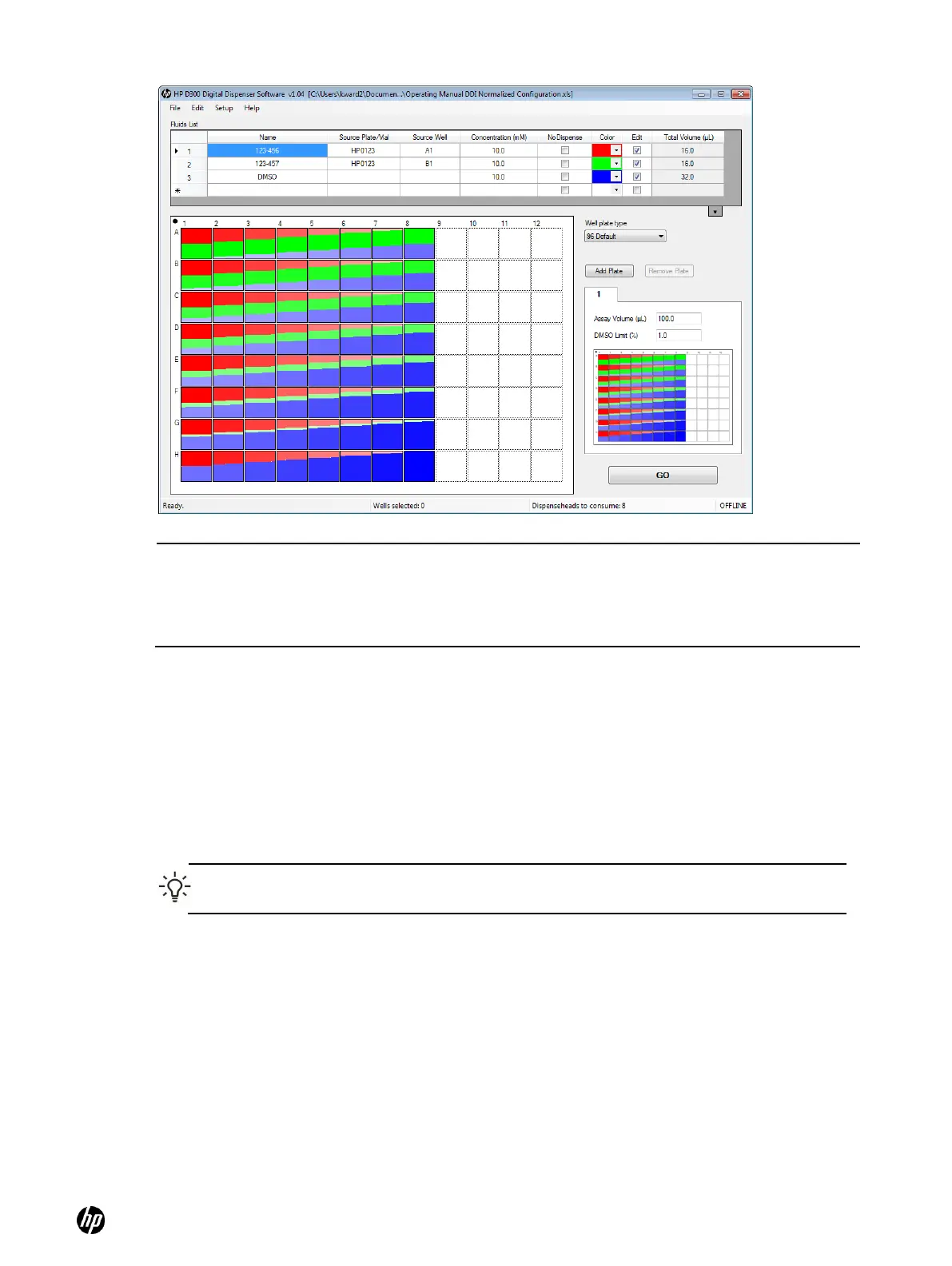
Figure 5-12 Result of using fluid 3 for DMSO Normalization
5-7 Randomize
Once the plate has been fully configured, the wells can be reordered randomly on the plate. This is
a useful way to minimize the impact of systematic plate edge effects on the output data.
1. In the well plate image, select the wells that you want to randomize. To omit areas of the plate
from randomization, use the CTRL key to select multiple noncontiguous regions. To deselect
single wells, hold down the CTRL key while clicking on the well.
2. Right-click to open the Edit Well Plate menu and select Randomize. See Figure 5-13.
TIP: To return to the non-randomized, ordered plate, click Edit and select Undo.
3. Only the selected wells are randomized.
NOTE: When DMSO is added to the Fluids List, the default concentration is often left at 10mM.
Since this is not the concentration of neat DMSO, this means that the well pop-up concentrations
(as shown in Figure 4-11) for DMSO in normalized wells will be incorrect. For DMSO, enter the
source fluid concentration as 14100 mM , or ignore the concentration part of the well pop-up.
Either way, the percentages and volumes for DMSO shown in the well pop-ups are correct.



 To Next Page