Service cover
Description Spare part number
Service cover
For non-touch models 720254-001
For touch models 720255-001
Before disassembling the computer, follow these steps:
1. Shut down the computer. If you are unsure whether the computer is off or in Hibernation, turn
the computer on, and then shut it down through the operating system.
2. Disconnect all external devices connected to the computer.
3. Disconnect the power from the computer by first unplugging the power cord from the AC outlet
and then unplugging the AC adapter from the computer.
4. Remove the battery (see
Battery on page 33).
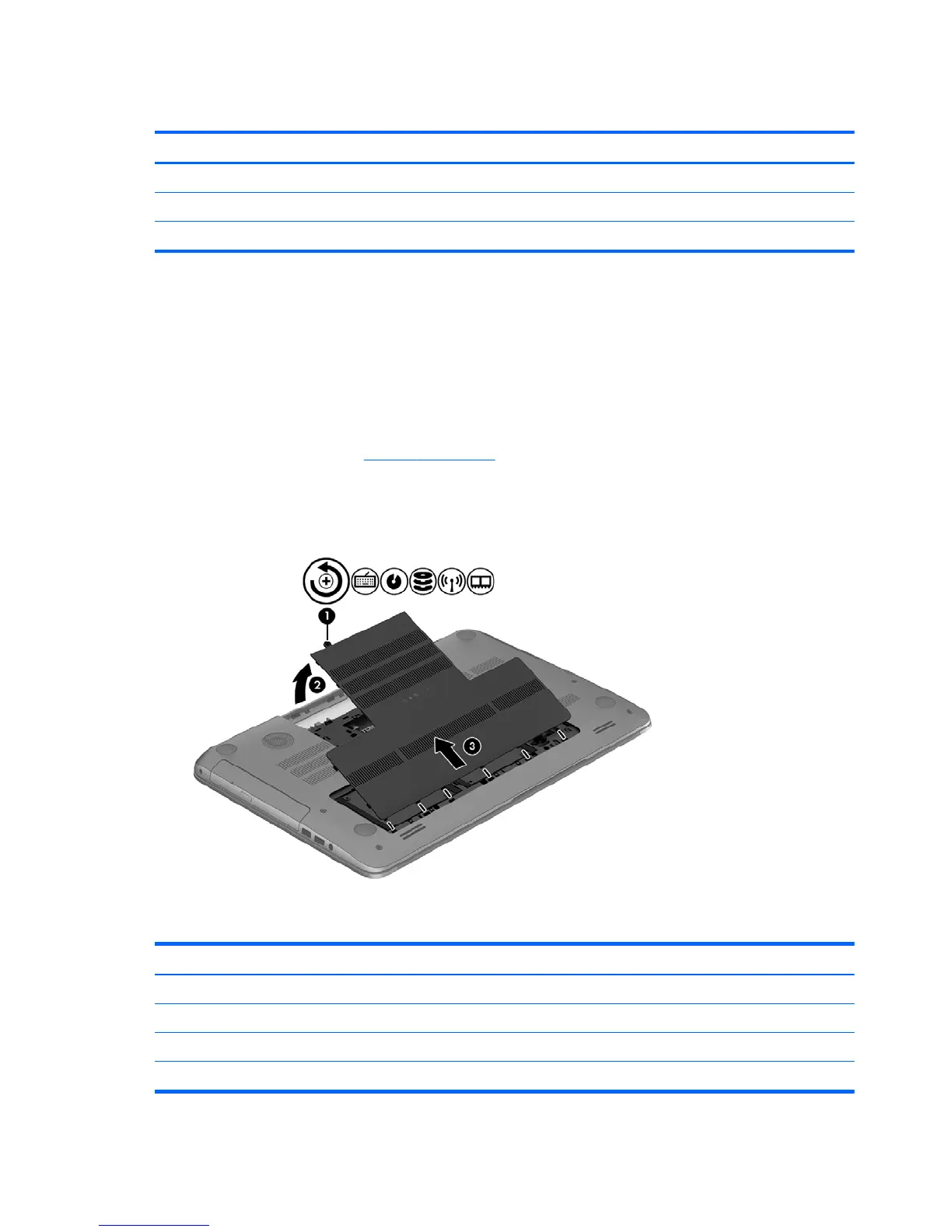
Remove the service cover:
▲
Loosen the captive screw (1) that secures the service cover to the computer, lift the cover (2),
and then remove it (3).
Hard drive
Description Spare part number
750-GB 5400RPM SATA RAW 63.5mm (2.5 in) 634250-001
1-TB 5400RPM SATA RAW 63.5mm (2.5 in) 676521-001
500-GB 5400RPM SATA RAW 7mm (2.76 in. 683802-001
24-GB mSATA solid-state drive (SSD) 720264-001
34 Chapter 5 Removal and replacement procedures for Customer Self-Repair parts


 To Next Page