Display panel
Description Spare part number
Display bezel (includes 2 rubber screw covers) 720227-001
17.3-in, LED, HD, BrightView display panel for non-touch models 720257-001
17.3-in, LED, FHD, AG display panel for non-touch models 720256-001
Before removing the display panel, follow these steps:
1. Shut down the computer. If you are unsure whether the computer is off or in Hibernation, turn
the computer on, and then shut it down through the operating system.
2. Disconnect all external devices connected to the computer.
3. Disconnect the power from the computer by first unplugging the power cord from the AC outlet
and then unplugging the AC adapter from the computer.
4. Remove the battery (see
Battery on page 33).
Remove the display panel:
1. Open the computer.
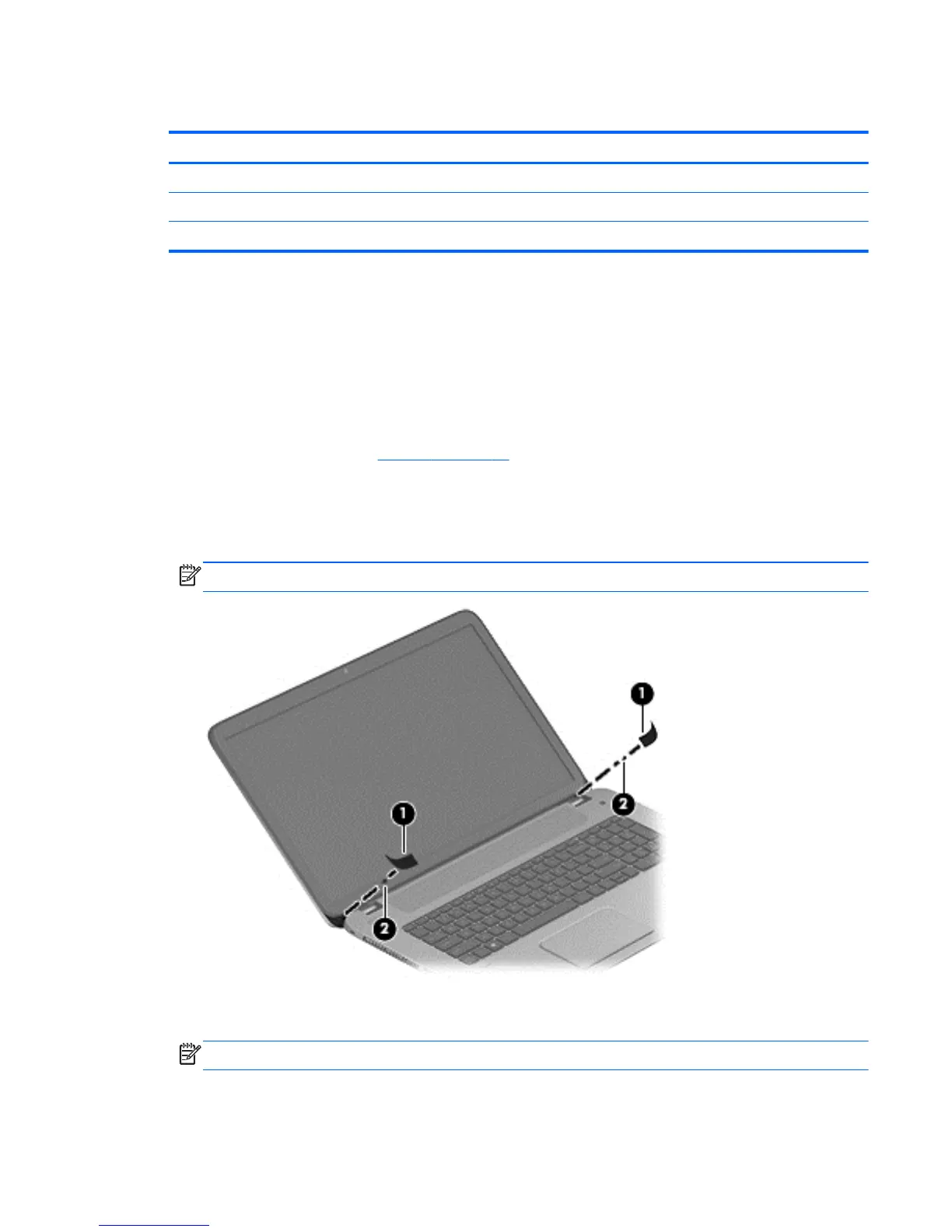
2. Remove the 2 screw covers (1) on the left and right side base of the display panel.
NOTE: Use a sharp probe to pop the covers out to avoid scratching the bezel.
3. Remove the 2 screws (2) on the left and right hinges that secure the display panel to the
computer.
NOTE: Support the display panel as you are removing the screws.
4. Loosen the edges of the plastic bezel cover (3) from all four sides of the display panel.
Component replacement procedures 45


 To Next Page