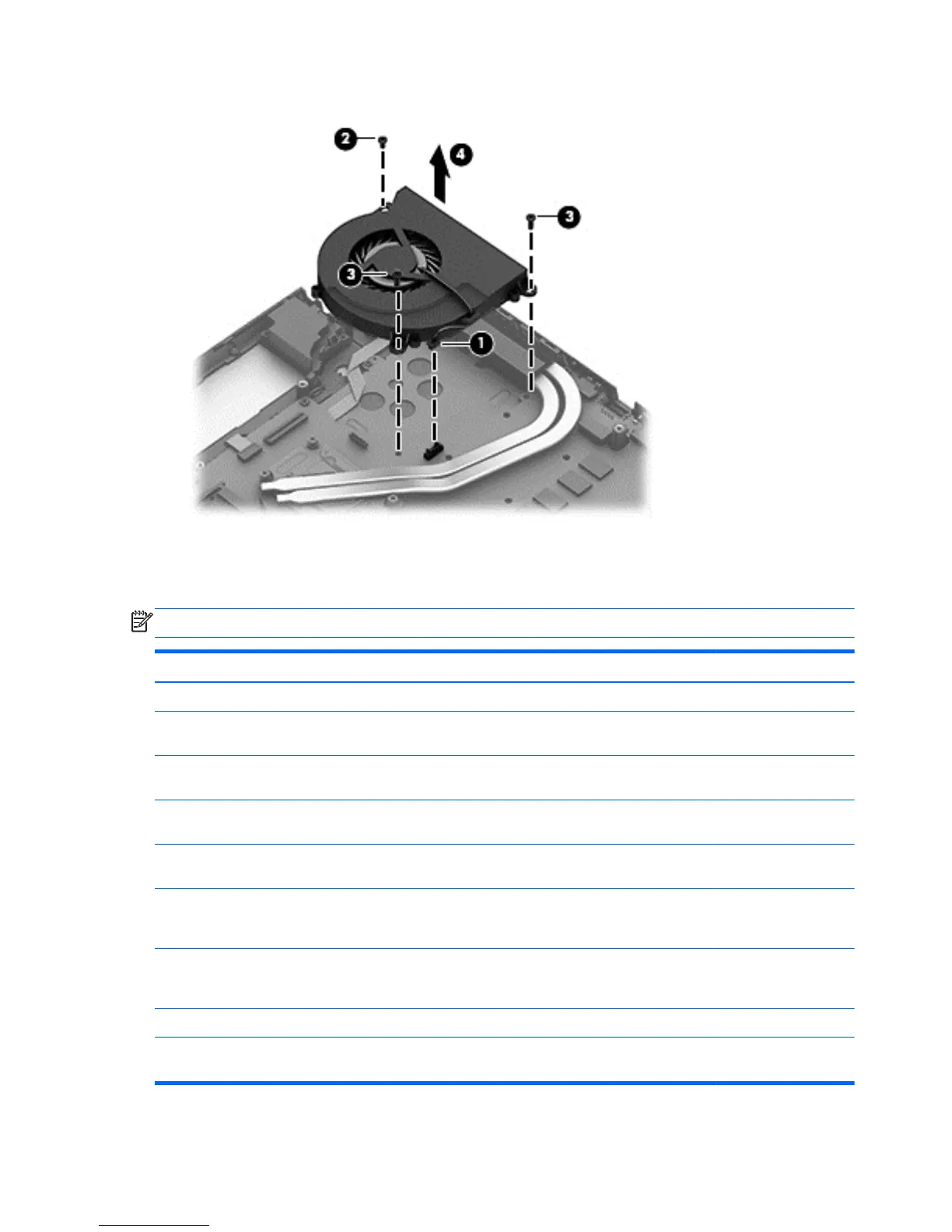
3. Lift the fan (4) to remove it.
Reverse this procedure to install the fan.
System board
NOTE: The system board spare part kit includes replacement thermal material.
Description Spare part number
For non-touch models:
For use only with computer models equipped with Intel HM77 Express chipset (includes
replacement thermal material)
720268-001
For use only with computer models equipped with Intel HM77 Express chipset and Windows 8
Standard (includes replacement thermal material)
720268-501
For use only with computer models equipped with Intel HM77 Express chipset and Windows 8 Pro
(includes replacement thermal material)
720268-601
For use only with computer models equipped with Intel HM77 Express chipset and Nvidia N14P-
GV2 GeForce 740M/2G graphics card (includes processor and replacement thermal material)
720269-001
For use only with computer models equipped with Intel HM77 Express chipset, Nvidia N14P-GV2
GeForce 740M/2G graphics card and Windows 8 Standard (includes processor and replacement
thermal material)
720269-501
For use only with computer models equipped with Intel HM77 740M/2G Express chipset, Nvidia
N14P-GV2 GeForce 740M/2G graphics card, and Windows 8 Pro (includes processor and
replacement thermal material)
720269-601
For touch models:
For use only with computer models equipped with Intel HM87 Express chipset (includes
replacement thermal material)
720265-001
70 Chapter 6 Removal and replacement procedures for Authorized Service Provider parts


 To Next Page