▲
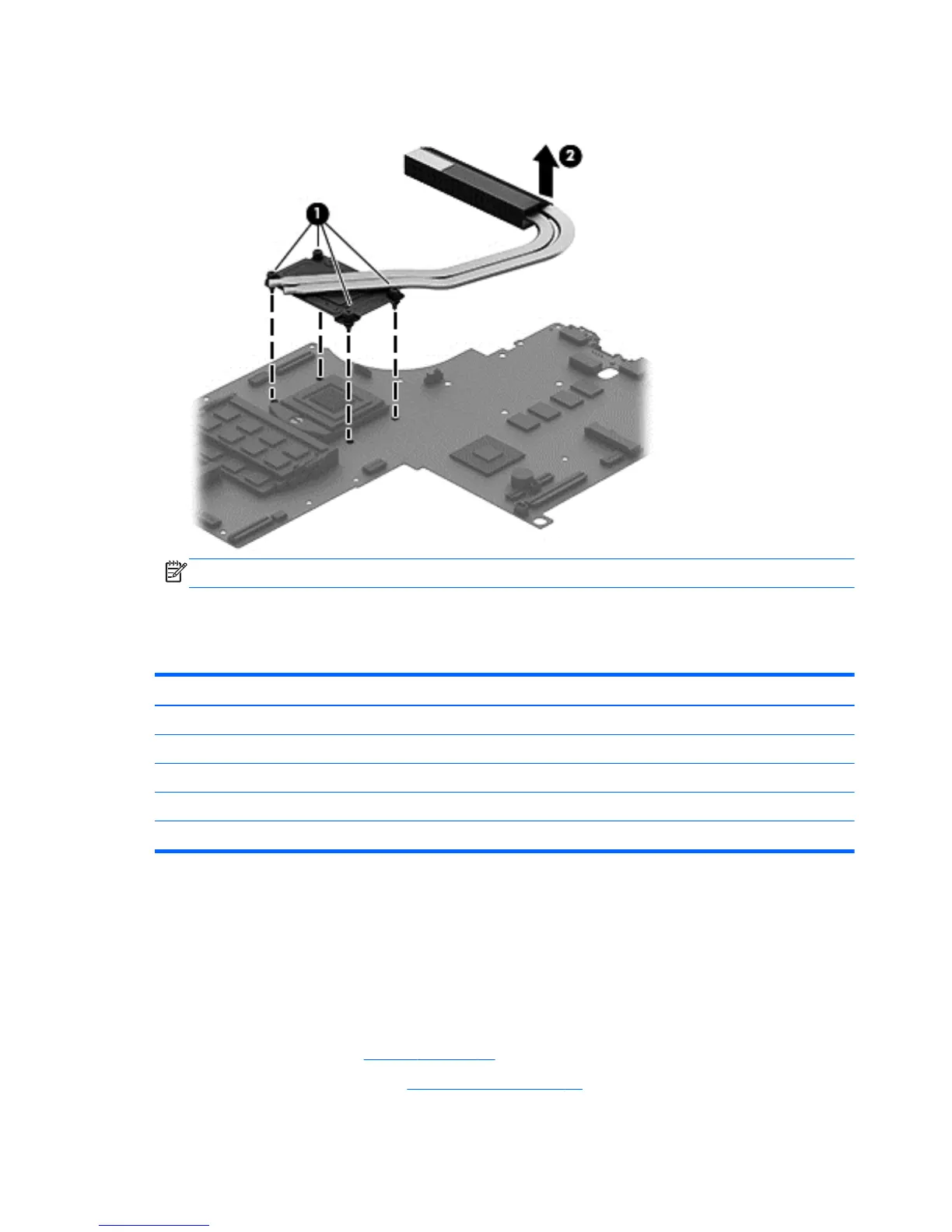
Loosen the 4 captive screws in the order listed on the heat sink (1), and then remove the heat
sink (2).
NOTE: There is thermal paste between the heat sink and the processor.
Reverse this procedure to install the heat sink.
Processor
Description Spare part number
Processor
Intel® Core™ i3-3120M (2.5GHz), 1600MHz (3MB L3, Dual 35W) processor 700627-001
Intel® Core™ i3-3130M (2.6GHz), 1600MHz (3MB L3, Dual 35W) processor 713163-001
Intel® Core™ i3-3120M (2.9GHz), 1600MHz (3MB L3, Dual 35W) processor 708762-001
Intel® Core™ i5-3230M (2.6GHz), 1600MHz (3MB L3, Dual 35W) processor 711903-001
Before removing the processor, follow these steps:
1. Shut down the computer. If you are unsure whether the computer is off or in Hibernation, turn
the computer on, and then shut it down through the operating system.
2. Disconnect all external devices connected to the computer.
3. Disconnect the power from the computer by first unplugging the power cord from the AC outlet
and then unplugging the AC adapter from the computer.
4. Remove the battery (see
Battery on page 33),
5. Remove the display panel (see
Display panel on page 45).
74 Chapter 6 Removal and replacement procedures for Authorized Service Provider parts



 To Next Page