21
FCoE enabling configuration example
Network requirements
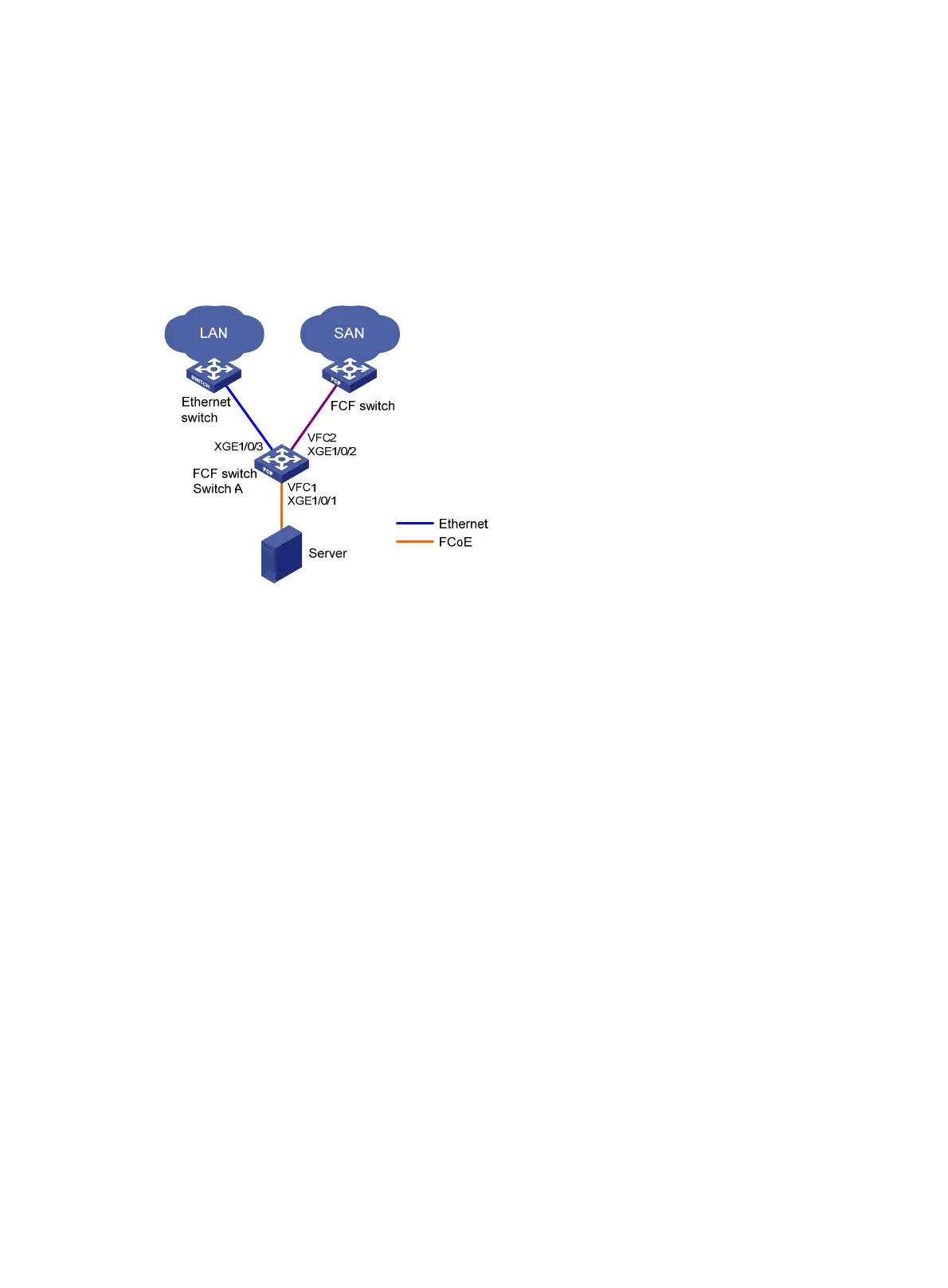
As shown in Figure 15, use FCoE in a data center combining a LAN and a SAN to reduce the number
of devices, network adapters, and cables.
Figure 15 Network diagram
Configuration procedure
Configure Switch A as follows:
1. Enable the advanced mode:
# Configure the switch to operate in advanced mode. (Skip this step if the switch is operating in
advanced mode.)
<SwitchA> system-view
[SwitchA] system-working-mode AdvancedBridge
Do you want to change the system working mode? [Y/N]:y
The system working mode is changed, please save the configuration and reboot the
system to make it effective.
# Save the configuration.
[SwitchA] save
The current configuration will be written to the device. Are you sure? [Y/N]:y
Please input the file name(*.cfg)[flash:/startup.cfg]
(To leave the existing filename unchanged, press the enter key):
Validating file. Please wait...
Saved the current configuration to mainboard device successfully.
[SwitchA] quit
# Reboot the switch.
<SwitchA> reboot
Start to check configuration with next startup configuration file, please
wait.........DONE!
This command will reboot the device. Continue? [Y/N]:y

 To Next Page
 Loading...