LED Function LED color Behavior
3 Chassis power Green
On: The J2000 is powered on and operating correctly.
O: The J2000 is not powered on.
4 IOM fault Yellow
On: One or more I/O modules have experienced a fault requiring a
service action.
O: No faults are present in the IOMs.
5 IOMs Green
On: Both I/O modules are powered on and operating correctly.
O: IOMs are powered OFF.
6 Fan fault Yellow
On: One or more fan modules have experienced a fault requiring a
service action.
O: No faults are found within the fans.
7 Fans Green
On: All fan modules are powered on and operating correctly.
O: Fans are powered OFF.
8 Power module fault Yellow
On: One or more power modules have experienced a fault requiring
a service action.
O: No faults are found within the power module.
9 Power modules Green
On: Both power modules are powered on and operating correctly.
O: Power modues are OFF.
Location of service labels
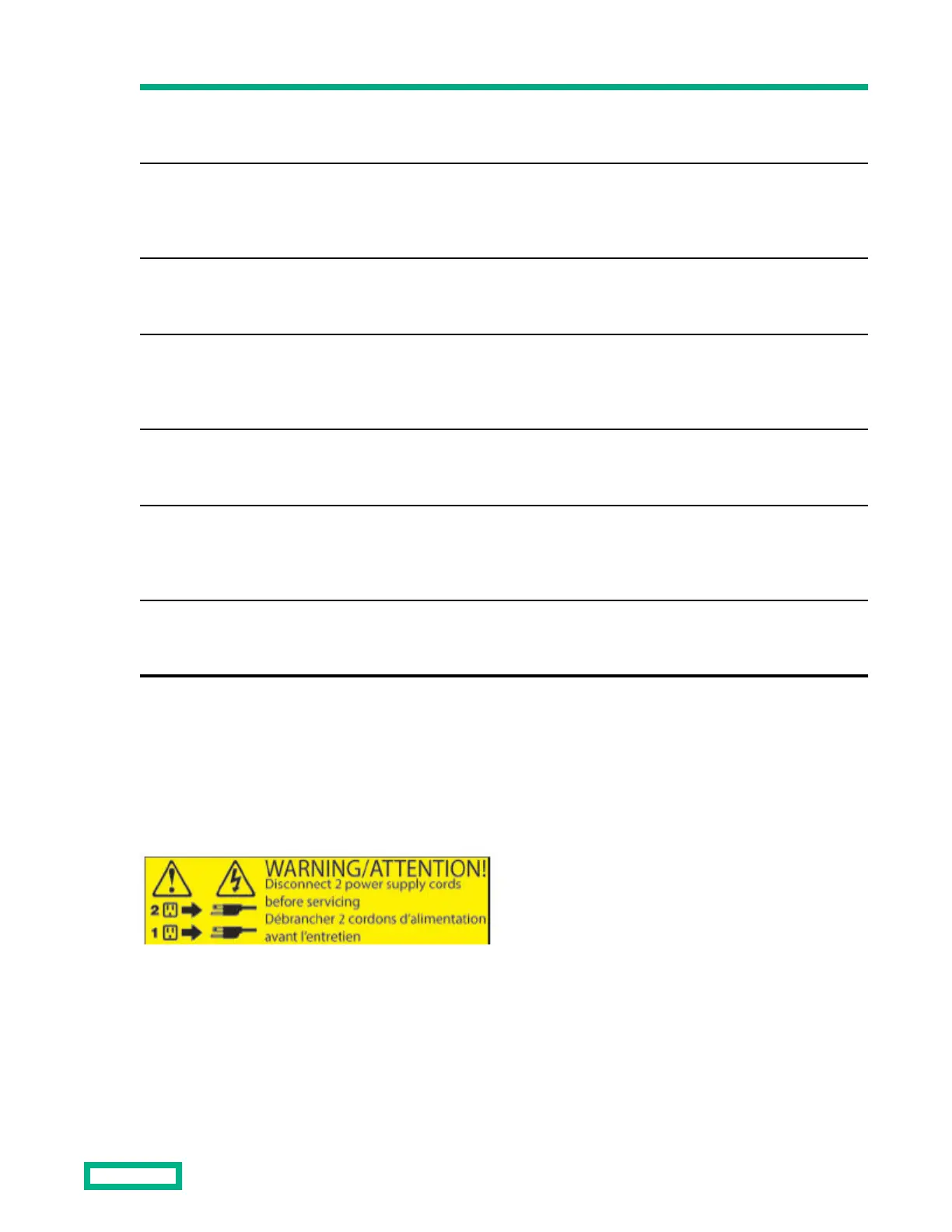
Dual cord warning label
The two dual cord warning labels ensure your safety by reminding you to remove both power cords, one from each power
module, before proceeding with service actions that require system power to be shut down. This label is located on the
rear of the J2000.
Regulatory label
The regulatory label identifies system compliance with
dierent regulatory agencies (such as ROHS and WEEE), and may
also contain various country/region marks. Other certifications may be added without notice. The regulatory label is
located above the power supply units on the top cover.
Maintenance
16


 To Next Page