
 To Next Page

G
Gloria MasonSep 3, 2025
What does 'Rectifier Input Over Current' mean on my HP R5000?
- YYolanda NobleSep 4, 2025
The HP UPS displays 'Rectifier Input Over Current' when rectifier input current limits have been exceeded.

What does 'Rectifier Input Over Current' mean on my HP R5000?
The HP UPS displays 'Rectifier Input Over Current' when rectifier input current limits have been exceeded.
What does 'Wiring Problem' mean on my HP R5000?
If your HP UPS displays 'Wiring Problem', the difference between ground and neutral voltage is less than 30 V.
What does 'Service Battery' mean on my HP UPS?
If your HP UPS displays 'Service Battery', a faulted battery string has been detected, and the battery charger has been disabled until it is replaced.
What does 'Remote Emergency Power Off' mean on my HP R5000?
If your HP UPS displays 'Remote Emergency Power Off', the external contacts in the rear of the UPS are configured for REPO operation and have been activated.
What does 'Inverter Fault' mean on my HP UPS?
The HP UPS displays 'Inverter Fault' when it has detected a fault in the inverter circuit while attempting recovery from bypass or Fault modes.
What does 'Inverter AC Under Voltage' mean on my HP R5000?
The HP UPS displays 'Inverter AC Under Voltage' when it has detected abnormally low output voltage levels.
Why did my HP R5000 initiate a 'Battery Shutdown'?
The HP UPS displays 'Battery Shutdown' when it has been running on battery for an extended period, exhausting the battery capacity.
What does 'DC Link Over Voltage' mean on my HP R5000 UPS?
The HP UPS displays 'DC Link Over Voltage' when the link or rail voltage has exceeded its upper threshold limit.
What does 'Inverter Output Over Current' mean on my HP R5000?
The HP UPS displays 'Inverter Output Over Current' when inverter output current limits have been exceeded.
What does it mean when my HP R5000 says 'Utility Not Present'?
If your HP UPS showing 'Utility Not Present', it means that the utility level has fallen below the defined threshold.
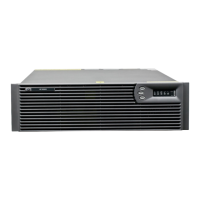
Provides an overview of the HP UPS R5000 features, capabilities, and benefits.
Details critical safety instructions for operating and maintaining the UPS to prevent injury.
Explains the function and usage of the Remote Emergency Power Off (REPO) port.
Lists important safety and handling precautions before installation.
Step-by-step guide to physically installing the UPS unit into the rack.
Instructions for connecting the UPS battery leads safely.
Details on how to connect the REPO port, including safety warnings.
How to connect the UPS to the main power source.
Guidance on connecting equipment to the UPS output receptacles.
Information on how to charge the UPS batteries before use.
Introduction to configuring the UPS Network Module.
Steps to access and log into the UPS Network Module web interface.
Details on configuring settings via the web interface.
Steps for installing the Extended Runtime Module (ERM).
Describes the different operating modes of the UPS.
Steps to safely power down the UPS.
Overview of the HP Power Protector software and its features.
Guide for replacing the hot-swappable Network Module.
Introduction to the process of replacing UPS batteries.
Crucial safety warnings related to battery handling.
Step-by-step procedure for replacing UPS batteries.
Instructions for removing and replacing the entire UPS unit.
Steps for removing and replacing the Extended Runtime Module (ERM).
Guidance on how to update the UPS firmware.
Guide to identifying and resolving UPS alarms.
Troubleshooting steps for battery connection issues.
Diagnosing and resolving situations where bypass mode is unavailable.
Steps to take for general alarm conditions.
Troubleshooting steps for out-of-range input voltage.
Diagnosing issues with low battery warnings.
Troubleshooting steps for internal UPS faults.
Addressing issues related to low battery shutdowns.
Troubleshooting steps for overload conditions.
Diagnosing and resolving REPO related conditions.
 General
| Output Voltage | 230V |
|---|---|
| Form Factor | Rack-mountable |
| Rack Height | 3U |
| Nominal Output Voltage | 230V |
| Topology | Double Conversion Online |
| Input Voltage | 230V |
| Frequency | 50/60 Hz |
| Battery Recharge Time | 3 hours |
| Transfer Time | 0 ms |
| Operating Temperature | 0 - 40 °C |
| Battery Type | Sealed Lead Acid (SLA) |
| Interface | USB, Serial |
| Output Power Capacity | 4500 Watts |
| Efficiency | 95% |
| Power Capacity | 5000 VA |
| Dimensions | 43.2 x 66 x 13 cm |