5 Web Page Settings
5.1 Logging In to the Web Page
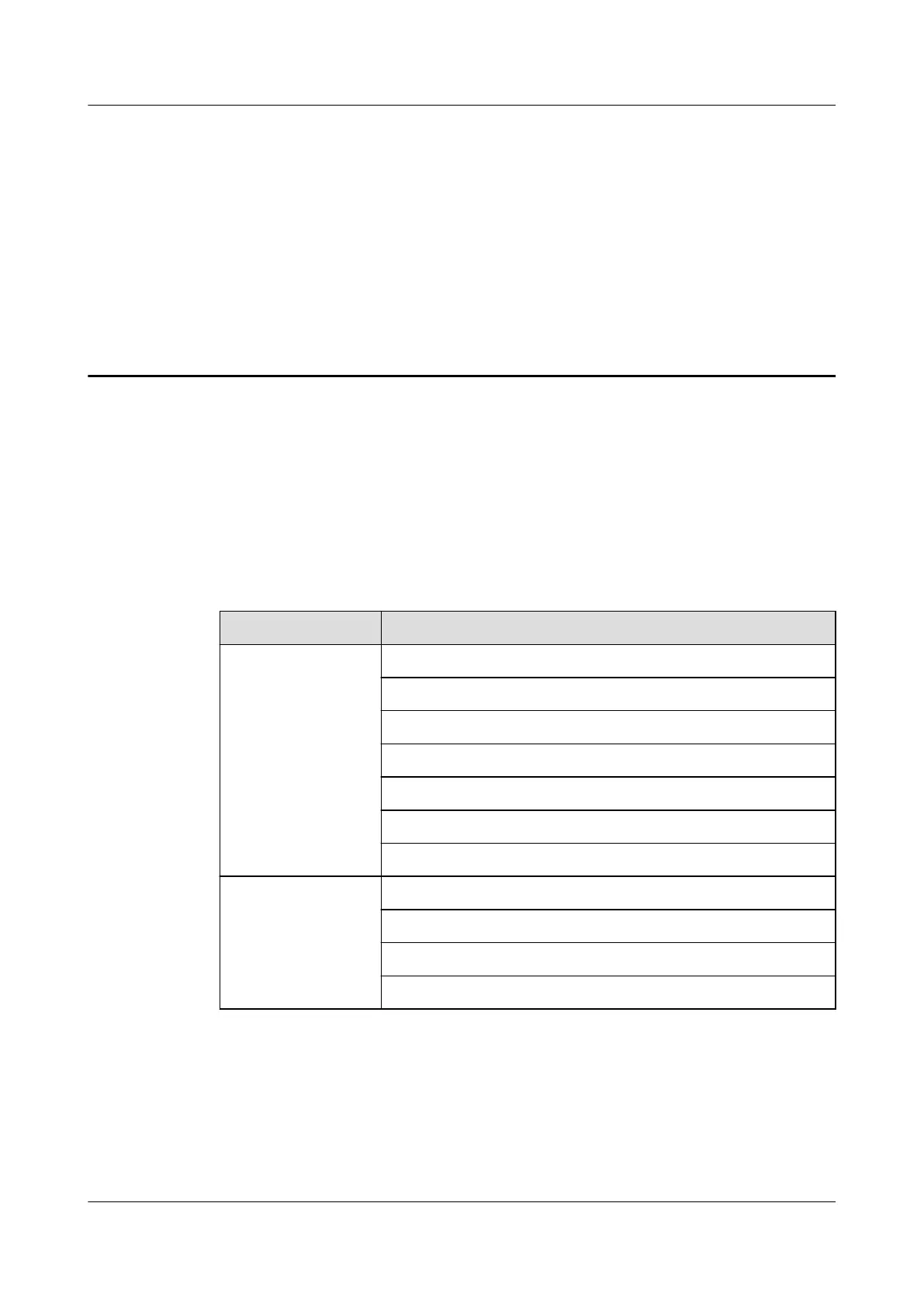
The IP phone web management system supports the operating systems and web browsers
listed in Table 5-1.
Table 5-1 Supported operating systems and web browsers
Item
Details
Operating system WindowsXP
Windows7 32-bit
Windows7 64-bit
Windows8 32-bit
Windows8 64-bit
Windows10 32-bit
Windows10 64-bit
Web browser IE8
IE9
IE10
IE11
You can perform the following steps to access the web page of the phone:
Step 1 On the PC, open a browser and enter the IP address of the phone, for example, http://
192.168.1.72. For details about how to query the IP address of the phone, see 4.3.2 Network.
The login page is displayed.
eSpace 7910&7950 IP Phone
User Guide
5 Web Page Settings
Issue 03 (2017-06-30) Huawei Proprietary and Confidential
Copyright © Huawei Technologies Co., Ltd.
44



 To Next Page