If You Want to... Then...
End a conference 1. Press More to navigate to End and press
End.
2. Press OK.
7.8 Presence
On your phone LCD screen, you can view or set your phone status, and view the status of
your contacts in your contact list, call history, redial list, and conference participant list. This
function provided is known as presence.
NOTE
Before using the presence function, ensure that your account has been assigned the presence service
rights. For any questions, contact your system administrator.
Setting Status
You can set your status to idle, busy, or DND depending on your needs.
Step 1 Press Status.
Step 2 Select the desired status.
Step 3 Press Select.
----End
Viewing Status
l Viewing your own status
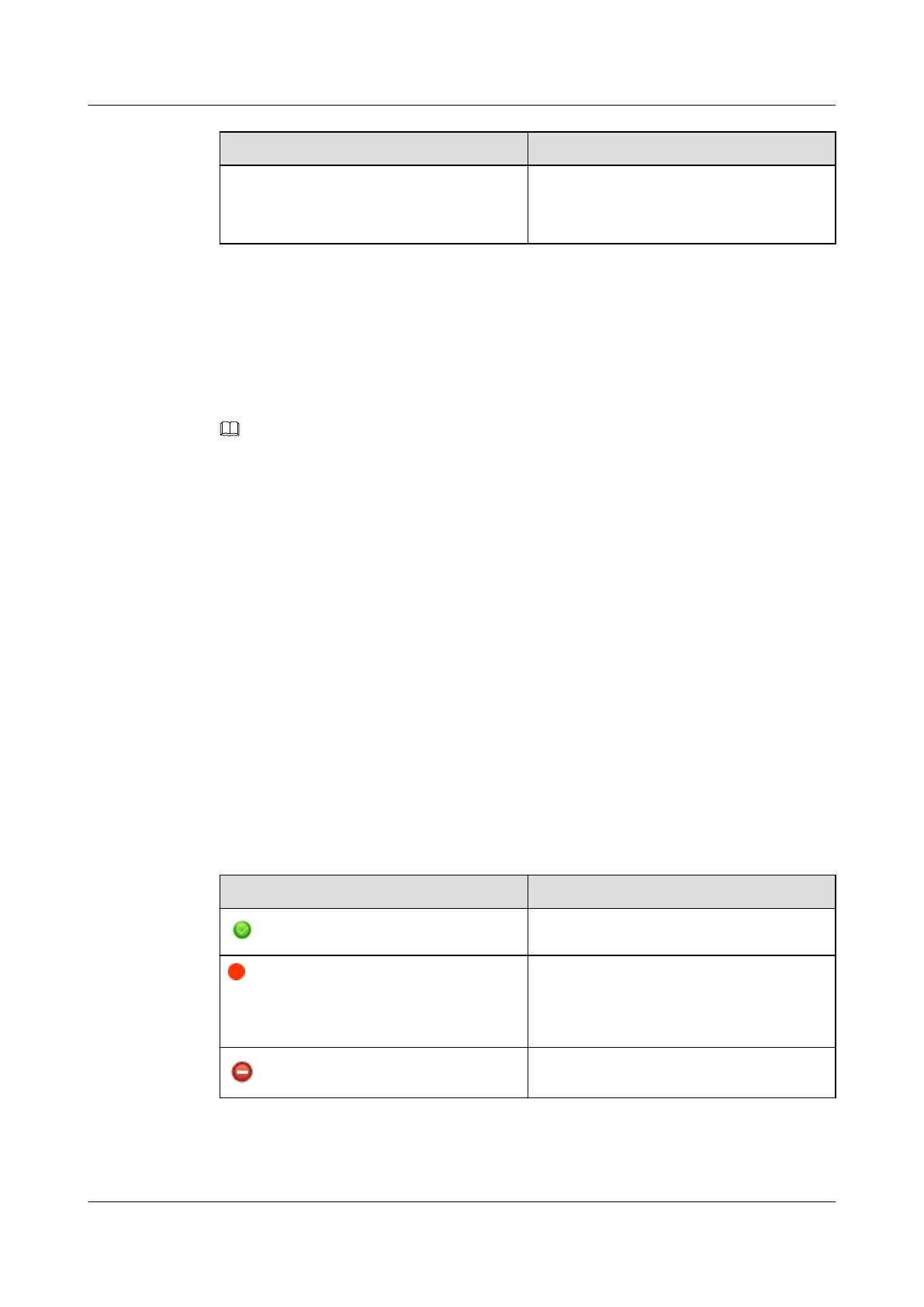
You can view your own status in the upper right corner of your phone screen. Table 7-8
describes the status.
Table 7-8 Status description
Icon
Description
The phone is in idle state.
The phone is in busy state, which can be
subdivided into offhook, dialing, absent,
receiving a call, placing a call, and being
engaged in a call.
The phone is in DND state.
l Viewing the status of your contacts
eSpace 7910&7950 IP Phone
User Guide
7 eSpace UC-Related Functions
Issue 03 (2017-06-30) Huawei Proprietary and Confidential
Copyright © Huawei Technologies Co., Ltd.
134



 To Next Page