6 Phone Usage
6.1 Logging In to Your Phone
You can perform the following steps to log in to the home screen of the phone:
Step 1 Power on the phone. The login screen is displayed.
Step 2 Enter your account and password, and press Log In.
NOTE
l During a login, ensure that the phone is properly connected to the network (that is, the icon is
not displayed in the upper right corner of the login screen). If you still fail to log in, contact your
system administrator.
l From the login screen, choose More > Language. The Language screen is displayed. You can select
a language on this screen.
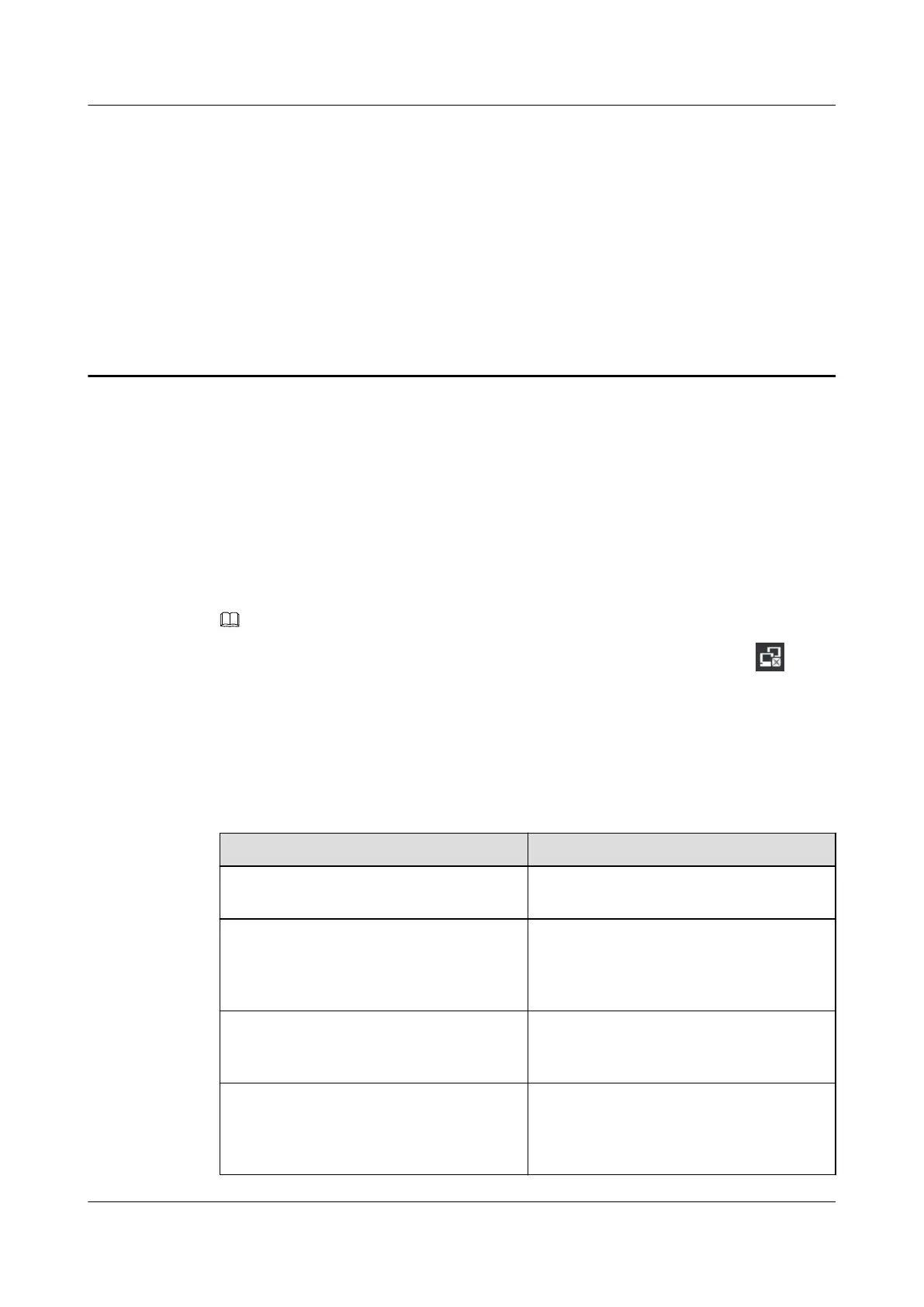
Table 6-1 lists the methods for logging in to your phone on different networks.
Table 6-1 Login methods on different networks
Network
Login Method
EC6.X You can log in to your phone using the
uPortal account.
UC2.X You can log in to your phone using the
phone number, account, or AD domain
account. By default, the phone number is
used.
IMS+UC You can log in to your phone using the
phone number or account. By default, the
account is used.
IMS You can log in to your phone using the
phone number. During the login, you need
to enter the account, user name, and
password.
eSpace 7910&7950 IP Phone
User Guide
6 Phone Usage
Issue 03 (2017-06-30) Huawei Proprietary and Confidential
Copyright © Huawei Technologies Co., Ltd.
59



 To Next Page