l Line switching is required in services such as call waiting, call transfer, and local
conference. Therefore, you need to configure at least two lines for the account that uses
such services.
NOTE
You can view the configuration of each line for an account on your phone LCD screen or your phone
web page. For any questions, consult your system administrator.
6.4 Answering Incoming Calls
6.4.1 Answering Calls Manually
When the phone in idle state has an incoming call, you can pick up the phone to answer the
call.
NOTE
l If the detailed information such as name, number, department, and profile picture of a contact is
saved in the contact list or directory, the information is displayed on the screen when a call from the
contact comes in.
l During a call, if the MOS is lower than 2300, the "Poor network condition. Call quality may be
affected" message is displayed on the phone screen.
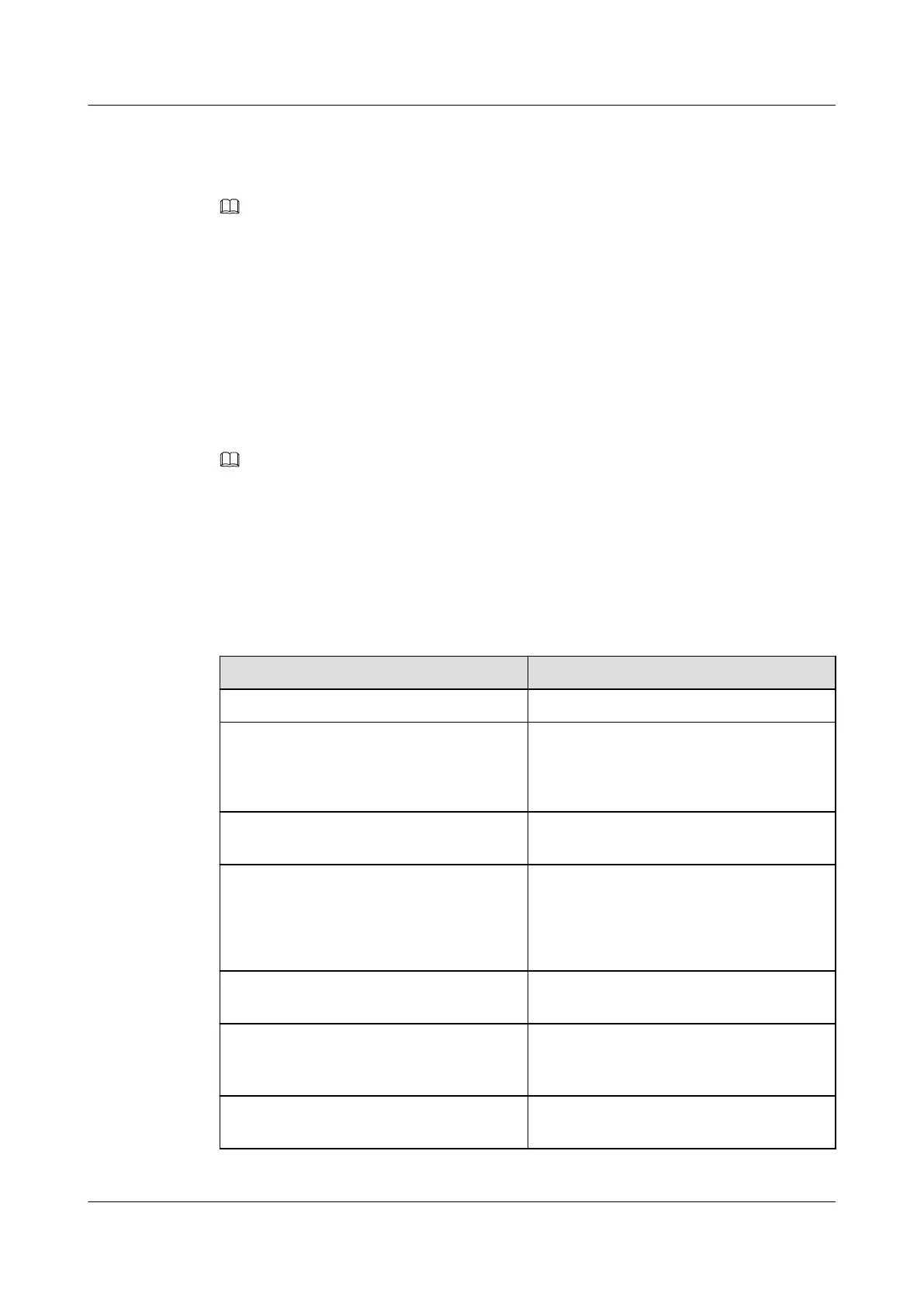
You can answer a call in different ways. For detailed operations, see Table 6-2.
Table 6-2 Call answer
If You Want to...
Then...
Answer with the speaker Press the Speaker button.
Answer with a headset Press the Headset button.
NOTE
Ensure that your phone has connected to a
headset (RJ-9).
Answer using the preset audio source Press Answer or the corresponding line
button.
Answer a reminder call (call of the alarm
clock service)
Press Answer.
NOTE
You may receive a reminder call only when your
phone has an idle line. For detailed operations,
see 6.8 Reminder Call.
Answer an intercom call Press the line button corresponding to the
intercom function.
Autoconnect a call Enable the auto answer function. For
detailed operations, see 6.4.2 Answering
Calls Automatically.
Use your phone to answer a call that rings
elsewhere
Enable the call pickup function. For detailed
operations, see 6.21 Call Pickup.
eSpace 7910&7950 IP Phone
User Guide
6 Phone Usage
Issue 03 (2017-06-30) Huawei Proprietary and Confidential
Copyright © Huawei Technologies Co., Ltd.
62



 To Next Page