Camera and Gallery
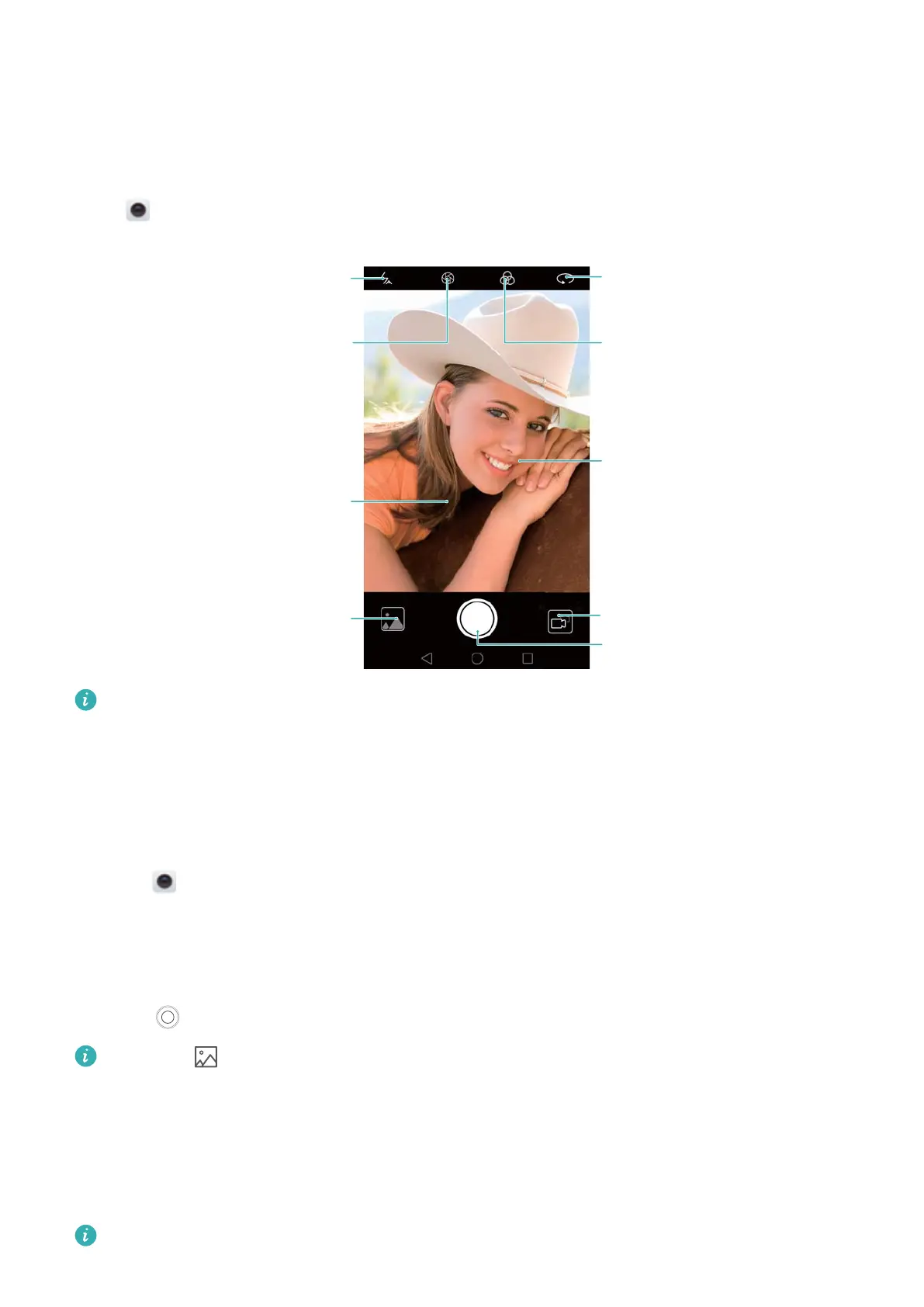
Accessing the viewfinder
Open
Camera to access the viewfinder
.
Switch flash modes
View images or videos
Swipe right on the
screen to change
camera modes
Shoot a video
Take a photo
Apply filter effects
Switch between
rear and front
cameras
Swipe left on the
screen to configure
the camera settings
Switch to wide
aperture mode
For more information on the camera settings, see Camera settings.
Taking a photo
Y
our phone comes with a feature-packed camera that you can use to capture life's unforgettable
moments.
1 Open
Camera.
2 Frame the scene you want to capture. The camera will focus automatically
. Touch any part of
the viewfinder to focus on the corresponding area. To adjust the focal length, pinch two
fingers together or spread them apart on the viewfinder.
3 Touch
.
Touch the thumbnail to view a photo and share it with friends. For more information, see
Sharing images or videos.
Shooting modes
Y
our phone features a variety of different camera modes for different shooting scenarios.
Availability of different shooting modes varies by model.
72



 To Next Page