HUAWEI SE2900 Session Border Controller
Hardware Description
1 Service Processing Device
Huawei Proprietary and Confidential
Copyright © Huawei Technologies Co., Ltd.
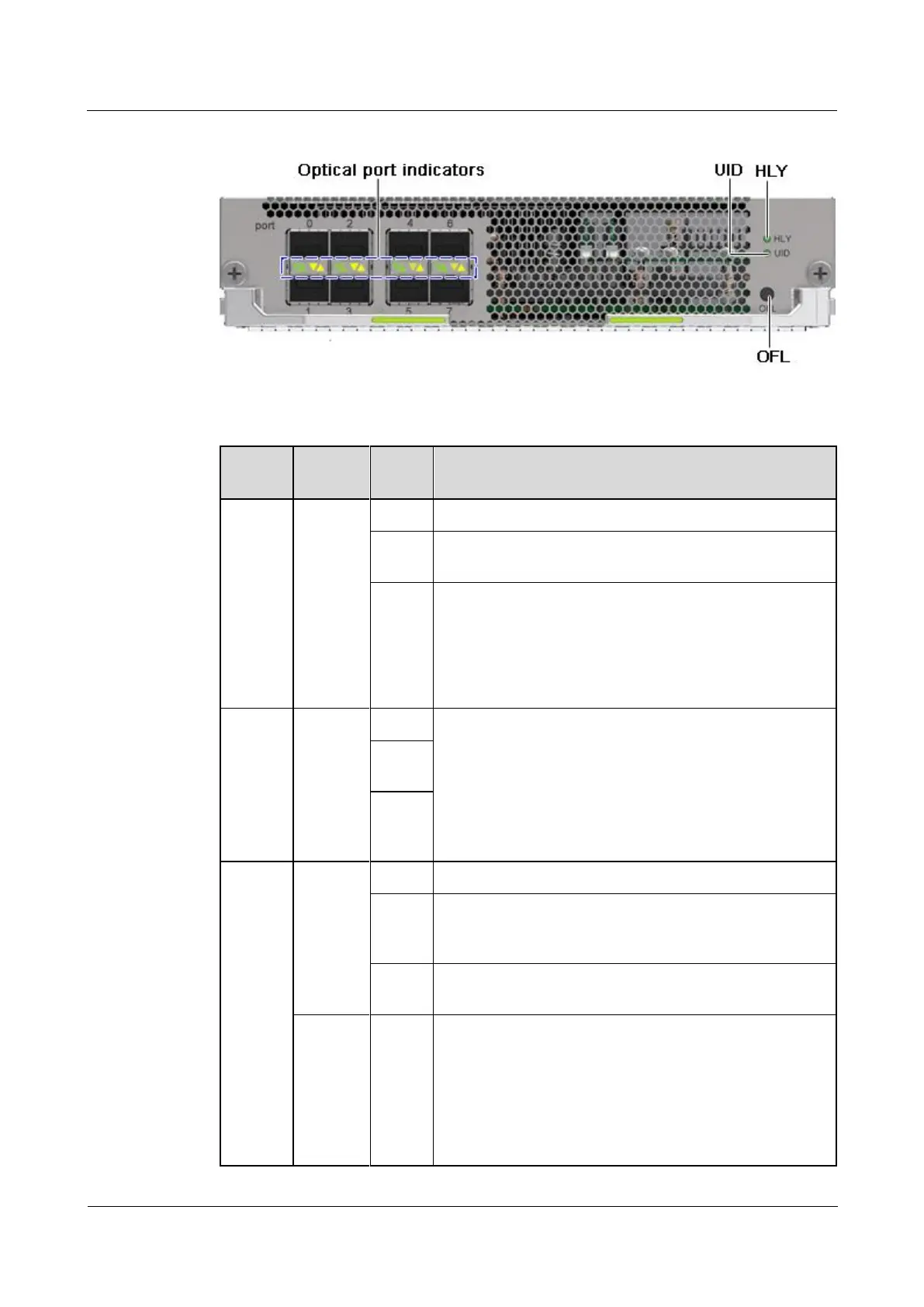
Figure 1-50 Indicators and buttons
Table 1-43 Description of indicators and buttons
The board is not powered on.
The board is operating properly.
An alarm is generated. The blinking frequency indicates
the alarm severity:
Blinking at 0.5 Hz: indicates a minor alarm.
Blinking at 1 Hz: indicates a major alarm.
Blinking at 4 Hz: indicates a critical alarm.
The indicator is used to locate a device to be operated.
You can customize the function of this indicator.
The board is operating properly.
The board is sending a request for power-on or power-off,
or the board is being powered on or off.
The board is powered off. You can remove the board at the
time.
To power on the board, hold down this button for more
than 0.5 seconds.
To safely power off the board, hold down this button
for 6 seconds until the OFL indicator is blinking blue.
When the OFL indicator is blinking blue, the board is
in the graceful power-off state. When the OFL
indicator is steady blue, the board is powered off.



 To Next Page