Step 2 Choose Area > AP Zone Management. The Zone Configuration page is displayed.
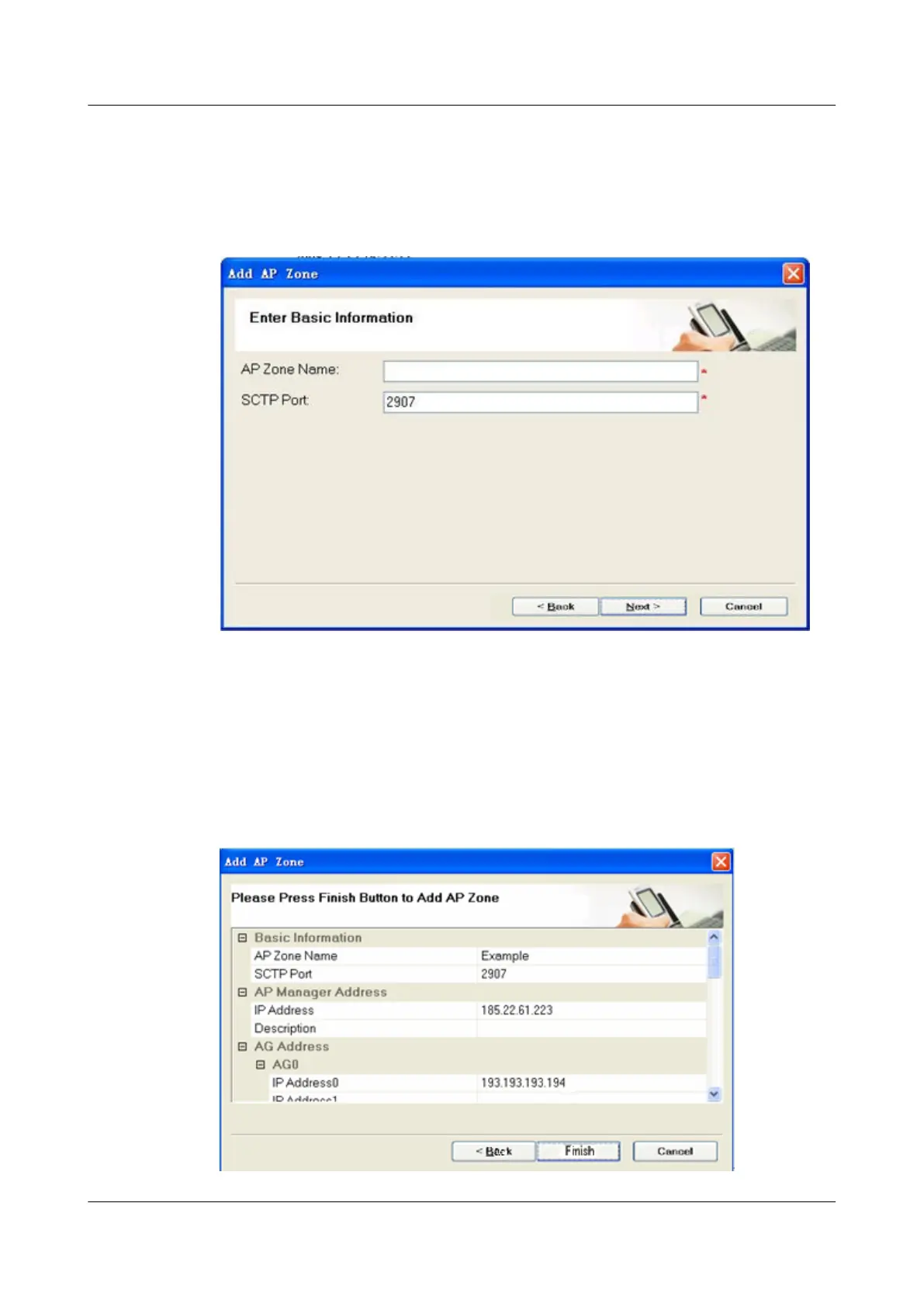
Step 3 Click Add. The Add AP Zone dialog box is displayed, as shown in Figure 5-5.
Figure 5-5 Adding an AP zone
Step 4 Type the zone where the AP is located and set SCTP Port to the port ID that is the same as the
port ID of the AG.
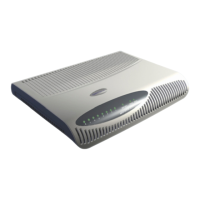
Step 5 Click Next to set the IP addresses of the AP Manager, AG, SeGW, and CLK and the information
about neighboring macro cells around the AP cell in sequence.
Step 6 Confirm the settings, and then click Finish, as shown in Figure 5-6.
Figure 5-6 Completing settings
5 Configuring the UAP2105
UAP2105
User Guide
5-6 Huawei Proprietary and Confidential
Copyright © Huawei Technologies Co., Ltd.
Issue 03 (2009-08-20)


 To Next Page