6.2 Diagnosing Faults
This describes how to diagnose the faults in the AP, faults at the radio network layer, and faults
at the transport network layer on the WebUI and how to view diagnosis results.
Procedure
Step 1 Log in to the WebUI. For details, see Logging in to the WebUI. Then, choose
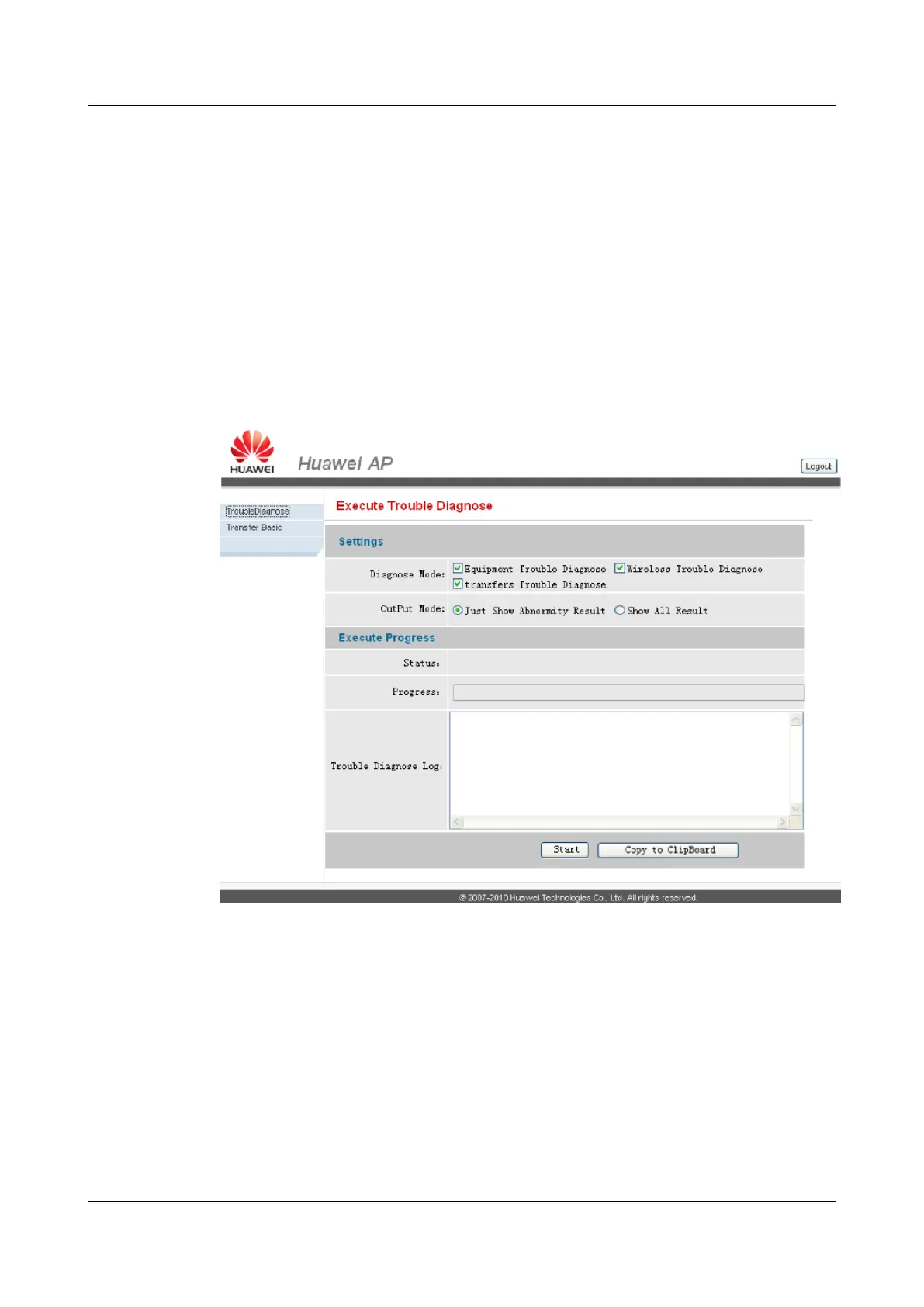
TroubleDiagnose. The Execute Trouble Diagnose page is displayed, as shown in Figure
6-2.
Figure 6-2 Execute Trouble Diagnose
Step 2 Set Diagnose Mode and determine the type of a fault.
l Equipment Trouble Diagnose: indicates the faults in the AP.
l Wireless Trouble Diagnose: indicates the faults at the radio network layer.
l transfers Trouble Diagnose: indicates the faults at the transport network layer.
Step 3 Set OutPut Mode and determine the output mode of the fault diagnosis result.
l Just Show Abnormity Result: indicates that only fault diagnosis results are displayed.
l Show All Result: indicates that all diagnosis results are displayed.
6 Routine Operation and Maintenance of the UAP2105
UAP2105
User Guide
6-4 Huawei Proprietary and Confidential
Copyright © Huawei Technologies Co., Ltd.
Issue 03 (2009-08-20)


 To Next Page