INSTALLATION
11
Optional Satellite Battery Pack (If Applicable)
Mount the Satellite Battery Pack
■
Decide where you want to mount the satellite battery pack. A satellite battery pack may
be mounted in any orientation.
■
Mark the screw holes for the wall mount bracket.
■
Drill the screw holes using a
3
⁄
32
" drill bit.
■
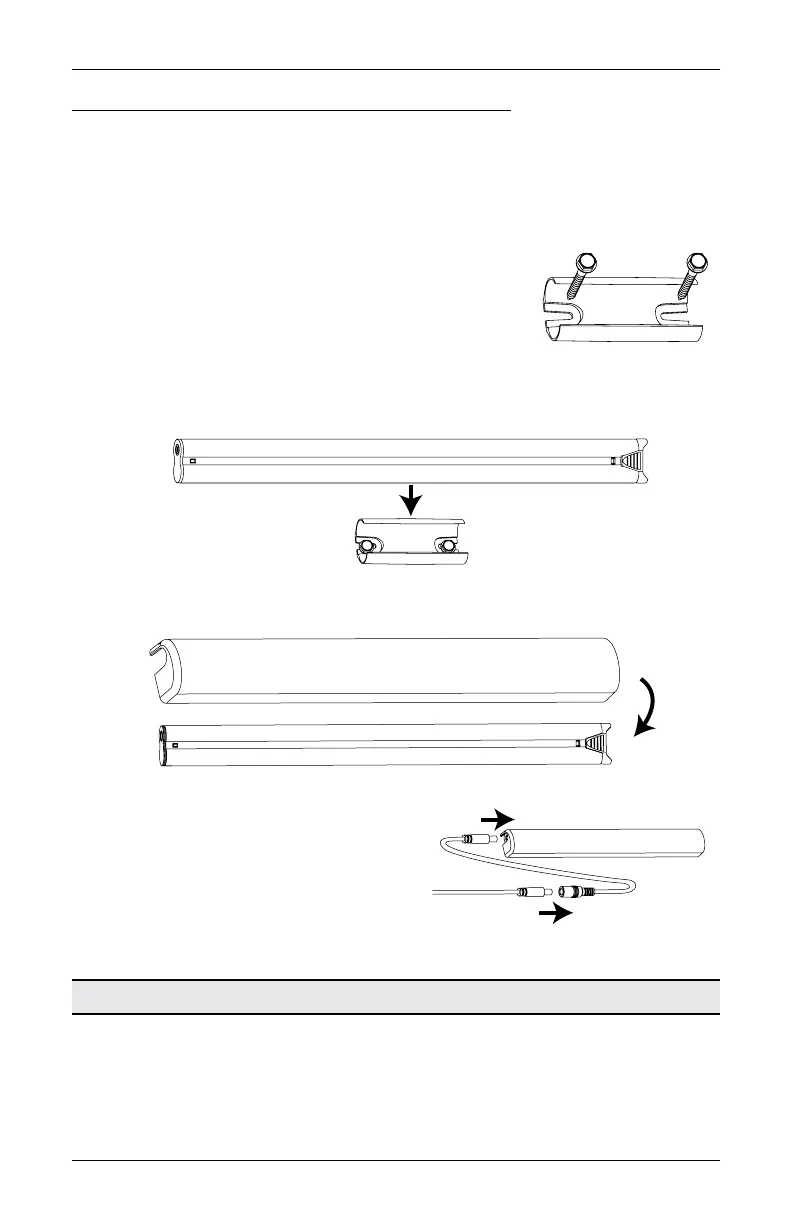
Remove the backing from the double-sided tape. Press the
bracket into place.
■
Attach the bracket using the screws provided.
■
Position the battery wand so the power cable is easily connected to the socket.
■
Snap the battery wand into the wall mount bracket.
■
Install the battery wand cover with the slot aligned to the socket in the battery wand.
■
Plug the power cable from the shade into the
extension cable.
■
Plug the other end of the extension cable into
the socket in the battery wand.
■
Secure the power supply using wire retainers
(not supplied).
Proceed to “Testing the Shade” on page 16.
Battery Wand Cover
Slot
Battery Wand Cover
Extension
Cable
Power Cable
from Shade









 To Next Page