CARE
27
Removing the Shade (If Necessary)
■
Fully raise the shade.
■
Disconnect the power source from the power cable at the back of the shade.
■
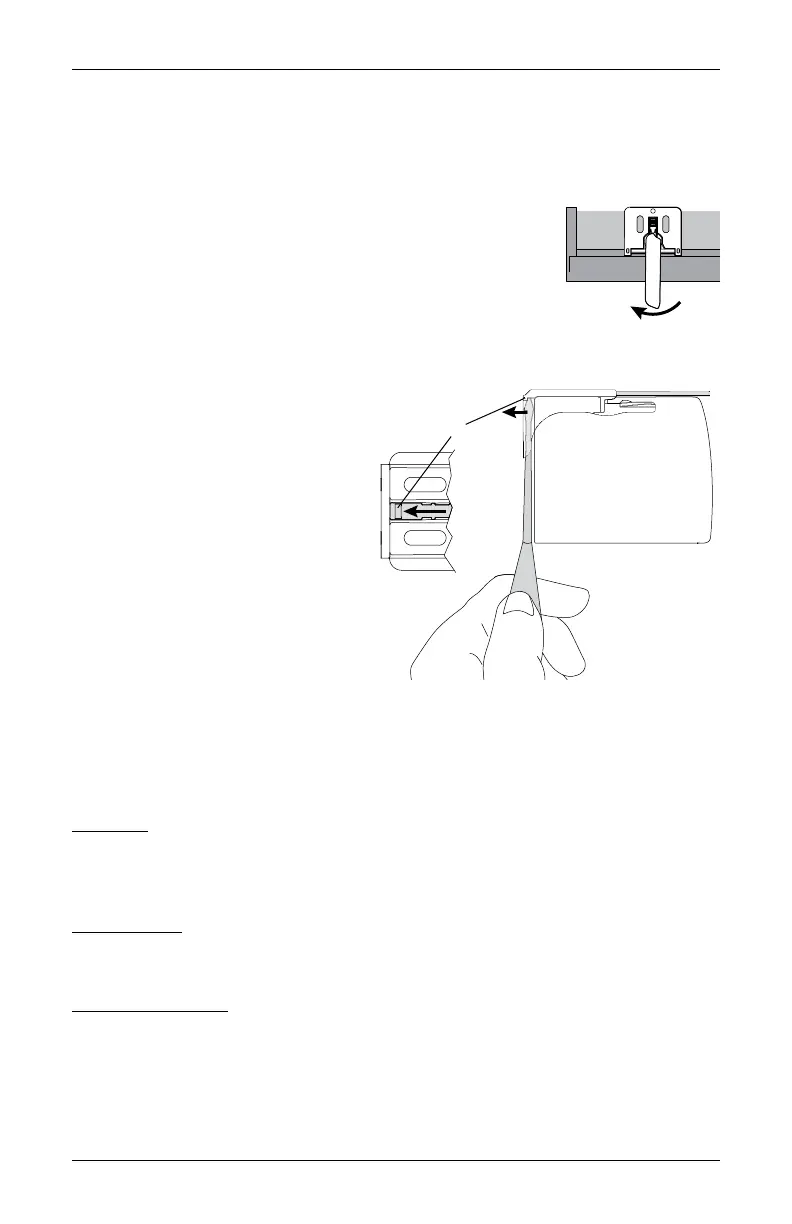
Move each lever of the installation brackets to the left to release
the shade.
➤
A flat blade screwdriver can be used to move the lever.
CAUTION: Be very careful not to tear or damage thefabric.
➤
If the lever is inaccessible or inoperable, lower the shade
until you can see the underside
of the bracket. Carefully reach
a small flat blade screwdriver
behind the shade to the tab on
bottom of the bracket between the
screw holes.
➤
Push the tab away from the shade
and pull the headrail to release it
from the bracket.
■
Carefully pull the shade to remove it
from the brackets.
Cleaning Procedures
Sonnette
®
Cellular Roller Shades are made from anti-static, dust-resistant materials which
repel dirt and dust. The following options are available if your shade needs cleaning.
CAUTION: Do not steam the shades.
Dusting
■
Regular light dusting with a feather duster is all the cleaning needed in most
circumstances.
Vacuuming
■
Use a hand-held vacuum with low suction for more thorough dust removal.
Compressed Air
■
Use compressed air to blow dust and dirt off shades.
Move Lever to Left
Top View
Back
Front
End Cap
Tab
Underside of
Bracket









 To Next Page