To Next Page

B
Brandon BrewerSep 7, 2025
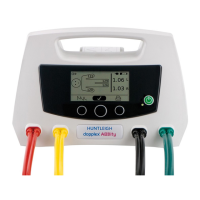
Why is the display not clear on Huntleigh dopplex ABIlity Medical Equipment?
- JJoseph AndradeSep 7, 2025
If the display on your Huntleigh Medical Equipment is not clear, the contrast setting might be incorrect.

Why is the display not clear on Huntleigh dopplex ABIlity Medical Equipment?
If the display on your Huntleigh Medical Equipment is not clear, the contrast setting might be incorrect.
What to do if Battery Low symbol is showing on Huntleigh Medical Equipment?
If the 'Battery Low' symbol is showing on your Huntleigh Medical Equipment, connect it to the power source.
Why does the paper printout jam on Huntleigh dopplex ABIlity Medical Equipment?
If the paper printout jams in your Huntleigh Medical Equipment, it might be due to incorrect paper being fitted.
What to do if only one ankle cuff inflates on Huntleigh dopplex ABIlity?
If only one ankle cuff inflates on your Huntleigh Medical Equipment, check that the patient type is correctly set.
Why is the printout blank on my Huntleigh dopplex ABIlity Medical Equipment?
If the printout from your Huntleigh Medical Equipment is blank, make sure the paper is inserted correctly.
Why does the cuff take a long time to inflate on Huntleigh dopplex ABIlity Medical Equipment?
If the cuff on your Huntleigh Medical Equipment takes a long time to inflate, check the air filter and inspect the cuffs for any leaks.
What to do if Huntleigh dopplex ABIlity Medical Equipment produces no results?
If your Huntleigh Medical Equipment is not producing any results, check all tubes and cuffs, then repeat the test.
How to fix a Huntleigh dopplex ABIlity Medical Equipment with green power indicator not illuminated?
If the green power indicator on your Huntleigh Medical Equipment is not lit, it could be due to several reasons: * The power cable might not be properly connected to a power source. Ensure it is securely plugged in. * The power cable itself could be defective and may need replacement. * The mains input fuses might be blown, requiring replacement.
How to fix Huntleigh Medical Equipment when the battery does not hold charge?
To address a battery that doesn't hold a charge in your Huntleigh Medical Equipment, you can select the ‘Battery Conditioner’ menu or replace the battery.
What to do if the battery low symbol is showing on Huntleigh dopplex ABIlity?
If the battery low symbol is showing on your Huntleigh Medical Equipment, connect it to the power source.
Provides critical warnings for the safe operation and potential hazards of the equipment.
Details risks that require attention and are identified by specific symbols within the manual.
Specifies the qualifications and recommendations for healthcare professionals using the device.
Instructions on how to reconnect the internal battery after initial unpacking.
Explains the mandatory battery conditioning process for optimal performance before first use.
Step-by-step instructions for the initial power-up and connection of the unit.
Guide on how to prepare the patient and the environment for taking measurements.
Step-by-step process for initiating and conducting the measurement test.
How to access, interpret, and print the measurement results.
Lists common error messages displayed by the unit and their recommended actions.
Tips and best practices to ensure accurate and reliable measurement results.
Detailed procedures for cleaning and disinfecting cuffs and tubing based on risk levels.
 General
| Brand | Huntleigh |
|---|---|
| Model | dopplex ABIlity |
| Category | Medical Equipment |
| Language | English |