Specification Details
Maximum depth 200 m (656 ft)
Operating temperature –5 to 50 °C (23 to 122 °F), non-freezing
13.2 Product overview
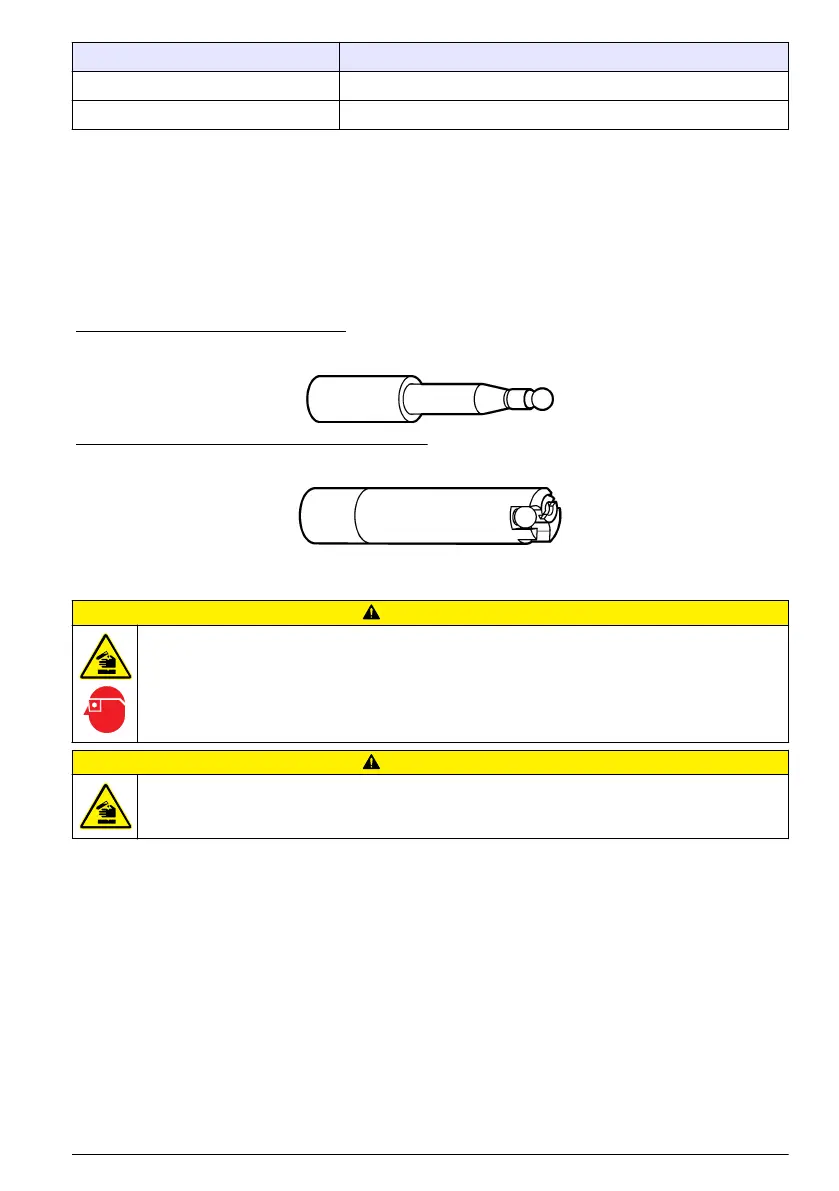
The pH/ORP sensor (007235) is shown in Figure 16. The pH/ORP sensor is the same as the pH
sensor (007264) with the addition of a platinum band. The pH glass bulb is easily damaged. The
pH/ORP sensor is always used with a separate reference sensor (004463). Refer to Reference
sensor (004463) on page 35.
The pH/ORP integrated sensor (007233) is shown in Figure 17. The pH/ORP integrated sensor is the
same as the pH integrated sensor (007234) with the addition of a stud. The pH/ORP integrated
sensor has an integrated reference sensor.
Figure 16 pH/ORP sensor (007235)
Figure 17 pH/ORP integrated sensor (007233)
13.3 Calibration
C A U T I O N
Chemical exposure hazard. Obey laboratory safety procedures and wear all of the personal protective
equipment appropriate to the chemicals that are handled. Refer to the current safety data sheets
(MSDS/SDS) for safety protocols.
C A U T I O N
Chemical exposure hazard. Dispose of chemicals and wastes in accordance with local, regional and
national regulations.
Calibrate the sensors before initial use, at regular intervals and after sensor maintenance or
modifications. Periodically, do a calibration check to make sure that measurements are still within
tolerance range.
Refer to the Hydrolab Operating Software Manual for instructions on how to do the tasks that follow:
• Start a sensor calibration.
• Start a sensor calibration check.
• Set the calibration mode.
• Select the measurement units shown during calibration and calibration checks.
• Look at the calibration history.
To look at the Hydrolab Operating Software Manual, start the Hydrolab Operating Software, click
Help and select Hydrolab Operating Software Help.
When a calibration or a calibration check is started, the step-by-step instructions for the sensor show
on the display.
English
33



 To Next Page